
The SpaceX Crew Dragon ISS Docking Simulator is one of those rare online experiences that sounds simple until it quietly humbles you in front of your laptop. The goal seems innocent enough: guide SpaceX’s Crew Dragon spacecraft toward the International Space Station and dock successfully. No laser cannons. No alien ambush. No dramatic movie soundtrack. Just you, a floating spacecraft, a very expensive orbiting laboratory, and the terrifying realization that “a tiny correction” in space can feel like trying to parallel park a school bus on an ice rink.
Released by SpaceX before the historic Demo-2 crewed mission, the simulator gives everyday users a taste of the manual control interface astronauts can use to pilot the Dragon 2 vehicle toward the ISS. Crew Dragon normally performs rendezvous and docking autonomously, but astronauts train for manual control as a backup. That is what makes the simulator so fascinating: it is not just a space-themed browser game. It is a stripped-down public doorway into the logic, patience, and precision behind modern human spaceflight.
What Is the SpaceX Crew Dragon ISS Docking Simulator?
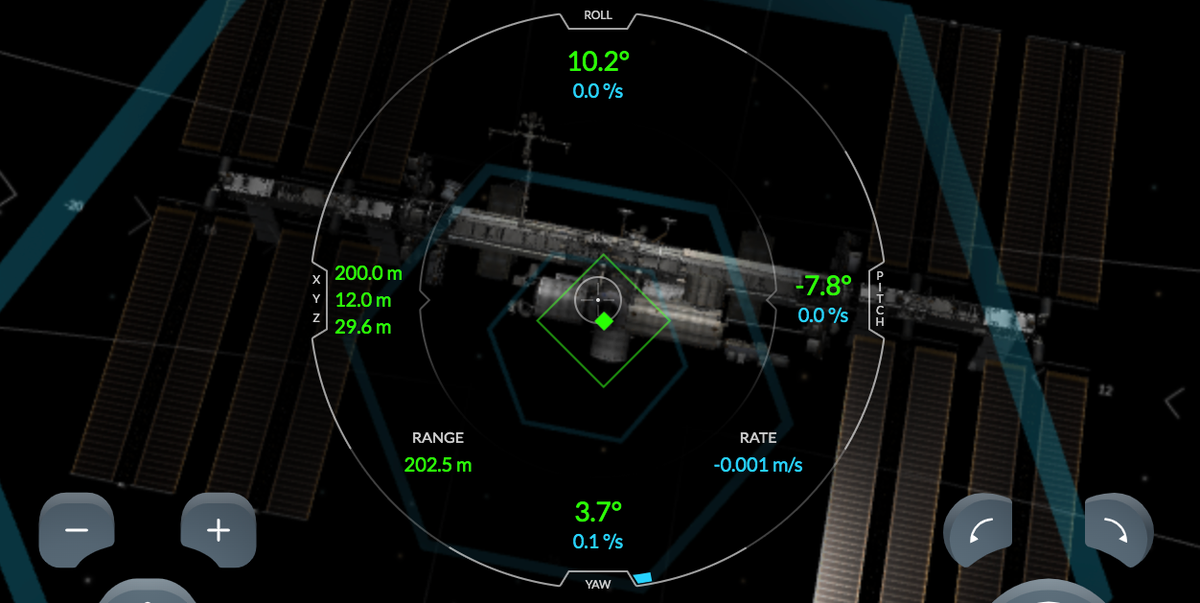
The SpaceX Crew Dragon ISS Docking Simulator is a free web-based simulator that recreates the final approach of Crew Dragon as it lines up with the International Space Station’s docking port. The interface shows roll, pitch, yaw, translation, distance, and rate information. Green numbers indicate corrections still needed for alignment, and the objective is to bring those values within the safe docking range.
In plain English: make the spacecraft face the right direction, slide it into the correct position, approach slowly, and avoid treating the International Space Station like a bumper car. The simulator rewards small movements and punishes overconfidence. If you mash the controls like a video game controller, the spacecraft drifts away with the quiet judgment of orbital physics.
Why the Simulator Matters
Crew Dragon represents a major shift in American human spaceflight. NASA’s Commercial Crew Program was designed to restore crew transportation from U.S. soil to low Earth orbit through partnerships with private companies. SpaceX’s Crew Dragon became central to that effort, carrying NASA astronauts to and from the International Space Station.
During NASA’s SpaceX Demo-2 mission in 2020, astronauts Robert Behnken and Douglas Hurley launched from Kennedy Space Center aboard Crew Dragon Endeavour. The mission tested the spacecraft from launch through in-orbit operations, docking, undocking, re-entry, splashdown, and recovery. Although Dragon was designed for autonomous docking, the crew also tested manual control modes to confirm that astronauts could intervene if needed.
That is the educational magic of the simulator. It turns an abstract aerospace concept into something you can feel. After a few minutes, “manual docking” stops sounding like a heroic movie line and starts sounding like a slow, careful, math-heavy negotiation with momentum.
How Crew Dragon Docks With the ISS
In real missions, Crew Dragon approaches the International Space Station through a carefully planned series of maneuvers. The spacecraft uses navigation sensors, flight computers, thrusters, and docking software to align with the correct port. At the station, Crew Dragon docks to an International Docking Adapter attached to the Harmony module.
The International Docking Adapter follows the International Docking System Standard, allowing compatible spacecraft to connect safely and consistently. Once Crew Dragon reaches the docking interface, the system goes through soft capture and hard capture phases. Soft capture helps the spacecraft make initial contact and absorb motion. Hard capture uses hooks and sealing mechanisms to create a secure connection. After pressure checks, the vestibule between the spacecraft and station can be prepared for hatch opening.
The simulator does not model every mechanical detail of that process, but it focuses on the part people immediately understand: the final alignment. Can you guide the vehicle into the correct attitude and position without arriving too fast, too tilted, or too far off target? It sounds easy. It is not. Space is rude like that.
Understanding the Simulator Controls
The simulator gives you two main control zones: rotation and translation. Rotation changes the spacecraft’s orientation. Translation changes its position. The difference is important, because docking is not just about pointing at the target. You also have to move the capsule’s centerline toward the docking port.
Roll, Pitch, and Yaw
Roll turns the spacecraft around its front-to-back axis. Pitch tilts the nose up or down. Yaw swings the nose left or right. These three rotational axes determine whether Crew Dragon is properly aimed at the docking adapter. If your angle is wrong, moving forward only gets you closer to a bad idea.
Translation: Up, Down, Left, Right, Forward, and Back
Translation controls shift the spacecraft without necessarily changing where it points. This is how you center the docking target. A common beginner mistake is trying to fix everything with rotation. That can make the capsule look aimed correctly while it is still physically offset. The smart approach is to rotate first, translate second, and approach last.
Green Numbers and Blue Numbers
The green values show how much correction is still needed. Lower is better. The blue values show rates, meaning how quickly the spacecraft is moving or rotating. This is where the simulator quietly teaches one of the most important lessons in orbital operations: speed is not always your friend. Close to the station, slow and boring is beautiful.
How to Dock Successfully: A Practical Strategy
If you are opening the simulator for the first time, resist the urge to press forward immediately. That is the spaceflight equivalent of starting a chess game by knocking over your own king. Docking works best when you divide the task into calm, deliberate stages.
Step 1: Fix Your Orientation First
Start with roll, pitch, and yaw. Use small taps. Watch the numbers respond. Your goal is to line up the spacecraft so the docking interface is square with the target. If one axis begins drifting the wrong way, correct it gently. Do not chase every number like a cat attacking a laser pointer.
Step 2: Center the Target
Once your orientation is under control, use translation controls to move the spacecraft into position. Shift left, right, up, or down until the target is centered. This is where patience pays off. Every input has consequences, and the spacecraft keeps moving after you stop pressing the button.
Step 3: Approach Slowly
When the spacecraft is aligned and centered, begin moving forward. Keep your closing speed low, especially near the final meters. If you approach too quickly, you may not have time to correct a drift. The best docking attempts look almost boring. In spaceflight, “boring” often means “everyone gets to keep their job.”
Step 4: Make Tiny Corrections
As you close in, the temptation to overcorrect becomes stronger. Do not do it. Small taps are your friend. Think of the controls less like a steering wheel and more like nudging a soap bubble through a doorway. The simulator is teaching you to respect inertia, and inertia is not known for accepting apologies.
What the Simulator Gets Right
The simulator succeeds because it communicates the feel of spacecraft control without burying users in equations. It shows that docking is a six-degree-of-freedom problem: three axes of rotation and three axes of translation. It also shows that there is no air resistance in space to conveniently slow you down. Once you start drifting, you must actively counter that motion.
It also captures the mental discipline of docking. The interface is clean, but the task is demanding. You must read numbers, interpret motion, make small inputs, and wait for the result. The hardest part is not understanding what the buttons do. The hardest part is doing less.
What the Simulator Leaves Out
Of course, the SpaceX Crew Dragon ISS Docking Simulator is not a full astronaut training platform. It does not replicate every sensor, procedure, safety check, mission control callout, emergency rule, or real spacecraft system. It does not simulate the full orbital rendezvous profile from launch to approach. It does not make you wear a pressure suit, answer a flight director, or explain to NASA why you arrived sideways.
That is perfectly fine. Its purpose is public education, not certification for orbital operations. The simulator gives users an accessible slice of a complex process. It helps people understand why automated docking is valuable, why manual backup matters, and why astronauts train so intensely even when computers handle most routine operations.
Why Manual Control Still Matters in an Autonomous Spacecraft
Crew Dragon is designed to fly autonomously through launch escape, orbit operations, rendezvous, docking, undocking, re-entry, and splashdown sequences. Automation reduces crew workload and allows the spacecraft to execute precise maneuvers. But human spaceflight is built on layers of redundancy. Manual control gives astronauts another option if a system behaves unexpectedly.
During Demo-2, NASA astronauts tested manual flight capability while en route to the station. These tests were not theatrical flourishes. They were part of validating the spacecraft’s design. If astronauts ever need to command attitude or translation directly, they must know the interface, trust the response, and understand the vehicle’s behavior.
Educational Value: Why Teachers and Students Love It
The simulator is especially useful for STEM learning. It turns physics vocabulary into visible behavior. Students can see inertia, relative motion, rates, coordinate axes, and control feedback in action. A teacher can explain roll, pitch, and yaw on a whiteboard, but the idea lands differently when a student accidentally spins a spacecraft away from the ISS and has to recover.
It also encourages a healthy engineering mindset. Users learn to test, observe, adjust, and try again. Failure is not a disaster; it is data. That makes the simulator a fun entry point into aerospace engineering, orbital mechanics, human-computer interaction, and mission operations.
Common Beginner Mistakes
Most first-time users make the same errors. They move forward too soon. They overcorrect rotation. They ignore sideways drift. They focus only on the center target and forget rate values. They panic near the end and start tapping everything like the keyboard owes them money.
A better strategy is to pause between inputs. Press once, watch, and respond. Use the precision controls when close to the station. Keep rotation rates low. Reduce closing speed before final contact. The simulator is less about reflexes and more about restraint. It is a rare game where the winning move is often to wait.
What Playing the SpaceX Crew Dragon ISS Docking Simulator Feels Like
The first experience with the simulator usually begins with confidence. The ISS is right there. The controls are visible. The target is obvious. You think, “How hard can this be?” Then you press a button, the capsule drifts, one number improves while another gets worse, and suddenly you understand why astronauts do not train by vibes alone.
The simulator has a wonderfully quiet tension. Nothing explodes immediately. There is no loud failure screen. Instead, the spacecraft simply refuses to behave like a car, airplane, or anything else most people have controlled. You nudge left and continue sliding left. You rotate slightly and then realize the rotation has a rate that must also be stopped. It is like learning to dance with a refrigerator in zero gravity.
After several attempts, the rhythm starts to make sense. You stop treating the controls as commands and start treating them as suggestions to physics. A tiny tap changes the motion. A second tap cancels the motion. You begin watching the blue rate numbers as carefully as the green correction numbers. That is when the simulator becomes genuinely satisfying. You are no longer just pressing buttons; you are managing motion.
The final approach is the best part. The docking port grows larger. The numbers shrink. Your closing speed is low. You make one small correction, then another. The spacecraft seems to float into place rather than drive there. When the simulator finally confirms success, it feels earned. Not because the graphics are flashy, but because the task demanded calm attention.
The experience also changes how you watch real Crew Dragon missions. A live docking broadcast becomes more meaningful when you have tried the simplified version yourself. The slow pace no longer feels dull. It feels deliberate. Those long pauses, careful holds, and tiny adjustments are part of the safety culture of spaceflight. The simulator gives viewers a new appreciation for the teams at SpaceX, NASA, and the ISS who make routine-looking operations possible.
One of the most memorable lessons is emotional: speed feels good until precision matters. The simulator makes impatience visible. Every rushed input becomes drift. Every overcorrection becomes a new problem. Eventually, you learn that the best pilots in this environment are not the most aggressive ones. They are the ones who can stay calm, read the data, and make the smallest useful move.
That is why the SpaceX Crew Dragon ISS Docking Simulator remains so compelling. It is not just a novelty for space fans. It is a compact lesson in engineering humility. It lets anyone with a browser experience a tiny piece of astronaut decision-making and discover that docking with the ISS is less “rocket hero” and more “patient scientist with excellent hand-eye coordination.”
Conclusion
The SpaceX Crew Dragon ISS Docking Simulator is a smart, accessible, and surprisingly addictive way to understand one of the most delicate parts of human spaceflight. It shows why Crew Dragon’s autonomous docking system is impressive, why astronauts still train for manual control, and why precision matters more than speed when approaching the International Space Station.
For space enthusiasts, it is a fun challenge. For students, it is a physics lesson disguised as a browser experience. For anyone who has ever watched a Crew Dragon docking and thought it looked easy, it is a polite correction from the universe. Docking is not just about getting there. It is about arriving perfectly, slowly, and with all the green numbers behaving themselves.