
Making a schedule sounds simple until real life walks in wearing muddy boots. You plan to answer emails at 9:00, finish a report by 11:00, exercise at lunch, cook dinner, call your mom, and somehow become a calmer, shinier version of yourself by bedtime. Then one meeting runs long, your inbox breeds like rabbits, and your beautiful plan turns into modern art.
The good news: a useful schedule is not a prison sentence. It is a flexible map for your day, week, or month. When you learn how to make a schedule properly, you stop guessing what to do next and start giving your time a job. A strong schedule helps you prioritize important work, reduce decision fatigue, protect personal time, and make steady progress without relying on panic as your main productivity strategy.
This guide breaks down how to create a schedule that actually works in real life: practical, flexible, easy to follow, and not so packed that one spilled coffee ruins the entire operation.
What Is a Schedule?
A schedule is a planned structure for how you use time. It can be daily, weekly, monthly, or project-based. A to-do list tells you what needs to be done; a schedule tells you when you will do it. That difference matters. “Finish presentation” on a list is a hopeful wish. “Work on presentation from 10:00 a.m. to 11:30 a.m.” is a commitment with a chair, a desk, and a fighting chance.
A good schedule includes fixed commitments, priority tasks, breaks, personal responsibilities, buffer time, and review periods. It is not only for work. Your schedule should also include meals, exercise, rest, family time, errands, learning, hobbies, and the sacred activity known as doing absolutely nothing for a few minutes.
Why Making a Schedule Matters
Learning how to make a schedule is one of the most useful time management skills because it turns vague intention into visible action. Instead of carrying every responsibility in your head like an overstuffed backpack, you place your tasks into a system you can see, adjust, and trust.
A schedule helps you:
- Focus on high-priority tasks before the day gets hijacked.
- Reduce procrastination by assigning work to specific time blocks.
- Balance professional, school, household, and personal responsibilities.
- Notice when your plans are unrealistic before burnout sends a formal complaint.
- Create routines that make good habits easier to repeat.
The biggest benefit is clarity. When you know what belongs where, your day feels less like a foggy treasure hunt and more like a route with signs.
How to Make a Schedule Step by Step
1. Start With a Full Brain Dump
Before you build a schedule, gather everything you need to do. Write down work tasks, school assignments, appointments, chores, errands, deadlines, calls, fitness goals, meals, family duties, and personal projects. Do not organize yet. Just empty your mental junk drawer.
For example, your brain dump might include: submit expense report, study chapter five, grocery shopping, dentist appointment, laundry, finish client proposal, 30-minute walk, pay phone bill, meal prep, and read for 20 minutes. Once it is all out of your head, your schedule has raw material to work with.
2. Separate Fixed Commitments From Flexible Tasks
Fixed commitments are events with set times: meetings, classes, appointments, work shifts, school pickup, workouts with a trainer, or dinner reservations. Put these into your calendar first because they are the immovable furniture in the room.
Flexible tasks are activities that need to happen but can move around: cleaning, writing, studying, planning, shopping, exercise, or admin work. These will fill the open spaces around fixed commitments. This step prevents the common scheduling mistake of pretending every hour is available when, in reality, half the day has already been claimed by life.
3. Choose Your Scheduling Tool
The best scheduling tool is the one you will actually use. A digital calendar is helpful for reminders, recurring events, color coding, and easy editing. A paper planner is great if you remember things better when you write them by hand. A simple spreadsheet works well for weekly planning. A wall calendar can help families or roommates coordinate without sending 47 “What time is soccer?” texts.
You do not need a complicated productivity dashboard with sixteen apps and a motivational quote that judges you. Start simple. Your schedule should reduce friction, not become another hobby you must schedule.
4. Define Your Priorities
Not every task deserves the same amount of time or attention. Before placing tasks into your schedule, decide what matters most. Ask yourself: What must be done today? What moves an important goal forward? What has a real deadline? What can wait? What can be delegated, shortened, or deleted?
A helpful method is the “must do, should do, could do” approach. Must-do tasks are essential. Should-do tasks are useful but not urgent. Could-do tasks are optional if time remains. This keeps your daily schedule from becoming a buffet plate piled so high that the mashed potatoes touch the dessert.
5. Estimate How Long Each Task Will Take
Time estimates are where optimism goes to get humbled. Many people schedule a one-hour task that actually takes three hours, then wonder why the day collapsed like a folding chair. Be honest. If writing a report usually takes two hours, schedule two and a half. If grocery shopping takes 45 minutes plus travel, do not write “quick groceries” in a 15-minute gap unless your supermarket is located in your kitchen.
When you are unsure, track your time for a few days. Notice how long routine tasks really take. This makes future schedules more accurate and less imaginary.
6. Use Time Blocking
Time blocking means assigning specific blocks of time to specific activities. Instead of keeping an open-ended to-do list, you might schedule deep work from 9:00 to 10:30, email from 10:30 to 11:00, meetings from 11:00 to noon, lunch from noon to 12:45, and project work from 1:00 to 3:00.
Time blocking works because it reduces the number of decisions you must make during the day. You do not have to ask, “What should I do now?” every 20 minutes. Your calendar answers for you, politely but firmly.
7. Batch Similar Tasks Together
Task batching means grouping similar activities into the same time period. For example, instead of checking email all day, schedule two or three email blocks. Instead of making one call every hour, group calls into a communication block. Instead of doing laundry, dishes, and cleaning in random fragments, create one household block.
Batching reduces context switching, which is the mental cost of constantly jumping from one type of work to another. Your brain is not a browser with unlimited tabs. It is more like a golden retriever with a calculator: smart, but easily distracted by noise.
8. Put Your Hardest Work During Your Best Energy
A schedule should respect your natural rhythm. If you think clearly in the morning, place demanding work early. If your creativity wakes up at night like a dramatic vampire, schedule writing or brainstorming later. Save low-energy tasks, such as filing, inbox cleanup, or simple errands, for periods when your focus is naturally lower.
This is one of the most overlooked schedule-making tips. Productivity is not only about time; it is also about energy. One focused hour at your best can beat three sluggish hours spent staring at the screen and negotiating with your coffee.
9. Add Breaks Before You Need Them
Breaks are not rewards for finishing everything. They are maintenance for the human machine. Add short breaks between work blocks, especially after focused or mentally demanding tasks. A five-minute walk, stretch, water refill, or screen break can keep your schedule sustainable.
Also schedule meals. Skipping lunch may feel productive until 3:30 p.m., when you are emotionally defeated by a printer jam and considering cereal for dinner straight from the box.
10. Build in Buffer Time
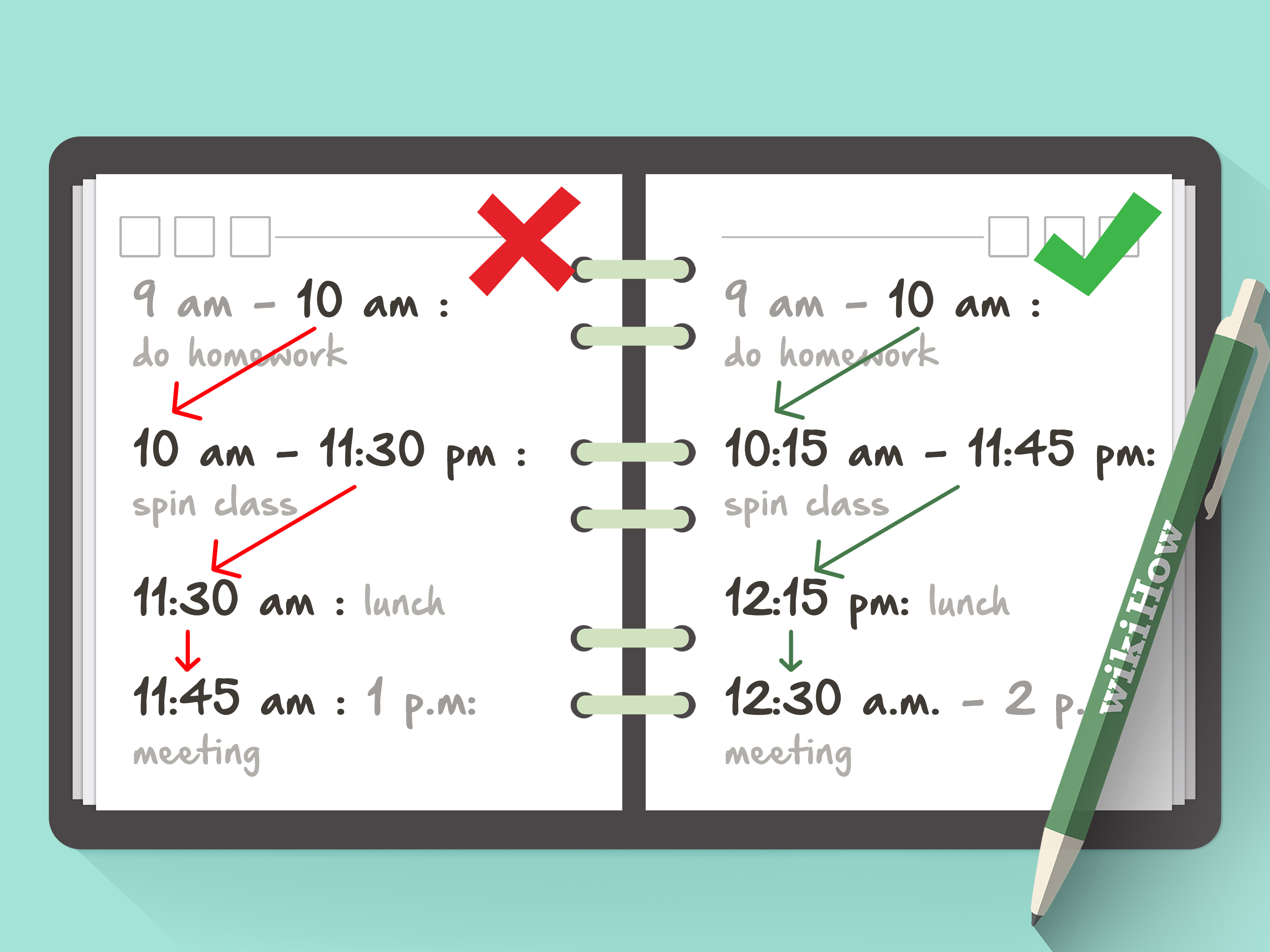
Buffer time is empty space between tasks or appointments. It protects your schedule from normal disruptions: traffic, long conversations, technical issues, tiredness, or tasks that take longer than expected. Without buffer time, one delay creates a domino effect. With buffer time, your day can bend without breaking.
For a daily schedule, leave at least 10 to 15 minutes between major activities. For a weekly schedule, keep a few open blocks for overflow. This is not wasted time. It is schedule insurance.
Daily Schedule Example
Here is a simple daily schedule for a remote worker who wants structure without turning the day into a military operation:
- 6:30 a.m. Wake up, hydrate, light stretching
- 7:00 a.m. Breakfast and family time
- 8:00 a.m. Review priorities and plan the day
- 8:30 a.m. Deep work: main project
- 10:00 a.m. Short break
- 10:15 a.m. Email and messages
- 11:00 a.m. Meetings or collaboration
- 12:00 p.m. Lunch and walk
- 1:00 p.m. Focus block: writing, analysis, or creative work
- 2:30 p.m. Admin tasks and follow-ups
- 3:30 p.m. Buffer block for overflow
- 4:30 p.m. Review tomorrow’s priorities
- 5:00 p.m. End workday
- 6:00 p.m. Dinner, errands, or personal time
- 9:30 p.m. Wind down
- 10:30 p.m. Sleep
This schedule includes work, rest, planning, meals, movement, and buffer time. It is structured but not suffocating. That is the sweet spot.
Weekly Schedule Example
A weekly schedule helps you see the bigger picture. It is especially useful when you have recurring responsibilities, multiple deadlines, or goals that need steady progress.
For example:
- Monday: Planning, priority work, team meeting, grocery pickup
- Tuesday: Deep work, exercise, project development
- Wednesday: Calls, errands, admin, lighter creative work
- Thursday: Deep work, review deadlines, meal prep
- Friday: Finish loose ends, inbox cleanup, weekly review
- Saturday: Household tasks, social plans, personal projects
- Sunday: Rest, family time, weekly planning
The goal is not to control every minute. The goal is to understand the shape of your week so important things do not hide behind urgent things.
How to Make a Schedule You Can Actually Stick To
Keep It Realistic
The fastest way to abandon a schedule is to create one for a superhero version of yourself. Do not schedule 14 hours of flawless productivity if your current routine is powered by caffeine, hope, and three forgotten passwords. Start with a schedule you can follow on an average day.
Plan Tomorrow Before Today Ends
Spend five to ten minutes at the end of each day preparing for the next one. Review unfinished tasks, choose your top priorities, and place them into your calendar. This helps you start the next morning with direction instead of letting your inbox choose your destiny.
Use Reminders Wisely
Reminders can help, but too many notifications become digital mosquitoes. Use alerts for appointments, transitions, and important deadlines. Avoid setting reminders for everything, or you will train yourself to ignore them all.
Review and Adjust Weekly
Your schedule should evolve. At the end of each week, ask: What worked? What felt rushed? What kept getting moved? Which tasks took longer than expected? Where did I need more rest? Adjust the next week based on evidence, not guilt.
Common Scheduling Mistakes to Avoid
Overpacking the Day
A packed schedule may look impressive, but it often fails by lunchtime. Leave room for transitions, delays, and being human. You are making a schedule, not launching a space mission.
Ignoring Personal Time
If your schedule includes work but not meals, rest, exercise, relationships, or fun, it is incomplete. Personal time is not leftover time. It is part of a healthy life.
Scheduling Every Task at the Wrong Energy Level
Do not put your hardest task at the time of day when your brain normally becomes soup. Match tasks to your energy whenever possible.
Never Updating the Plan
A schedule made on Sunday may need changes by Wednesday. That does not mean you failed. It means reality sent an update. Edit the plan and keep moving.
Best Tools for Making a Schedule
You can make a schedule with many tools, including:
- Google Calendar: Great for digital time blocking, recurring events, and reminders.
- Microsoft Outlook Calendar: Useful for work schedules, meetings, and shared calendars.
- Todoist or Microsoft To Do: Helpful for task lists that connect with planning.
- Asana, Trello, or Notion: Good for project-based schedules and team workflows.
- Paper planners: Excellent for people who think better with pen and paper.
- Simple printable templates: Useful for students, families, and weekly planning.
The tool matters less than the habit. A messy paper planner used daily beats a gorgeous app opened once and then emotionally abandoned.
Personal Experience: What Actually Works When Making a Schedule
After working with many scheduling styles, one lesson stands out: the perfect schedule is usually the least useful one. Perfect schedules are fragile. They assume every task will take the expected amount of time, every person will reply promptly, every meeting will end early, and nobody will suddenly need help finding the scissors that are somehow always missing. Real schedules need elbows.
One of the best experiences related to making a schedule is starting with only three daily anchors. For example: a morning planning block, one deep work block, and an evening reset. When those three anchors are stable, the rest of the day becomes easier to organize. You do not need to control every minute at first. You need dependable points in the day that guide your behavior.
Another practical experience is that scheduling small tasks prevents them from becoming emotional clutter. A five-minute task can take up mental space all day if it is not assigned a home. When you schedule “pay bill at 4:00” or “reply to James after lunch,” your brain can stop waving the task around like a tiny emergency flag.
It also helps to name time blocks clearly. “Work” is too vague. “Draft introduction for client proposal” is better. “Clean” is broad. “Clean kitchen counters and load dishwasher” is specific. A schedule with clear actions is easier to follow because you do not waste time interpreting your own instructions like they were ancient poetry.
One surprisingly powerful habit is adding a shutdown routine. At the end of the workday, spend 10 minutes reviewing what was completed, moving unfinished tasks, clearing your workspace, and choosing tomorrow’s first priority. This creates a psychological finish line. Without it, work can leak into the evening, even when you are technically done.
Another experience worth mentioning: never schedule only responsibilities. When people create a schedule for the first time, they often fill it with work, chores, obligations, and errands. Then they wonder why they hate it. Add something enjoyable on purpose: a walk, reading, music, a slow breakfast, a call with a friend, or an episode of a favorite show. A schedule should support your life, not quietly steal it.
Finally, the most useful schedule is the one you forgive and fix. Some days will go sideways. You will oversleep. A meeting will expand. A task will be harder than expected. That is normal. Instead of throwing away the whole plan, update it. Move the nonessential task. Shorten the admin block. Protect the most important priority. A schedule is not a test of personal worth. It is a tool. Use it, adjust it, and let it help you build a calmer, more intentional day.
Conclusion
Learning how to make a schedule is not about becoming busy every second of the day. It is about making your time visible, choosing priorities on purpose, and creating enough structure to support the life you actually want. Start by listing your tasks, adding fixed commitments, choosing priorities, estimating time realistically, and using time blocks. Then add breaks, buffer time, and weekly reviews so your schedule can survive contact with real life.
The best schedule is clear, flexible, and honest. It helps you do important work, protect your energy, and stop treating every day like a surprise obstacle course. Make it simple. Make it realistic. Then keep improving it one week at a time.
Note: This article synthesizes widely accepted scheduling, productivity, time blocking, prioritization, and time management practices from reputable U.S.-based educational, workplace, health, and productivity resources.