
There are 3D prints that make you nod politely, and then there are 3D prints that make you lean toward the screen and say, “Wait, that came off a printer?” A mini car racing game that shows off multicolor printing belongs firmly in the second category. It is not just a cute desktop toy. It is a tiny mechanical arcade experience, a moving sculpture, and a surprisingly smart demonstration of what modern hobby-grade 3D printing can do when design, color, and playfulness all shake hands.
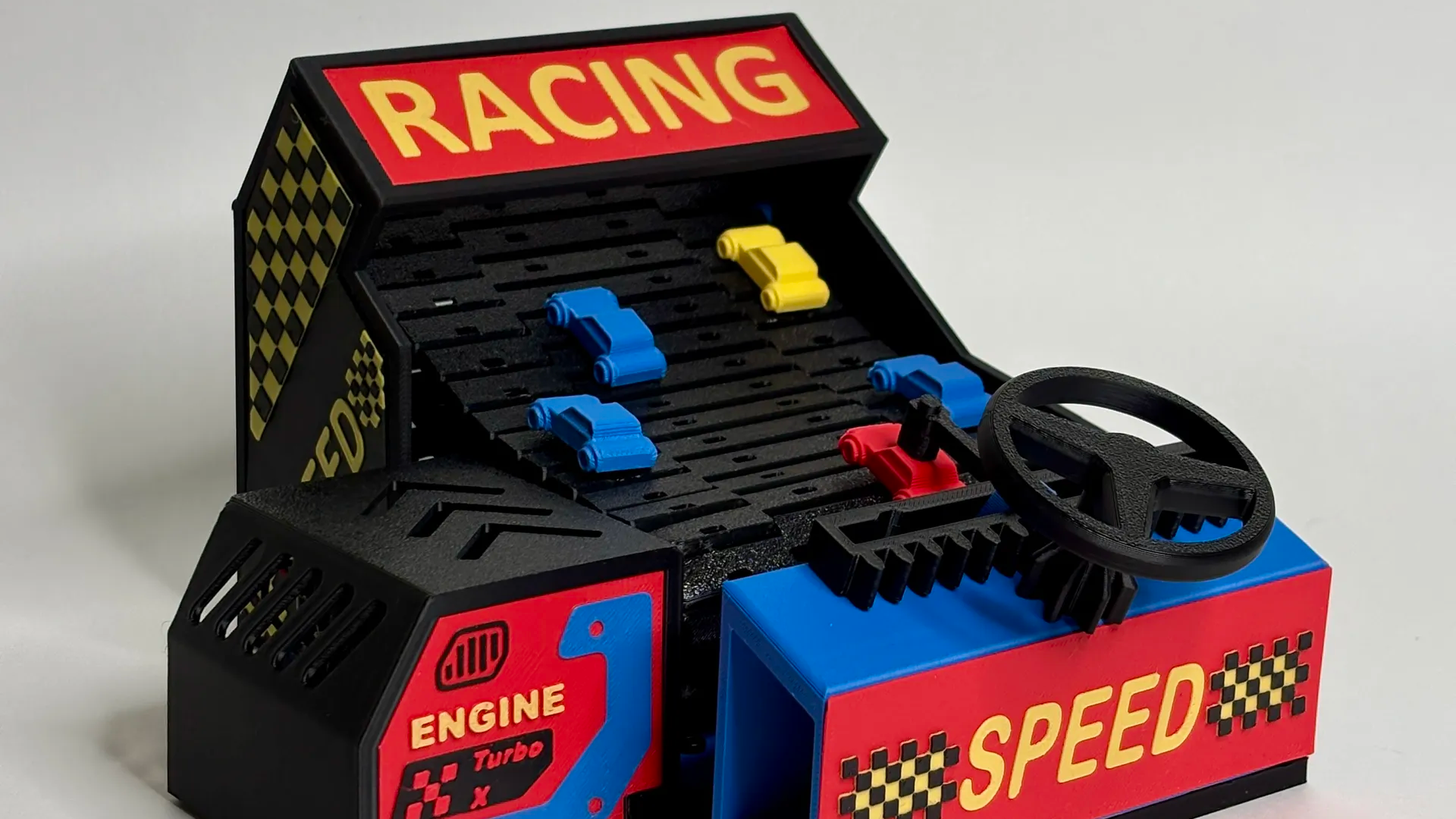
The project takes inspiration from classic handheld and tabletop driving games, the kind where a tiny car dodges incoming traffic on a moving road. Instead of relying on a glowing screen, it uses real printed parts: a moving belt, small cars, a steering wheel, a magnet-based player car, and colorful printed graphics that make the whole thing feel like a miniature arcade cabinet. The magic is not only in the mechanism. It is in the presentation. Multicolor printing turns a collection of functional plastic pieces into something that feels finished, polished, and ready to steal attention on a maker’s desk.
In an era when many people think of 3D printing as either practical brackets or dragon figurines, this mini car racing game lands in a sweet spot. It is functional, decorative, nostalgic, and educational all at once. It shows how multicolor 3D printing can replace stickers, paint, and post-processing with clean graphics built directly into the model. In other words, the printer is not just making the object. It is helping design the personality.
What Is the Mini Car Racing Game?
The mini car racing game is a 3D-printed mechanical toy that recreates the feeling of old-school arcade driving games. A small car sits on a moving road or treadmill-style belt. As obstacle cars move toward the player, the player steers left and right to dodge them. The game ends when the player’s car gets knocked out of position. Simple? Yes. Addictive? Also yes. It is the sort of toy that looks harmless until someone says, “One more try,” for the ninth time.
The clever part is that the game is mostly physical. The motion comes from a belt mechanism, often driven by a small DC motor or, in some versions, by a hand-cranked setup. That makes it part toy, part mechanical puzzle, and part demonstration model. It has the appeal of an arcade game without needing a screen, software updates, or a mysterious login that asks whether you accept cookies from the year 1987.
A Tiny Arcade Built From Printed Parts
The game’s design makes excellent use of 3D printing because it turns complex shapes into accessible parts. The road, car bodies, frame, belt links, steering pieces, decorative panels, and game details can all be printed as custom components. This is exactly where desktop 3D printing shines: producing small-batch, personalized, mechanical objects that would be difficult or expensive to manufacture using traditional methods.
Instead of buying a mass-produced toy, makers can print, assemble, tune, and modify the game themselves. Want brighter cars? Print them. Want a longer track? Resize or redesign the belt. Want a dashboard that looks like it belongs in a 1970s arcade? Multicolor printing says, “I was born for this.”
Why Multicolor Printing Makes This Project Stand Out
Multicolor printing is the star of this project because it transforms the game from a prototype into a finished object. A single-color version would still work, but it might look like a test print. Add contrasting road markings, bright cars, printed labels, checkerboard patterns, and panel details, and suddenly the game has charm. It looks intentional. It looks like something designed rather than merely fabricated.
In traditional model making, those details might require painting, decals, vinyl stickers, or careful hand finishing. Multicolor 3D printing moves many of those design elements directly into the print. Letters can be raised or recessed. Checkerboard graphics can be printed in alternating colors. Decorative trims can be part of the geometry. The result is cleaner than a rushed paint job and more durable than a sticker that starts peeling the moment someone looks at it with humid hands.
Color Is Not Decoration Only
One of the smartest lessons from this mini car racing game is that color can guide the user. A racing game benefits from visual contrast. The player must instantly understand where the car is, where the obstacles are, and how the road is moving. Bright cars stand out against a darker track. Lane markings help communicate motion. Color-coded parts can make assembly easier. A printed logo or label can tell players what they are looking at before anyone explains it.
Good multicolor printing is not about using every filament in the drawer just because the drawer is feeling neglected. It is about choosing colors that support the object’s purpose. In this case, color reinforces the arcade theme, improves readability, and gives the game a toy-like personality without making it look messy.
How Multicolor 3D Printing Works
Multicolor 3D printing can happen in several ways. The simplest method is a manual filament swap, where the printer pauses at a specific layer and the user changes filament. This works well for signs, nameplates, flat graphics, and raised text. More advanced methods use automatic material systems, multi-material units, dual extruders, or tool-changing printers to switch between colors during the print.
For projects like a mini car racing game, both simple and advanced methods can be useful. Flat decorative panels can be printed with layer-based color changes. More complex details, such as multicolor car bodies or checkerboard surfaces, may benefit from an automatic filament switching system. The best method depends on the model design, available printer, tolerance requirements, and how much patience the maker has before muttering at a purge tower.
Raised and Recessed Details
One common strategy for clean multicolor prints is to model decorative details as slightly raised or recessed geometry. For example, a checkerboard pattern can be designed so that one color sits slightly higher than the surrounding surface. When sliced correctly, the printer can assign that feature to a different filament color. This gives sharp visual separation and often looks better than trying to paint tiny squares by hand.
The mini car racing game uses this concept beautifully. Details that might have been stickers in an older toy can be built into the print itself. The result feels more permanent and more integrated. It is a reminder that multicolor printing is not only a hardware feature. It starts in the design file.
The Mechanical Design: Why the Game Feels So Satisfying
A good mini racing game depends on motion. The moving belt creates the illusion that the player’s car is driving forward while obstacle cars approach. This simple trick has powered toys and arcade-style games for decades because it works. Your brain sees the scrolling road and immediately accepts the challenge: dodge the traffic, survive longer, brag responsibly.
The belt mechanism is especially interesting from a 3D printing perspective. Belts, hinges, snap-fit connections, and print-in-place assemblies can be tricky because they require accurate clearances. Too tight, and the belt jams. Too loose, and the motion feels sloppy. When a printed belt moves smoothly, it tells you the designer understood tolerances, material behavior, and the tiny negotiations plastic likes to make after cooling.
Snap-Together Belt Segments
One standout feature of the design is the use of belt segments that can snap together without relying heavily on external fasteners. That is a very 3D-printing-friendly idea. It allows makers to print replacement sections, resize the game, or experiment with different track lengths. Modular parts also make the project easier to repair, which matters because a racing game invites repeated use.
For hobbyists, this is a practical lesson: design for assembly, maintenance, and iteration. A printed toy should not become a sad desk fossil the moment one part wears out. If a belt section breaks, the best answer is not “throw away the game.” The best answer is “print another one and maybe make it neon this time.”
Why This Project Feels Nostalgic
The mini car racing game taps into the charm of electromechanical entertainment. Before every game had a touchscreen, cloud account, and suspiciously aggressive tutorial, many toys created fun through gears, belts, motors, cams, springs, and simple controls. These games were understandable. You could see the parts working. You could hear the motion. You could feel the mechanism fighting back just enough to make winning satisfying.
That is a big reason this project resonates. It does not hide the fun behind a sealed black box. It celebrates the mechanism. The player sees the car, the track, the obstacles, and the steering motion. The experience is physical, immediate, and a little silly in the best way.
Old-School Play, Modern Tools
What makes the project special is the combination of old and new. The gameplay idea feels vintage, but the manufacturing method is modern. Desktop 3D printers make it possible for one designer to create a polished, customized, mechanical toy and share it with makers around the world. Multicolor printing adds the final layer of polish that old homemade prototypes often lacked.
In that sense, the game is more than a toy. It is a small example of how maker culture works in 2026: remixable, printable, customizable, and visually impressive enough to make people ask for the file before they ask how it works.
Design Lessons for Makers
The mini car racing game offers several useful lessons for anyone interested in 3D printed toys, mechanical projects, or multicolor design. First, function should come before flair. The game works because the mechanical concept is solid. The belt moves, the car steers, and the obstacles create a clear challenge. Color enhances that experience, but it does not replace it.
Second, multicolor printing works best when the model is designed for it from the beginning. If color is added as an afterthought, the print can become wasteful, slow, or visually confusing. But when the geometry supports color changes, the result can look crisp and professional. Raised text, inset panels, separated parts, and smart color boundaries all help.
Third, tolerances matter. Moving parts need enough clearance to operate smoothly. Snap-fit parts need to be strong without being impossible to assemble. Small cars need to roll, slide, or attach consistently. Magnets, if used, should be safely enclosed and not treated as casual loose decorations, especially if the object may be handled around children.
Material Choices Matter Too
PLA is often a popular choice for colorful display prints and toys because it is easy to print, available in countless colors, and produces sharp detail. PETG may be useful for parts that need more toughness or flexibility, although it can be stringier and less crisp for fine decorative details. TPU can be useful for flexible tires or grip elements, but it requires more careful tuning. The right material depends on whether the part is decorative, structural, flexible, or repeatedly stressed.
For a mini car racing game, a smart approach is to separate the design into categories. Use attractive colors for visible panels and cars. Use stronger or more durable materials for parts that experience friction. Use replaceable modules where wear is expected. That way, the game can look good and survive actual play instead of becoming a beautiful object that panics when touched.
The Beauty of Printed Graphics
One of the most impressive parts of multicolor printing is the ability to create graphics without post-processing. On a project like this, printed graphics can include lane markers, start lines, dashboard labels, racing stripes, arrows, numbers, and checkerboard flags. These details communicate theme instantly.
Printed graphics also age better than many surface decorations. Paint can chip. Stickers can peel. Marker ink can smudge. Multicolor printed features are part of the object itself. If the color extends through the raised or recessed detail, it remains visible even with normal handling. That is a major advantage for toys and interactive models.
When Color Becomes User Interface
In a physical game, color acts like a user interface. The steering wheel should be easy to identify. The player car should stand out. Obstacles should be readable at a glance. The road should visually move. Score markers, start areas, or danger zones can all be communicated through contrast. This is the same design logic used in board games, arcade cabinets, and consumer products: visual clarity makes interaction easier.
That is why the mini car racing game is such a good showcase. It does not use multicolor printing just to say, “Look, I own several spools.” It uses color to improve the entire experience.
Challenges of Multicolor Printing
Of course, multicolor printing is not magic. It can increase print time, filament usage, and slicer complexity. Single-nozzle systems often need to purge old filament before printing the next color, which can create waste. Automatic material systems are convenient, but they require setup, calibration, and dry, well-managed filament. A beautiful multicolor print can quickly become a spaghetti-themed tragedy if the basics are ignored.
The best way to control those challenges is thoughtful design. Avoid unnecessary color changes on every layer. Group colors logically. Use separate parts when that is more efficient than printing one complicated multicolor object. For example, printing cars, panels, and belt segments separately may reduce waste and make assembly easier. Not every part needs four colors. Sometimes one bold color and one accent color do the job beautifully.
Print Time vs. Visual Payoff
A maker should always ask whether a color change is worth it. On a visible dashboard or race car, yes. On an internal bracket nobody will see, probably not. Multicolor printing is most powerful when used where the eye naturally goes: logos, controls, player pieces, track markings, and decorative panels. That is where the extra time pays off.
The mini racing game succeeds because the colors support the theme. It looks like a game, not a random pile of printer calibration tests that got promoted.
Why Mini Projects Are Perfect for Showing Off Big Ideas
Small projects often reveal craftsmanship better than large ones. A mini car racing game has limited space, so every design decision matters. If the colors clash, you notice. If the belt stutters, you notice. If the steering feels awkward, you notice. The small scale makes the project demanding, but it also makes success more impressive.
Miniature mechanical projects are also approachable. They require less filament than large builds, fit on common desktop printers, and can be displayed easily. A tiny arcade racing game can sit on a shelf, desk, classroom table, or maker fair booth without needing its own zip code. That makes it a great conversation starter and a practical learning project.
A Great Project for Learning Iteration
This type of game teaches iteration naturally. Print a belt. Test it. Adjust clearance. Print a car. Test the magnet strength. Adjust the steering arm. Try a different color scheme. Improve the graphics. Each round teaches something useful. Unlike a purely decorative print, the game gives instant feedback because it either plays well or it does not.
That feedback loop is one of the best parts of 3D printing. You do not have to get everything perfect on the first try. In fact, you probably will not. The printer is not a magic box; it is a patient collaborator that occasionally makes crunchy noises to remind you who is really in charge.
500-Word Experience Section: What It Feels Like to Build and Play a Mini Car Racing Game
The first experience most makers have with a project like this is surprise. On the screen, the model looks clever. On the print bed, the parts look promising. But once the colors come together and the tiny cars are placed on the track, the project suddenly becomes more than plastic. It becomes a little world. The road has rhythm. The steering wheel invites your hand. The cars look like they are waiting for trouble, which, in racing games, is basically their job description.
During assembly, the most satisfying moment is usually when the belt starts moving smoothly. That is the point when the project changes from “collection of parts” to “actual machine.” If the belt snaps together cleanly and travels without catching, it feels like a small engineering victory. You may find yourself turning the mechanism several times just to watch it work. This is normal. Makers are allowed to admire functional motion. It is in the unofficial handbook, probably between “save every screw” and “never trust the first layer.”
The first play session is equally charming. The game is simple enough for anyone to understand immediately, but not so simple that it becomes boring. You steer, dodge, overcorrect, panic slightly, and then pretend the crash was caused by a mechanical fault rather than your reflexes. Because the car is physical, every mistake feels funny instead of frustrating. The magnet-based connection gives the game a clear fail state: once the car gets knocked away, the round is over. There is no dramatic explosion, but emotionally, yes, the tiny driver has had a difficult day.
Multicolor printing makes the experience better before the game even starts. A bright player car feels more personal. Contrasting obstacle cars are easier to read. A checkerboard detail or printed label gives the game a finished arcade personality. The colors make people want to touch it, test it, and ask how it was made. That is a huge advantage at a maker fair, classroom demonstration, or workshop. A plain mechanical prototype explains itself slowly. A colorful mini racing game waves people over from across the room.
There is also a useful lesson in restraint. After discovering multicolor printing, it is tempting to make every piece a carnival. But the best experience comes from balanced color choices. The track should be readable. The cars should stand out. The frame should support the design rather than compete with it. A good color scheme makes the toy look intentional, while a chaotic one can make it look like the filament drawer sneezed.
Building a project like this also changes how you look at ordinary toys. You begin noticing how designers use contrast, motion, friction, and feedback. You start thinking about where printed parts could replace molded ones, where magnets need safer enclosures, where snap-fits could simplify assembly, and where color could eliminate stickers. That is the real value of the mini car racing game. It is fun to play, but it is also fun to study.
By the time the game is finished, it has done something rare: it has taught mechanical design, print planning, color strategy, assembly thinking, and user experience without feeling like homework. It is a tiny racing game with a surprisingly large lesson under the hood.
Final Thoughts
The mini car racing game really shows off multicolor printing because it proves that color is not just decoration. Color can clarify controls, strengthen a theme, replace stickers, improve usability, and turn a working prototype into a delightful finished object. Combined with smart mechanical design, modular printed parts, and classic arcade inspiration, the project becomes a standout example of what desktop 3D printing is now capable of producing.
For makers, the lesson is clear: do not treat multicolor printing as a gimmick. Treat it as a design tool. Use it where it improves the object. Use it to guide the player, sharpen details, and create personality. When done well, as this mini racing game demonstrates, multicolor 3D printing can make a small project feel big, polished, and wonderfully alive.
Note: This article is written as original, web-ready content based on real 3D printing concepts, maker project details, and current multicolor printing practices. It contains no source-link placeholders, no contentReference tags, and no unnecessary publishing artifacts.