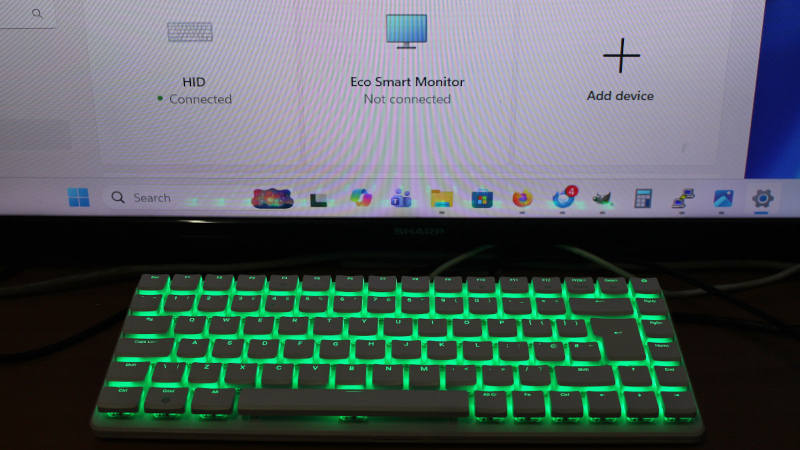

Some tech hacks are practical. Some are elegant. And some walk into the room wearing a cape made of circuit boards and announce, “I have solved your missing keyboard dongle problem with an entire Linux computer.” That is exactly the charm of the Pi 500 turned into an overkill Bluetooth keyboard. On paper, the idea sounds ridiculous: take a Raspberry Pi 500-style keyboard computer, a machine capable of browsing the web, running code, driving displays, and tinkering with hardware, then use it as… a wireless keyboard.
Ridiculous? Yes. Useful? Also yes. Delightfully nerdy? Absolutely.
The Raspberry Pi 500 and its more premium sibling, the Pi 500+, continue the classic “computer inside a keyboard” idea. They are spiritual cousins of early home computers from the 1980s, except instead of loading software from a cassette while making futuristic robot noises, they run modern Linux, support wireless networking, and can connect to multiple displays. The twist is that the same keyboard-computer form factor that makes the Pi 500 convenient as a tiny desktop also makes it tempting as a standalone input device.
That temptation became especially interesting when makers started exploring whether the Pi 500 family could behave like a Bluetooth HID keyboard. In plain English: could this whole computer pretend to be a regular Bluetooth keyboard for another computer, tablet, or device? The answer is yes, with caveats, and that is where the story gets fun.
What Is the Pi 500, Really?
The Raspberry Pi 500 is not just a keyboard with a secret personality. It is a compact desktop computer built into a keyboard shell. Inside, it uses hardware from the Raspberry Pi 5 generation, including a quad-core 64-bit Arm processor, 8GB of RAM, modern I/O, wireless networking, and the familiar Raspberry Pi ecosystem. It is designed to be simple: plug in power, attach a monitor, connect a mouse, and suddenly the keyboard on your desk is also the computer.
That design makes sense for students, hobbyists, classrooms, lightweight desktop use, coding projects, retro computing, and anyone whose desk already looks like a cable-themed escape room. Instead of a separate single-board computer, case, power button, heat sink, keyboard, and half a drawer of adapters, the Pi 500 rolls much of the experience into one tidy slab.
The Pi 500+ pushes the idea even further with upgrades aimed at people who care about typing feel and onboard storage. It adds a more premium mechanical keyboard experience, more memory, NVMe storage, RGB lighting, and a stronger “this is not just a toy” vibe. In other words, it is the kind of device that can be both a daily writing station and a weekend rabbit hole.
Why Turn a Whole Computer Into a Bluetooth Keyboard?
Because makers are makers. Give them a device with Linux, Bluetooth, and a keyboard, and sooner or later someone will ask, “Can I make this type into another machine?” That question is not silly. It is the same curiosity that has given us homemade cyberdecks, tiny servers hidden in toys, e-ink dashboards, garage-door automations, and coffee makers that probably know too much.
The practical reason is simple: sometimes you need a keyboard and do not have the right one. Maybe your wireless keyboard dongle is missing. Maybe a laptop keyboard is broken. Maybe you are setting up a media PC across the room. Maybe you are troubleshooting a machine and want a temporary input device without rearranging your desk like a small furniture convention.
A normal person might buy a cheap Bluetooth keyboard. A maker looks at a Pi 500+, notices it already has Bluetooth and a keyboard, and thinks, “This is probably a terrible idea. Let’s do it.”
The Software Magic: Bluetooth HID and btferret
The key idea behind this hack is Bluetooth HID, short for Human Interface Device. HID is the category that lets devices like keyboards, mice, game controllers, and other input accessories talk to computers in a standardized way. When a laptop sees a Bluetooth keyboard, it is not thinking, “Ah yes, a full emotional relationship with a QWERTY rectangle.” It is receiving structured input reports: key pressed, key released, modifier active, and so on.
For the Pi 500 keyboard-computer trick, the open-source btferret project plays a central role. btferret is a C and Python Bluetooth library developed with Raspberry Pi hardware in mind, though it can also work on other Linux systems. In this context, it helps the Pi advertise and behave like a Bluetooth keyboard, sending keystrokes from the Pi’s own keyboard to another paired device.
The result is wonderfully strange. You are typing on a computer that is not being used as the computer. Instead, it is acting as the keyboard for another computer. That is like hiring a professional chef to butter toast, except the chef also brings a compiler, a GPIO header, and possibly a tiny fan.
Why It Is Overkilland Why That Is the Point
Using a Pi 500 as a Bluetooth keyboard is clearly overkill. A basic Bluetooth keyboard costs less, weighs less, boots faster, and does not have a full operating system wondering what happened to its life ambitions. But overkill is not always a criticism in maker culture. Sometimes overkill is the laboratory where useful ideas are born.
Think about it this way: a dedicated keyboard sends keystrokes. A Pi 500 acting as a keyboard can, in theory, do much more. It can run scripts, map special keys, transform input, trigger macros, log local events, integrate with accessibility tools, or bridge unusual workflows between devices. The keyboard is no longer just a keyboard; it becomes a programmable input station.
That is where the hack moves from comedy to genuine utility. A programmable Bluetooth keyboard-computer could help users who need custom phrases, repeated commands, special layouts, or device-switching experiments. It could become a lab tool, a presentation controller, a writing terminal, or a recovery keyboard for machines with damaged input hardware.
The Pi 500 Family Fits the Job Better Than You Would Expect
The Pi 500 design makes this project more believable than it first appears. It is already shaped like a keyboard. It already has onboard Bluetooth. It already runs Linux. It already has enough processing power to do far more than translate keystrokes. And because the Pi ecosystem is friendly to tinkering, the community tends to poke at every hidden possibility until something interesting falls out.
The Pi 400 introduced many people to the “keyboard computer” concept in the modern Raspberry Pi lineup. The Pi 500 refined the formula with more performance, better I/O, and hardware based on the Raspberry Pi 5 generation. The Pi 500+ then made the keyboard itself feel more premium, which matters a lot if the entire point is typing.
That keyboard quality is not a minor detail. If you are using a device as a keyboard, the switches, spacing, layout, and typing feel become the product. A computer inside a keyboard is clever. A computer inside a keyboard that people actually want to type on is far more compelling.
Real-World Use Cases for an Overkill Bluetooth Keyboard
Emergency Keyboard Replacement
The most obvious use is a rescue scenario. Your main keyboard dies, the dongle vanishes into the same dimension as missing socks, or a laptop key starts behaving like it has entered a rebellious teenage phase. A Pi 500 configured as a Bluetooth keyboard can be a temporary bridge until you fix the real problem.
Media Center Control
A living-room PC, mini PC, smart display, or tablet can be annoying to control from across the room. A Pi 500 keyboard-computer can theoretically serve as both a compact couch computer and an input device for another screen. Is it more elaborate than a remote? Yes. But a remote cannot SSH into a server during halftime.
Accessibility and Custom Input
One of the more serious angles is accessibility. A programmable keyboard can be adapted for people who need shortcuts, word expansion, special key combinations, or reduced typing effort. A full Linux environment gives developers room to create custom behavior that a normal off-the-shelf keyboard may not support.
Developer Workflows
Developers often juggle multiple machines: a main laptop, a test system, a Raspberry Pi, a server console, or a lab bench device. A programmable Bluetooth keyboard could become a quirky control layer for switching input, sending commands, or testing Bluetooth behavior in a controlled way.
Because It Is Fun
Fun is underrated. Not every project needs to justify itself with a spreadsheet. Some projects exist because they make people laugh, learn, and understand technology more deeply. Turning a full keyboard computer into a wireless keyboard is a great example. It teaches Bluetooth, Linux input handling, device profiles, keymaps, and the weird joy of making hardware do something it was not marketed to do.
The Limitations: This Is Not a Magic Keyboard Wand
The project is clever, but it is not perfect. Reports around the Pi 500+ Bluetooth-keyboard experiment mention keymap quirks, setup complexity, and behavior that may not feel as seamless as a commercial Bluetooth keyboard. One especially funny limitation is that pressing Escape can terminate the program in some setups, which is exactly the kind of issue that waits until you are typing something important before announcing itself.
There may also be pairing differences across Windows, macOS, Linux, Android, iPadOS, and other Bluetooth hosts. Bluetooth is a standard, but anyone who has paired headphones with three devices knows that standards sometimes behave like polite suggestions. A homebrew HID keyboard setup may work beautifully with one machine and require fiddling on another.
Battery life is another practical point. The Pi 500 is not a battery-powered Bluetooth keyboard in the usual sense. It needs power. That means it is best suited for desks, labs, classrooms, workshops, or couch setups with a nearby outlet. If your dream is to throw it in a backpack and type in a coffee shop all day without cables, a regular Bluetooth keyboard will probably be less dramatic.
Security and Trust: Do Not Pair Random Keyboards
Any device that pretends to be a keyboard deserves a moment of caution. Keyboards are powerful because computers trust them. A keyboard can type commands, submit forms, send messages, and trigger shortcuts. That is useful when you are in control and risky when you are not.
If you experiment with a Pi 500 as a Bluetooth keyboard, treat pairing as a trusted-device relationship. Do not pair unknown input devices to important machines, and do not leave experimental Bluetooth services discoverable forever. For personal projects, lab setups, and controlled environments, the risk is manageable. For shared workplaces or public spaces, keep security boring. Boring security is good security. Exciting security usually means someone is updating a résumé.
How This Hack Reflects the Raspberry Pi Spirit
The real appeal of the Pi 500 turned Bluetooth keyboard is not just the output. It is the mindset. Raspberry Pi hardware has always encouraged people to ask “what else can this do?” The answer has ranged from weather stations and retro consoles to robotics, signage, NAS boxes, education kits, and tiny desktops. A Bluetooth keyboard transformation fits right in.
It also shows why keyboard computers remain charming. In a world of sealed tablets and disposable gadgets, a Raspberry Pi keyboard-computer feels refreshingly understandable. You can imagine what is happening inside. You can modify it. You can run code locally. You can fail, fix it, and learn something along the way.
That is why this project resonates even with people who will never use it daily. It is a reminder that hardware is more fun when it invites curiosity. A Pi 500 is a finished product, but it is also a question mark with keycaps.
Is It Better Than Buying a Bluetooth Keyboard?
No. And yes.
If your only goal is to type wirelessly, buy a normal Bluetooth keyboard. It will pair quickly, travel easily, and not require you to explain to anyone why your keyboard has an operating system. A $30 keyboard is the sensible choice.
But if your goal is to learn, experiment, customize input, rescue a broken setup, or enjoy the comedy of using a small desktop computer as a keyboard, the Pi 500 solution is much more interesting. It is not better in the consumer-product sense. It is better in the “I learned five things and accidentally built a conversation piece” sense.
What Makers Can Learn From the Project
The biggest lesson is that interfaces are flexible. A computer does not have to be only a computer. With the right software, it can become a peripheral, a bridge, a controller, a server, a display driver, or a specialized appliance. Bluetooth HID is just one doorway into that idea.
The second lesson is that Linux remains a playground for practical weirdness. Because Linux exposes so much of the system to developers, it is possible to build unusual tools that would be difficult or impossible on locked-down devices. The Pi 500 family benefits from that openness.
The third lesson is that overkill can be educational. A tiny microcontroller could be a more efficient Bluetooth keyboard emulator. A commercial keyboard could be more polished. But the Pi 500 version is easier to understand for many hobbyists because it provides a full operating system, familiar tools, and a large community. Sometimes the big hammer is useful because you can see how the hammer works.
The Future of Keyboard Computers
The Pi 500 and Pi 500+ are part of a broader revival of compact, integrated desktop ideas. The keyboard computer is no longer just a nostalgic tribute to old home micros. It is becoming a practical form factor again, especially for education, thin-client work, coding labs, and portable maker stations.
As hardware improves, these devices could become even more flexible. Imagine a keyboard computer that can instantly switch between being a standalone Linux desktop, a Bluetooth keyboard, a USB HID device, a KVM controller, a secure terminal, and a programmable macro pad. That sounds like a niche product, but many great tools begin as niche products with suspicious amounts of personality.
The Pi 500 Bluetooth keyboard hack hints at that future. It is not just about typing into another machine. It is about turning input into a programmable layer.
Experience Notes: Living With an Overkill Bluetooth Keyboard
Using a Pi 500-style device as an overkill Bluetooth keyboard feels less like using a normal accessory and more like bringing a tiny workshop to a typing job. The first impression is amusement. You look at the device, look at the host computer, and realize the “keyboard” is probably powerful enough to run half your daily tasks by itself. It is the digital equivalent of driving a pickup truck to deliver one sandwich.
But after the joke fades, the experience becomes surprisingly thoughtful. The keyboard form factor makes the Pi 500 family easy to keep on a desk. It does not feel like a loose development board with wires escaping in all directions. It feels like a real object with a purpose. That matters because many maker projects are technically impressive but physically awkward. A keyboard computer already has a natural place in a workspace.
The most satisfying part is the sense of control. A standard Bluetooth keyboard is a black box. It pairs, it types, and that is the end of the story. A Pi 500 acting as a keyboard invites you to imagine layers of customization. Could one key type a full email template? Could another send a command sequence to a test machine? Could the layout change depending on the paired device? Could it become a writing keyboard in the morning and a lab controller in the afternoon?
That flexibility also creates friction. A commercial keyboard disappears into the background when it works well. The Pi 500 approach does not always disappear. You are aware that software is involved. You may think about pairing, keymaps, services, power, and whether a certain key behaves as expected. For some users, that is annoying. For makers, that is half the entertainment.
One useful experience is the rescue scenario. Imagine troubleshooting a desktop with a flaky keyboard, or helping someone whose laptop keyboard has failed. Having a Pi 500 nearby that can serve as a temporary Bluetooth input device feels oddly heroic. It is not the smallest solution, but it is flexible. It can also double as a research machine while you diagnose the problem, which a normal keyboard definitely cannot do unless it has been hiding a secret Linux career.
The typing feel matters more than expected. If the device is a Pi 500+ with a more satisfying mechanical keyboard, the project becomes more appealing as a daily experiment. If the keys feel good, the absurdity becomes easier to justify. A keyboard that is technically clever but unpleasant to type on is like a sports car with square wheels: interesting, but only briefly.
The final experience is emotional, in a nerdy way. This hack makes technology feel playful again. It turns a product into a possibility. It reminds you that computers are not just appliances; they are adaptable tools. The Pi 500 turned overkill Bluetooth keyboard may not replace a compact wireless keyboard in your bag, but it can absolutely replace boredom on a rainy weekend. And for many Raspberry Pi fans, that is a perfectly valid feature.
Conclusion
The Pi 500 turned overkill Bluetooth keyboard is exactly the kind of project that makes the maker world worth watching. It is funny at first glance, useful in the right situation, and educational once you look under the hood. By using a Raspberry Pi keyboard-computer as a Bluetooth HID device, makers transform a compact Linux desktop into a programmable input tool for other machines.
It is not the simplest way to get a Bluetooth keyboard. It is not the cheapest. It is not the most portable. But it is clever, flexible, and full of possibility. More importantly, it captures the Raspberry Pi spirit: take something approachable, open it up, bend it sideways, and see what new trick falls out.
Note: This article is written as publish-ready web content. It intentionally avoids source links in the article body while remaining based on real product details, maker coverage, and Bluetooth keyboard concepts.