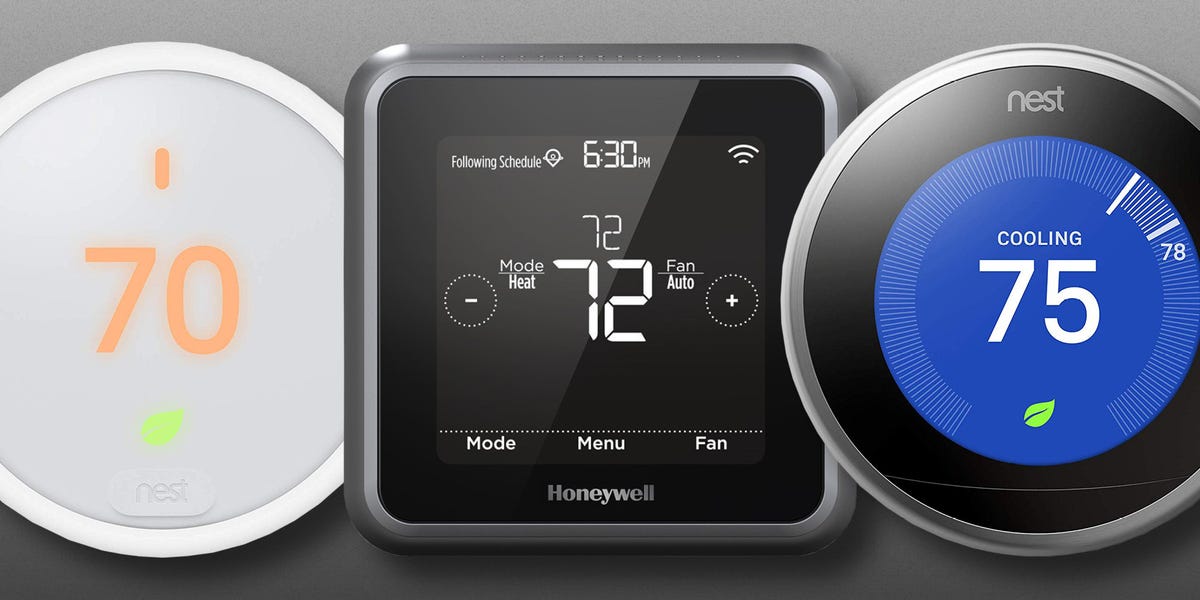

A good smart thermostat does more than let you lower the air conditioning from the grocery-store checkout line. It learns routines, manages uncomfortable rooms, tracks energy use, and politely reminds your HVAC system that it does not need to condition an empty house like a luxury hotel suite.
The best smart thermostat for your home, however, depends on more than the logo on the box. Your wiring, heating and cooling equipment, preferred smart-home platform, privacy expectations, and tolerance for complicated menus all matter. A beautiful thermostat that cannot control your heat pump is merely expensive wall jewelry.
After comparing current specifications, ENERGY STAR guidance, manufacturer documentation, and long-term testing from major U.S. home and technology publications, five models stand out for different types of households. The Honeywell Home X8S is the strongest all-around choice, the fourth-generation Nest is the smartest learner, the Ecobee Premium offers the deepest feature set, Amazon wins on price, and the Sensi Touch 2 is the privacy-conscious option.
The Best Smart Thermostats at a Glance
- Best overall: Honeywell Home X8S Smart Thermostat
- Best for automatic learning: Google Nest Learning Thermostat, 4th Gen
- Best for smart-home enthusiasts: Ecobee Smart Thermostat Premium
- Best affordable model: Amazon Smart Thermostat
- Best for privacy and simple control: Sensi Touch 2 Smart Thermostat
How We Chose the Best Smart Thermostats
We prioritized HVAC compatibility, reliable scheduling, remote sensors, app usability, smart-home integrations, local controls, energy reporting, installation requirements, and long-term value. We also looked for models that remain useful when the novelty wears off. Nobody needs a thermostat that performs twelve circus tricks but makes changing the temperature feel like filing a tax return.
Energy savings matter, but no thermostat can promise the same result in every house. ENERGY STAR estimates that certified smart thermostats save the average household about 8% on heating and cooling bills, or roughly $50 per year. The U.S. Department of Energy also notes that properly setting temperatures back for part of the day can reduce annual heating and cooling costs by as much as 10%, depending on climate, equipment, insulation, and household habits.
1. Honeywell Home X8S Smart Thermostat: Best Overall
The Honeywell Home X8S is the best smart thermostat for households that want modern automation without giving up a large, readable wall interface. Its 5-inch touchscreen behaves more like a compact smart display than a traditional thermostat, making schedules, humidity readings, system status, and temperature controls easy to understand at a glance.
Why It Stands Out
The X8S supports Alexa, Google Home, Apple Home, and Matter, so it fits into nearly any major smart-home ecosystem. It also works offline for essential thermostat functions, which is reassuring when the internet decides to take an unscheduled personal day. An onboard radar sensor helps detect occupancy, while optional room sensors can prioritize the spaces that matter most.
The thermostat includes indoor air-quality monitoring, utility-reward features, customizable screens, and integration with selected video doorbells. That last feature is not essential to climate control, but seeing who is at the door from the hallway thermostat is undeniably futuristic in a “the house has become the receptionist” sort of way.
What to Know Before Buying
The X8S requires a C-wire for continuous power. Installation is possible for experienced do-it-yourselfers, but its wiring and setup can take longer than simpler models. Its video-doorbell compatibility is also limited to selected devices, so do not assume it will display every camera feed in your home.
Best for: Families, larger homes, Matter users, and anyone who wants a premium touchscreen with strong multiroom controls.
The X8S is ENERGY STAR certified, requires a C-wire, includes radar-based occupancy sensing and air-quality features, and supports leading smart-home systems. Recent independent testing has also highlighted its offline controls and whole-home sensor capabilities.
2. Google Nest Learning Thermostat, 4th Gen: Best for Automatic Learning
The fourth-generation Google Nest Learning Thermostat is designed for people who want the thermostat to do more of the thinking. It studies temperature changes and household patterns, develops a schedule, and adjusts heating or cooling based on occupancy, weather, and energy-saving opportunities.
Why It Stands Out
Nest remains one of the easiest thermostats to operate directly on the wall. The rotating ring is intuitive, the display is crisp, and the enlarged design can show weather, time, indoor conditions, and system information from across a room. A second-generation Nest Temperature Sensor is included, allowing the system to use the temperature in a bedroom, nursery, office, or other important room instead of relying entirely on the hallway.
The fourth-generation model works with Google Home and Matter, which broadens compatibility beyond Google-only households. Most installations do not require a C-wire because the thermostat can use Nest’s power-sharing technology, although a small number of HVAC systems still need a common wire or Nest Power Connector.
Where It Falls Short
Nest is expensive, and households that prefer a rigid manual schedule may find its learning behavior a little too enthusiastic. Fortunately, automatic learning can be adjusted or disabled. The included room sensor measures temperature but does not provide the same occupancy-based room intelligence offered by some Ecobee sensors.
Best for: Busy households, Google Home users, design-conscious buyers, and people who want scheduling to happen with minimal tinkering.
Google states that the fourth-generation Nest works with Matter and generally operates without a C-wire, although limited systems require additional power hardware. Independent testing praises its learning functions, improved display, and included temperature sensor.
3. Ecobee Smart Thermostat Premium: Best for Smart-Home Enthusiasts
The Ecobee Smart Thermostat Premium is the Swiss Army knife of this group, except it controls humidity instead of opening a can of beans. It combines strong HVAC compatibility, a remote SmartSensor, indoor air-quality monitoring, voice control, security-related features, and support for multiple home-automation platforms.
Why It Stands Out
Ecobee’s greatest advantage is its approach to room sensors. The included SmartSensor can detect both temperature and occupancy, helping the thermostat focus on rooms that are actually being used. Additional sensors can reduce hot and cold spots in larger or oddly shaped homes.
The Premium supports Apple HomeKit, Amazon Alexa, Samsung SmartThings, IFTTT, and other integrations. Alexa is built in, while Siri can operate through a compatible Apple home hub. The thermostat can also control a wide range of 24-volt equipment, including conventional heating and cooling systems, heat pumps, boilers, humidifiers, dehumidifiers, and ventilation accessories.
Its built-in air-quality monitor offers general guidance about indoor conditions, and the large display can show weather information and compatible Ecobee doorbell video. Those extras make it feel like a broader home-control device rather than a thermostat wearing a Wi-Fi hat.
Where It Falls Short
The Ecobee Premium is costly, and some security functions require a subscription. It needs continuous power, although the included Power Extender Kit can help compatible homes that lack a dedicated C-wire. The menus and automation options also require more setup than Amazon’s simpler model.
Best for: Apple Home users, automation fans, homes with temperature differences between rooms, and advanced HVAC systems.
Ecobee documents broad 24-volt HVAC support, optional accessory control, dual-band Wi-Fi, major smart-home integrations, and a Power Extender Kit for compatible systems without a C-wire. Long-term home testing has repeatedly praised its sensor system and broad feature set.
4. Amazon Smart Thermostat: Best Budget Pick
The Amazon Smart Thermostat proves that a connected thermostat does not need to cost as much as a small appliance. It is usually priced below premium competitors while still offering schedules, app control, ENERGY STAR certification, energy tracking, vacation settings, and Alexa-based automation.
Why It Stands Out
Setup and everyday control are handled through the Alexa app. Alexa Hunches can adjust temperatures based on patterns such as when the household appears to be asleep or away. For homes already filled with Echo speakers, Ring devices, and Alexa routines, the experience feels natural and pleasantly uncomplicated.
The clean display shows the current temperature and basic status information. It does not try to become a wall-mounted command center, which is either refreshingly focused or a tragic lack of weather animations, depending on your priorities.
Where It Falls Short
The Amazon Smart Thermostat requires a C-wire or compatible adapter. It works with most common 24-volt forced-air, heat-pump, and boiler systems, but it is not designed for 110- to 240-volt electric baseboard heating. It also lacks remote room-sensor support and is built primarily around Alexa rather than Apple Home or Google Home.
Best for: Apartments, starter homes, Alexa households, and buyers who want reliable smart scheduling without premium extras.
Amazon lists compatibility with most 24-volt HVAC equipment, requires a C-wire or adapter, and excludes line-voltage electric baseboard systems. Independent six-month testing has found it dependable, easy to manage through Alexa, and unusually capable for its price class.
5. Sensi Touch 2 Smart Thermostat: Best for Privacy and Familiar Control
The Sensi Touch 2 is ideal for homeowners who want smart features without feeling as though an algorithm has moved into the guest room. It combines a clear color touchscreen, traditional scheduling, app access, optional room sensors, humidity monitoring, and strong privacy policies.
Why It Stands Out
Copeland states that Sensi does not use thermostat activity for advertising and does not sell personal data. It also avoids automatically changing settings based on assumptions about the household’s priorities. That makes the Touch 2 appealing to users who want remote control and energy reports but prefer to remain the unquestioned ruler of the temperature setting.
Optional Sensi Room Sensors can prioritize one room or average temperatures across several areas. The thermostat also works with Alexa, Google Home, and Samsung SmartThings. Its interface resembles a polished version of a conventional programmable thermostat, so guests and less tech-focused family members can use it without requesting a software tutorial.
Where It Falls Short
A C-wire is required, although Copeland sells a kit for compatible systems without one. Room sensors are sold separately, and the platform offers fewer elaborate smart-home tricks than Ecobee or the X8S. For many households, that restraint is the appeal rather than a defect.
Best for: Privacy-conscious buyers, traditional thermostat users, rental properties, and families that value straightforward manual control.
Sensi highlights optional room and outdoor sensors, app-based scheduling, Alexa, Google Home and SmartThings integration, plus a policy against selling personal data or using thermostat activity for targeted advertising.
How to Choose the Right Smart Thermostat
Check Your HVAC System Before Looking at Features
Start by removing the old thermostat cover and identifying the wires without disconnecting them. Use the manufacturer’s compatibility checker and take a clear photograph. Most models in this guide are intended for low-voltage 24-volt systems. Electric baseboard heaters and other line-voltage systems usually require a specialized thermostat.
Understand the C-Wire
The common wire supplies continuous low-voltage power for Wi-Fi, bright displays, sensors, and processors. The X8S, Amazon Smart Thermostat, and Sensi Touch 2 require continuous power. Ecobee can use its Power Extender Kit in many compatible installations, while the fourth-generation Nest usually works without a C-wire. “Usually” remains an important word; unusual HVAC systems enjoy making simple projects educational.
Decide Whether Room Sensors Matter
A thermostat in a hallway cannot know that the upstairs bedroom feels like a toaster while the living room feels fine. Remote sensors are worth the investment in multi-story homes, nurseries, home offices, finished basements, and houses with large sunny rooms. They do not create true zoning unless your HVAC system already supports zones, but they can make the central system respond to more useful temperature readings.
Choose Your Smart-Home Ecosystem
Alexa households will find Amazon and Ecobee especially convenient. Google Home users may prefer Nest. Apple Home users should focus on the X8S, Ecobee, or Matter-compatible Nest. Matter improves cross-platform control, but the manufacturer’s own app is still often required for installation, detailed schedules, energy reports, and advanced settings.
Look for Utility Rebates
Many electric and gas utilities offer instant rebates, seasonal discounts, or demand-response programs for approved smart thermostats. A $200 model can become considerably less expensive after a rebate. Read the enrollment terms carefully, especially when a utility program may adjust temperatures during periods of high demand.
What It Is Really Like to Live With a Smart Thermostat
The first week with a smart thermostat is usually less magical than the advertising suggests. There is wiring to inspect, an app account to create, Wi-Fi to connect, schedules to review, and at least one moment when everyone stands in the hallway staring at a tiny terminal labeled “C.” Once installation is complete, however, the useful changes arrive quietly.
The Best Schedule Is Rarely the First Schedule
New owners often create an aggressive energy-saving plan on day one: cool house at breakfast, warmer house while everyone is away, comfortable again at dinner, then a dramatic overnight setback. Reality quickly contributes edits. Someone works from home on Wednesdays. The dog walker arrives at noon. A baby naps at 2 p.m. A perfectly logical schedule becomes a household negotiation with weather.
The practical approach is to begin with modest changes and watch how the home responds. Well-insulated homes may hold temperature for hours. Drafty homes may heat or cool rapidly. Heat pumps can be more efficient with smaller adjustments than deep setbacks that trigger expensive auxiliary heat. A smart thermostat is most effective when its automation respects the equipment instead of simply chasing the lowest possible setting.
Room Sensors Can End Surprisingly Serious Arguments
In many homes, the thermostat is mounted in the most thermally boring location imaginable. It may sit in an interior hallway with no sunlight, no exterior walls, and no humans nearby. Meanwhile, the office has two computers running, the nursery faces west, and the primary bedroom is above the garage.
Placing a remote sensor in the room that matters most can transform comfort. Parents can prioritize a nursery overnight. Remote workers can use the office sensor during business hours. Families can average readings from occupied rooms instead of allowing an empty hallway to make every decision. The result is not perfect zoning, but it is often close enough to stop the daily ritual of “Who touched the thermostat?”
Energy Reports Change Behavior More Than Expected
Monthly reports reveal how long the system runs and how weather affects usage. The numbers may show that a one-degree change barely matters on a mild afternoon but makes a noticeable difference during a heat wave. They can also expose unusual runtime that points to a clogged filter, an open window, weak insulation, or equipment that needs service.
The largest savings often come from avoiding obvious waste: cooling an empty house, heating at full strength overnight, or forgetting to change a vacation hold. Smart thermostats are not energy-producing wizard boxes. They are exceptionally persistent assistants that remember the small adjustments people forget.
Manual Controls Still Matter
Apps are convenient until a guest, babysitter, grandparent, or internet outage enters the story. A good thermostat should remain understandable on the wall. Large touchscreens such as the X8S and Sensi Touch 2 are especially friendly for households with different levels of technical comfort. Nest’s rotating ring is similarly intuitive. Amazon’s display is more limited, so owners rely more heavily on Alexa or the app.
After the first month, most people stop opening the thermostat app every day. That is a sign the system is working. The schedule becomes predictable, geofencing handles occasional departures, and the thermostat quietly changes temperature before anyone thinks to complain. The smartest thermostat is ultimately the one that disappears into daily life while keeping the home comfortable and the HVAC system out of unnecessary overtime.
Final Verdict
The Honeywell Home X8S is the best smart thermostat overall because it combines a superb display, multiroom controls, broad ecosystem support, offline operation, and advanced home-monitoring features. The Google Nest Learning Thermostat is better for hands-off scheduling, while the Ecobee Premium remains the strongest option for sophisticated automations and remote sensors.
Budget-focused Alexa users should choose the Amazon Smart Thermostat. Privacy-conscious households that prefer clear manual control should choose the Sensi Touch 2. Whichever model you select, verify the wiring and HVAC compatibility before ordering. The right smart thermostat can save energy and improve comfort; the wrong one can provide an exciting afternoon of staring into a furnace cabinet.
Note: Product features, utility rebates, app compatibility, and retail availability can change. Confirm current HVAC compatibility and wiring requirements with the manufacturer before installation.