
So you’re trying to find someone on Facebook… by location. Totally normal. Maybe you moved to Chicago and want to reconnect with old coworkers. Maybe you’re traveling and you’re wondering, “Do I know anyone in Austin?” Or maybe you just want to confirm that your cousin who says they “live off-grid” is, in fact, still checking in at a Starbucks every Tuesday.
Here’s the reality: Facebook doesn’t offer a magic “People Map” where you can zoom into a city and browse humans like pins on Google Maps. (For privacy reasons, thank goodness.) What is possible is using Facebook’s search tools, filters, and community featuresGroups, Events, Pages, and location cluesto narrow results to people connected to a specific place.
This guide walks you through the best ways to find people by location on desktop and mobile, with practical examples, troubleshooting tips, and a few important reminders about privacy and not being weird about it.
Before You Start: What “Find People by Location” Actually Means
When people say “find someone by location on Facebook,” they usually mean one of these:
- Find a specific person (you know the name) and confirm they’re in a certain city/state.
- Find people connected to a place (a city, a school, a workplace, a local group, or an event).
- Find locals with shared interests (e.g., “Denver hikers” or “Miami entrepreneurs”).
What you usually can’t do (and shouldn’t want to):
- Search “everyone currently in this neighborhood right now.”
- Browse strangers by real-time GPS location.
- See a person’s location unless they’ve chosen to share it (publicly or with you).
Key concept: Facebook can only surface location-based results using data people have made visiblelike “Current City,” “Hometown,” check-ins, public posts, public group membership, or event participation (when visible).
Method 1: Use Facebook People Search + City Filters (Best for Finding a Specific Person)
If you have at least a name (even a first name), this is your most direct approach. The trick is combining the name with location context and then narrowing results in the People category.
Desktop Steps (Facebook.com on a browser)
- Go to Facebook and click the search bar at the top.
- Type a query that includes a name + place. Examples:
- “Jordan Lee Seattle”
- “Jordan Lee lives in Seattle”
- “Jordan Lee University of Washington” (location-adjacent but powerful)
- Press Enter to see full results.
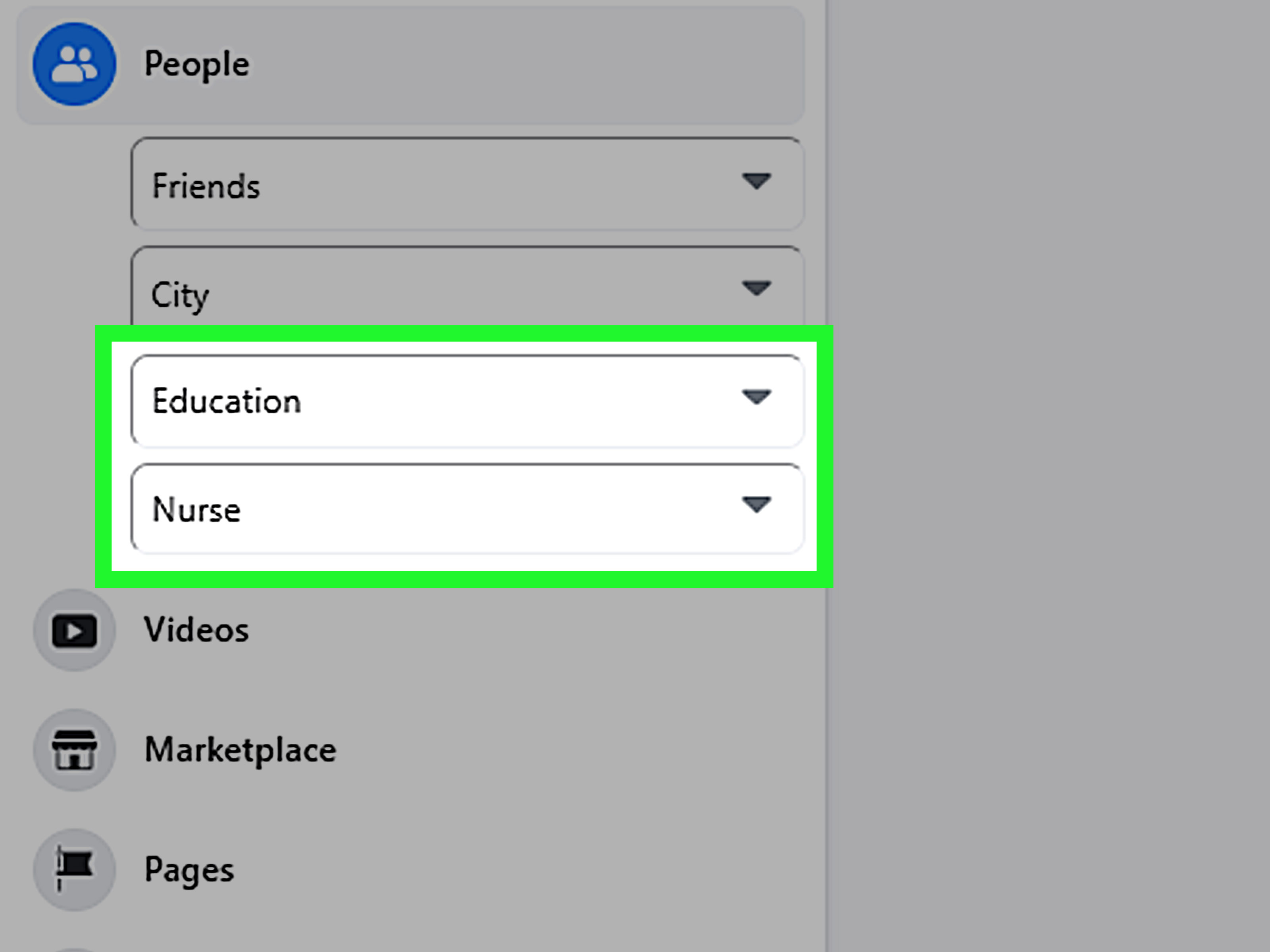
- Click the People filter/category (it may appear as a tab or a left-side option, depending on your layout).
- Look for additional filters such as City, Education, or Work if they appear.
Example: You’re looking for “Chris Johnson” in Phoenix. If you search only the name, you’ll get approximately 48 million Chrises. Try:
“Chris Johnson Phoenix AZ” or “Chris Johnson Phoenix” and then switch to People. Even if the City filter doesn’t show up, the combined query often nudges results toward profiles that mention Phoenix publicly.
Mobile Steps (Facebook app on iPhone/Android)
- Open the Facebook app and tap the search icon (often a magnifying glass).
- Type name + city (same examples as desktop).
- Tap Search to view results.
- Select the People category/tab if available.
- Use any visible filters (sometimes tucked behind a “Filter” or “Refine” option).
Mobile pro-tip: If the People category is buried, do the search first, then scroll until you see category chips/tabs like People, Posts, Groups, Pages, etc. Facebook loves hiding the good stuff like it’s a secret menu item.
How to Get Better Location Matches (Without Summoning the Wrong Jordan)
- Add a second identifier: school, workplace, mutual friend, or a hobby.
- “Jordan Lee Seattle nurse”
- “Jordan Lee Seattle Roosevelt High”
- Use neighborhood or suburb names: Some people list “Brooklyn” rather than “New York.”
- Try the “hometown” angle: If you suspect they moved, search with their old city too.
- Watch for profile clues: cover photo landmarks, recent public posts, or employer pages tied to a city.
Method 2: Find People Through Local Facebook Groups (Best for Meeting Locals)
If your goal is to find people in a city (not necessarily someone specific), local groups are gold. They’re like digital community bulletin boardssometimes helpful, sometimes chaotic, always full of opinions.
Desktop: Search for Location-Based Groups
- Use the search bar and type: “Austin runners group” or “San Diego photographers”.
- Click Groups in results.
- Join groups that look legitimate and active (recent posts, real moderation, clear rules).
- Once inside, use the group search to find posts or names (helpful when you remember someone posted “Looking for a roommate in Queens”).
Mobile: Search and Use Group Search Like a Pro
- Tap search and enter: “Dallas entrepreneurs” or “Portland hiking”.
- Switch to Groups.
- Join, then tap the group name to access tools like Search (often a magnifying glass).
- Search keywords like a location, employer, or interest: “Uptown”, “nurse”, “remote work”.
Important limitation: Many groups don’t provide a clean “search members by city” filter. Instead, you’re typically searching posts/comments inside the group, or scanning member lists manually when available. That’s why combining groups with keywords (neighborhoods, colleges, employers) works better than expecting a neat location dropdown.
Best Use Cases for Local Groups
- Relocating and building a network (friends, meetups, community events)
- Finding niche communities in a city (board games, expats, industry circles)
- Locating someone you know is active in a specific community (“That guy from the LA film group”)
Method 3: Use Facebook Events in the Target City (Sneaky Effective)
Events can act like temporary location hubsconcerts, networking meetups, charity runs, neighborhood festivals. If someone is active publicly, events may reveal a connection to a city.
Desktop
- Search for the city + “event” or a theme: “Nashville networking event”.
- Click Events in results.
- Filter by date and location if available.
- Open an event and look at attendee lists like Going or Interested (when visible).
Mobile
- Search for events by city or topic.
- Open the event listing and check details and attendee visibility.
Reality check: Some events hide attendee lists or limit visibility to friends. That’s not a bugthat’s Facebook occasionally remembering privacy exists.
Method 4: Search by Workplace, School, or a Local Place (Location… With Extra Steps)
This is one of the smartest “location” workarounds because people often list their employer or school publicly even when they hide their city.
How It Works
Instead of searching a city directly, you search a place that anchors people to that city:
- A company: “Mayo Clinic” (Rochester, MN)
- A university: “UCLA” (Los Angeles, CA)
- A local landmark or venue: “Navy Pier” (Chicago, IL)
Desktop & Mobile Steps
- Search the workplace/school/place name.
- Switch to People results if available.
- Scan for profiles that list that entity in their About section or activity.
Example: You want to find “Sam” who you only remember worked at a hospital in Baltimore. Search:
“Johns Hopkins Hospital Sam” or “Sam Johns Hopkins Baltimore”, then switch to People.
Why this works: Cities are optional on profiles. Schools and workplaces are surprisingly commonand more searchable when public.
Method 5: Find Your Friends by Location (If You’re Already Connected)
If you’re trying to find existing friends in a certain city (like before a trip), the experience is… mixed. Facebook makes some things easy, then makes other things feel like an escape room designed by a raccoon.
What You Can Do
- Search your friends list by name and then open profiles to check “Current City” (if visible).
- Use city-based clues: look for recent public posts or check-ins that mention a location.
- Use mutual friends: if you find one person in the city, their friend network may help you triangulate.
What may not work consistently: A clean “filter my friends by city” feature may not be available in every interface. If you don’t see it, you’re not doing it wrongFacebook just likes to rotate features like it’s running a fashion show.
Method 6: Use Google for Public Profiles (Only When Appropriate)
If a profile is public (or partially visible), a regular search engine can sometimes find it faster than Facebook search. This is useful when Facebook search gives you a pile of unrelated results.
Try searches like:
- site:facebook.com “Jordan Lee” Seattle
- site:facebook.com “Jordan Lee” “Seattle, Washington”
Use this responsibly: This only surfaces what is already public. If someone locked down their profile, a search engine isn’t a cheat codeit’s just going to shrug politely.
Why You Can’t Find Someone by Location (And What to Do About It)
If you tried the methods above and got nothingor got everyone except the person you wanthere are the usual culprits:
1) Their location info isn’t visible to you
Many people set “Current City” and “Hometown” to Friends-only or Only Me. If you’re not connected, you may never see it.
2) They didn’t list a city (or listed it differently)
“NYC” vs “New York, New York” vs “Brooklyn” vs “I live in a constant state of exhaustion.” Try alternative spellings and nearby areas.
3) The name is too common
When the name is common, location isn’t enough. Add:
school, workplace, mutual friend names, or a niche interest.
4) You’re searching from a different interface (and filters are missing)
Facebook’s layout changes, and some filters appear only after you pick a category like People. If you don’t see filters at first, switch categories and try again.
5) The account is deactivated, memorialized, or restricted
Some profiles won’t show up normally depending on the account status and privacy settings.
Privacy & Safety: Don’t Be Creepy, and Also Protect Yourself
Finding people by location is a two-way street: if you can search others, others can search youdepending on your settings.
Quick ways to reduce how “findable” you are by location
- Limit who can see your Current City and Hometown (Friends-only or Only Me).
- Be thoughtful with check-ins (especially real-time check-ins at home or routine spots).
- Review app permissions on your phone (location access should be intentional, not “sure, whatever”).
Worth knowing: Some older location-sharing features have been discontinued in past years, and Facebook has adjusted how location data is collected and used over time. Translation: don’t rely on outdated tutorials that promise a “Nearby Friends radar.” If a guide feels like it was written when people still said “YOLO” unironically, treat it like a historical artifact.
FAQ: Quick Answers to Common Location Search Questions
Can I find strangers near me on Facebook in real time?
Not in a straightforward, “show me everyone nearby” way. Facebook generally requires a person to share location data intentionally (and privacy settings can prevent visibility). Most effective “by location” methods rely on public profile fields, public activity, groups, and events.
Why doesn’t the City filter appear under People results?
Facebook’s interface varies by region, device, and account. Sometimes City filtering appears; sometimes it doesn’t. When it’s missing, your best workaround is building the location into the search query (name + city) and adding a second identifier (school/work).
What’s the safest way to reconnect with someone in a city?
Use People search with a name + city, verify identity with mutual friends or shared history, then send a polite message request. If you’re not sure it’s the right person, don’t guessnobody likes surprise messages meant for “the other Taylor from Phoenix.”
Conclusion
To find people by location on Facebook, your best bets are:
- People search + city-based queries (best for finding a specific person)
- Local Groups (best for meeting people in a city)
- Events (great for location-based communities)
- Workplace/school/place searches (a clever workaround when cities are hidden)
And remember: you’re not “tracking” someoneyou’re using what they’ve chosen to share publicly or socially. Use these tools like a normal human who wants to reconnect, not like a raccoon with a corkboard and red string.
Real-World Experiences: What It’s Actually Like Finding People by Location on Facebook (The Extra )
Let’s talk about the part nobody admits: using Facebook to find people by location is half strategy, half emotional archaeology. You start confident“I’ll just search their name and city!”and five minutes later you’re staring at 42 profiles that all look like they were generated by the same mysterious algorithm that also decides what ketchup tastes like in the future.
I’ve watched people try to find an old friend in a new city with nothing but a first name, a vague memory of “worked in marketing,” and the fact that they once owned a golden retriever. The first search is always optimistic: “Amanda Chicago.” The result is… every Amanda who has ever even glanced at Illinois. That’s when the smarter move kicks in: add context that’s tied to location, like a workplace, a school, or a group.
One of the most common “aha” moments happens with Groups. Someone moves to a new city, feels lonely, and joins a local community groupmaybe “Seattle Foodies,” “Brooklyn Parents,” or “Austin Board Game Night.” Once you realize groups are basically the modern version of a neighborhood corkboard, everything changes. You stop thinking “Where are the people?” and start thinking “Where do the people gather?” That shift is powerful. Instead of searching for humans directly, you search for the places they hang out online.
Events create similar breakthroughs. People might lock down their profile fields, but they’ll still mark themselves “Interested” in a local concert, a professional meetup, or a charity runsometimes publicly, sometimes visible to friends. It’s not a guaranteed method, but it’s a realistic one. And if nothing else, it reminds you that location is often revealed through behavior, not bios.
Now, the not-so-fun part: privacy can slam the door. You can do everything “right” and still fail because the person didn’t list a city, changed their name, or made their profile invisible to search. That’s not you losing the gamethat’s them choosing control. A surprisingly healthy response is: accept the boundary and try a different, respectful route. Ask a mutual friend. Look for a shared group. Or if you truly need to reconnect, send a simple message request to the best match you can confirm: “Hey, not sure if this is the right persondid you used to work at ___?”
Also: common names are chaos. If you’re hunting for “Mike Smith” in Los Angeles, you’re basically trying to find a specific grain of sand on a beach while wearing oven mitts. In those cases, “location” is not the herocontext is. School, workplace, a niche hobby, a mutual friend… that’s what turns a hopeless search into a laser-guided one.
And finally, a personal rule that keeps things sane: if you feel like you’re drifting from “reconnect” into “investigation,” take a break. The goal is to find people, not become a detective in a low-budget documentary titled “The Algorithm Made Me Do It.”