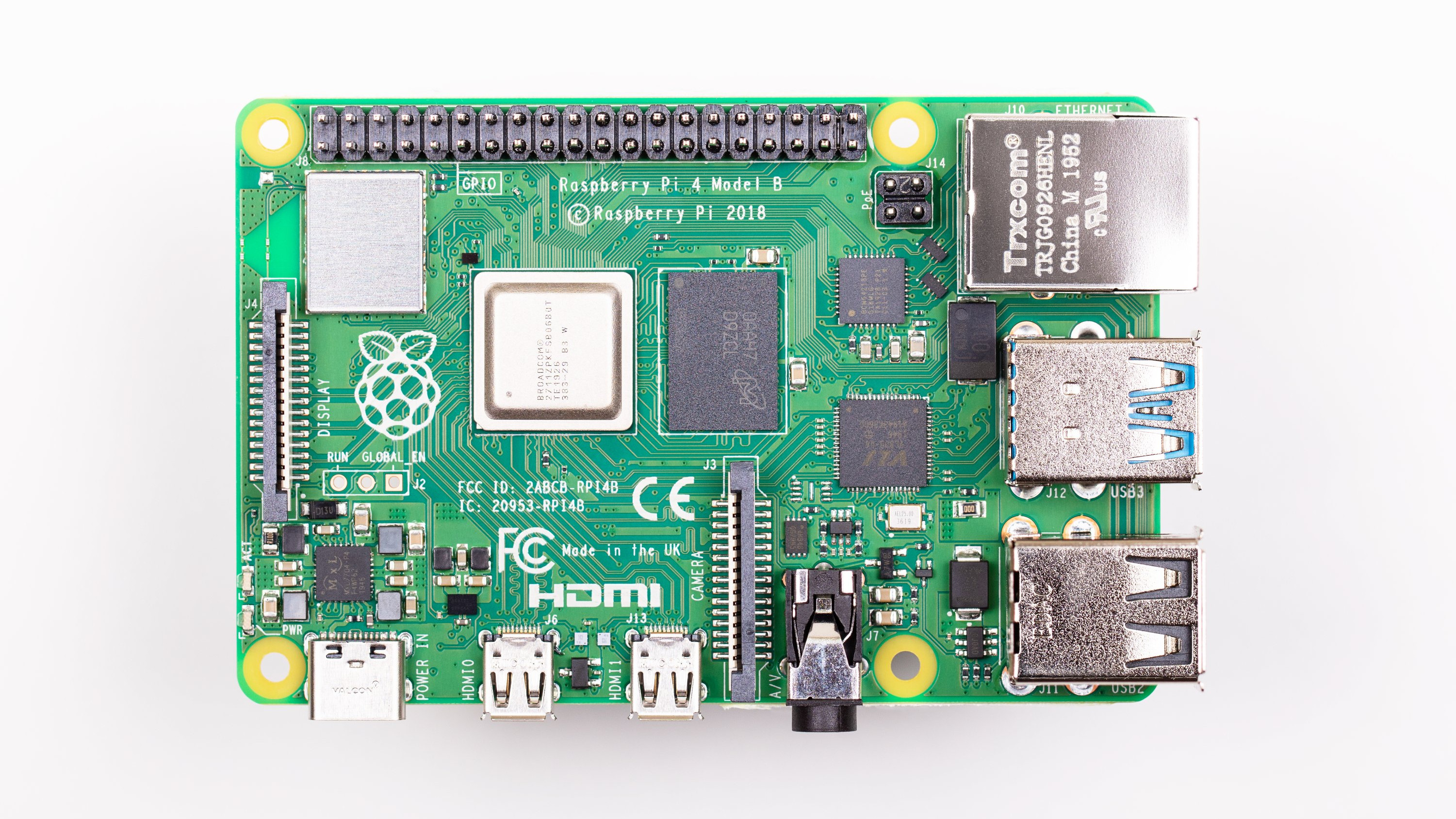

Raspberry Pi has always lived in a wonderfully strange neighborhood: part educational tool, part maker toy, part industrial computer, and part “why is this tiny board running my entire project?” miracle. It is cheap enough to buy without calling a finance meeting, powerful enough to run real workloads, and friendly enough that a beginner can blink an LED before dinner. But when developers move from “hello world” to “hello, undocumented register map,” the mood can change quickly.
The compromises of Raspberry Pi hardware documentation are not a simple story of “open” versus “closed.” They are more like a crowded workbench: official schematics, mechanical drawings, product briefs, peripheral documents, Linux driver behavior, Device Tree overlays, forum posts, silicon vendor limits, and community reverse-engineering all lying around like perfectly useful toolsnone of which happen to be the exact screwdriver you wanted at 2:00 a.m.
This article looks at why Raspberry Pi documentation is both impressively helpful and occasionally frustrating, how the Raspberry Pi 5 and RP1 chip changed the hardware-documentation conversation, and why these compromises exist in the first place.
What Raspberry Pi Hardware Documentation Gets Right
First, let’s give credit where the tiny green board deserves it. Raspberry Pi documentation is far better than what many consumer electronics companies provide. For most users, the official documentation covers the essentials: board specifications, power requirements, GPIO pinouts, camera and display connectors, boot configuration, mechanical drawings, and links to schematics for several models.
That matters. A hobbyist can build a weather station. A teacher can prepare a classroom lab. A startup can prototype a kiosk. A robotics team can mount a board using proper dimensions instead of the ancient engineering method known as “hold it up and squint.” Raspberry Pi’s documentation ecosystem lowers the entry barrier for people who want to build real things.
Practical Documentation for Practical Builders
Raspberry Pi’s strength is practical documentation. The official hardware pages focus on how to use the board, how to power it, how to connect peripherals, and how to configure features through files such as config.txt. Device Tree overlays allow many optional hardware features to be enabled without rebuilding a kernel from scratch. For many developers, that is exactly the right level of abstraction.
This design choice fits Raspberry Pi’s audience. Most users do not need a 1,200-page SoC manual to turn on I2C. They need a clear instruction that says, in effect: enable the interface, wire the sensor correctly, reboot when required, and please stop feeding 5 volts into places that only tolerate 3.3 volts. Documentation that protects users from unnecessary complexity is not laziness; it is product design.
Where the Compromises Begin
The friction starts when users need more than the official abstraction layer provides. Raspberry Pi boards use Broadcom application processors, and full public datasheets for those chips have historically been limited. Earlier Raspberry Pi models relied on Broadcom SoCs such as BCM2835, BCM2836, BCM2837, BCM2711, and later BCM2712. Raspberry Pi provides some processor and peripheral information, but not always the complete technical reference manual that bare-metal developers, driver writers, or hardware verification engineers may want.
That creates a gap. The official documentation may tell you how to use GPIO through Linux, but a low-level developer may want exact memory maps, timing behavior, interrupt controller details, DMA quirks, or electrical edge cases. When the public documents stop short, users turn to kernel source code, forum posts, GitHub issues, and community examples. This works surprisingly often, but it can feel like assembling a jigsaw puzzle from three boxes, one of which belongs to a toaster.
Documentation by Layers
Raspberry Pi documentation is layered. At the top is beginner-friendly guidance. Below that are product briefs, hardware summaries, schematics, mechanical files, and configuration references. Below that are Linux drivers, firmware behavior, Device Tree files, and kernel patches. Below that is silicon-level information, which is where the map becomes less complete.
This layered approach makes sense for scale. Raspberry Pi must support students, hobbyists, engineers, educators, industrial integrators, and software developers. A single documentation style cannot satisfy everyone. The compromise is that the official docs are broad and usable, while the deepest hardware details sometimes remain scattered, implicit, or unavailable.
The Raspberry Pi 5 Changed the Conversation
Raspberry Pi 5 introduced a major architectural change: the RP1 I/O controller. Instead of placing most external I/O directly behind the main application processor in the same old way, Raspberry Pi 5 uses RP1 as a separate in-house-designed chip that handles many outward-facing interfaces, including GPIO, USB, Ethernet-related functions, camera and display connections, and low-speed peripherals.
This was a big technical move. RP1 gave Raspberry Pi more control over its I/O architecture and helped modernize the board. It also made documentation more interesting. On one hand, Raspberry Pi could publish useful RP1-specific peripheral documentation because the chip was developed in-house. On the other hand, developers now had to understand that Raspberry Pi 5 is not simply “a faster Pi 4.” Some assumptions built around older boards no longer apply cleanly.
The RP1 Advantage
For hardware documentation, RP1 is a partial win. It gives developers a clearer target for many external interfaces. If you are working with GPIO behavior on Raspberry Pi 5, RP1 documentation is often more relevant than hunting for BCM2712 details. This makes the system more modular from a documentation point of view.
The catch is that RP1 also adds another layer. The I/O is connected to the main processor over PCI Express, which means low-level software may need to account for a different architecture from older Raspberry Pi boards. Libraries that assumed older peripheral layouts can break or require significant changes. That is not a documentation failure by itself; hardware evolves. But it does expose how much older Raspberry Pi software depended on familiar undocumented or semi-documented behavior.
Schematics Are Helpful, But They Are Not the Whole Board
One of the recurring debates around Raspberry Pi is the difference between publishing schematics and publishing everything needed to clone or fully reproduce the board. Raspberry Pi has historically made selected schematics and mechanical information available, but that is not the same as releasing full PCB layout files, detailed bill of materials, manufacturing test procedures, and every vendor-specific component choice.
This is a deliberate compromise. Schematics help people interface with the board. They show connector wiring, power sections, signals, and design intent. That is enough for add-on boards, troubleshooting, educational work, and many integrations. But full manufacturing documentation could make cloning easier, which creates business and supply-chain risks.
Open Enough to Hack, Not Always Open Enough to Clone
That phrase captures the central Raspberry Pi hardware documentation compromise. The project’s mission has always depended on openness and learning. But Raspberry Pi is also a real hardware organization with manufacturing partners, regulatory responsibilities, component sourcing challenges, and commercial realities. A board that is too easy to clone may weaken the ecosystem that makes affordable Raspberry Pi computers possible in the first place.
In other words, Raspberry Pi hardware documentation is not just a technical artifact. It is also a business boundary. The company must decide how much information helps users build and learn, and how much information could harm production economics or expose partner agreements. Engineers may want absolute openness. Manufacturers may prefer controlled disclosure. The published documentation lands somewhere between those poles.
The Compute Module Shows a Different Documentation Philosophy
The Raspberry Pi Compute Module family offers a useful contrast. Compute Modules are designed for custom carrier boards and embedded products, so the documentation naturally leans more toward hardware integration. The Compute Module 4 ecosystem, for example, includes design guidance and official I/O board files that help engineers build custom products around the module.
This makes sense because the product goal is different. A standard Raspberry Pi board is a finished single-board computer. A Compute Module is more like a compact engine waiting for a chassis. If Raspberry Pi wants engineers to design carrier boards, it must provide enough information to route power, expose interfaces, manage connectors, and avoid expensive mistakes. Nobody wants to discover after fabrication that their board is mostly a decorative coaster.
Why Documentation Improves When the Use Case Demands It
Documentation follows incentives. For consumer and education users, Raspberry Pi can prioritize tutorials, configuration guides, and robust defaults. For industrial integrators, it must provide more mechanical, electrical, compliance, and lifecycle information. This is why Compute Module documentation often feels more hardware-engineering-friendly than general Raspberry Pi board documentation.
The lesson is not that Raspberry Pi refuses to document hardware. The lesson is that documentation depth is tied to the intended customer. If a product is meant to be embedded into commercial devices, the paperwork gets more serious. If a product is meant to sit on a desk and teach Python, the documentation spends more time helping people avoid beginner traps.
Why Some Developers Still Feel Stuck
Even with official docs, community examples, and kernel source code, advanced developers can hit walls. Bare-metal programming is one example. Running Linux on Raspberry Pi is well supported, but writing software that talks directly to hardware without Linux drivers can be more difficult. The further you move away from the supported software stack, the more you depend on low-level details that may not be fully public.
Another pain point is long-term compatibility. Raspberry Pi boards share a family identity, but they are not identical under the hood. Code written for a Raspberry Pi 3 may not behave the same way on Raspberry Pi 4 or Raspberry Pi 5. GPIO access methods, peripheral base addresses, boot behavior, and driver expectations can change. Good documentation can soften that transition, but it cannot erase hardware evolution.
Community Knowledge Fills the Gaps
The Raspberry Pi community is part of the unofficial documentation system. Forum answers, GitHub issues, blog posts, library updates, and example projects often become the practical bridge between official documents and real-world problems. This is powerful, but it has drawbacks. Community knowledge can be outdated, board-specific, or based on trial and error. Sometimes the most useful answer is buried in a forum thread with a title that sounds only vaguely related to the problem.
For SEO purposes, this is also why the topic “Raspberry Pi hardware documentation” matters. People search for answers when official documents are not enough. They want to know whether a missing datasheet exists, whether a register changed, why a library fails on Raspberry Pi 5, or whether a schematic is complete enough for a custom design. The demand exists because the documentation is useful but not exhaustive.
The Tradeoff Between Simplicity and Completeness
Complete hardware documentation is not automatically better for every user. A beginner-friendly platform can be damaged by documentation that overwhelms the front door. If every GPIO tutorial began with bus fabrics, memory barriers, voltage rail sequencing, and silicon errata, many new users would close the tab and go raise sourdough instead.
Raspberry Pi’s documentation must therefore choose a default reader. Most of the time, that reader is someone who wants to build something successfully, not someone writing a new operating system before breakfast. The compromise is accessibility over total transparency. For the platform’s educational mission, that is a defensible choice.
But Advanced Users Need Clearer Signposts
The weakness is not that beginner docs exist. The weakness is that advanced pathways can feel under-signposted. A developer might need to jump from official documentation to RP1 materials, then to Linux source, then to Device Tree overlays, then to forum explanations. That workflow is possible, but it is not smooth.
A better documentation experience would not require Raspberry Pi to publish every restricted silicon detail. Even clearer “you are here” guides would help: which document applies to which model, when to read RP1 documentation instead of older BCM peripheral notes, which interfaces are stable through Linux APIs, and which low-level behaviors are intentionally unsupported or not publicly specified.
Specific Examples of Documentation Compromise
One example is board schematics. A schematic may show enough to connect hardware safely, but not enough to reproduce the exact board. That helps makers while protecting manufacturing investment.
A second example is Device Tree. Device Tree overlays are excellent for enabling hardware configurations without asking users to become kernel maintainers. However, they can also hide complexity. When something goes wrong, users must learn a new vocabulary: overlays, parameters, compatible strings, nodes, fragments, and bootloader behavior. Congratulations, your blinking LED has joined the bureaucracy.
A third example is Raspberry Pi 5 GPIO access. Because the RP1 chip changes the underlying I/O architecture, older libraries that assumed direct access to previous peripheral blocks may need redesign. The official documentation may explain supported paths, but low-level compatibility issues often surface first in community projects.
A fourth example is power documentation. Raspberry Pi provides clear guidance on recommended power supplies, current limits, and undervoltage behavior. This is practical and valuable. But industrial designers may still need deeper information about transient loads, thermal margins, connector behavior, and compliance implications for their exact product.
What Raspberry Pi Could Improve
Raspberry Pi does not need to become a fully open silicon vendor to improve the documentation experience. Several realistic improvements would help users without exposing sensitive manufacturing details.
First, model-specific documentation maps would reduce confusion. A Raspberry Pi 5 developer should be able to quickly see which documents cover BCM2712, RP1, boot configuration, GPIO, power, PCIe, camera, display, and mechanical design. Second, advanced disclaimers should be more explicit. If full SoC documentation is not publicly available, say so clearly and point users to supported alternatives.
Third, migration guides would be valuable. Many users do not start from scratch; they port projects from Raspberry Pi 3 or 4 to Raspberry Pi 5. Documentation that explains architectural differences in plain engineering language would save time. Fourth, official examples for low-level but supported use cases would reduce dependence on scattered forum archaeology.
What Developers Should Do Today
If you are building with Raspberry Pi hardware, start with the official documentation, but do not stop there. Treat documentation as a stack. Use the product brief for capabilities, the hardware page for board-level details, the mechanical files for enclosure design, the official configuration docs for boot and interface behavior, Device Tree references for hardware enablement, and Linux source when you need to understand driver-level reality.
If you are designing a product, consider Compute Module documentation before trying to bend a standard Raspberry Pi board into an industrial role. If you are writing bare-metal software, be prepared for missing details and model-specific surprises. If you are porting an old GPIO library to Raspberry Pi 5, assume RP1 changes matter. And if your project depends on an undocumented behavior, write that down before future-you sends present-you a very disappointed email.
Experience Notes: Living With Raspberry Pi Documentation in Real Projects
In real projects, the compromises of Raspberry Pi hardware documentation show up less like a dramatic failure and more like a series of tiny speed bumps. The first few hours are usually smooth. You find the pinout, enable an interface, install a library, and the project works. The board feels magical. Then you add a second peripheral, change the power supply, move from a Pi 4 to a Pi 5, or design a small carrier board, and suddenly the documentation becomes a treasure map with coffee stains.
One common experience is the “works in the tutorial, fails in the enclosure” problem. The documentation may correctly describe power requirements, but a real build adds USB devices, a display, a fan, an SSD, and maybe a sensor that behaves like it was raised by raccoons. The official docs tell you the correct power supply class, but your exact cable, hub, and load pattern still matter. The lesson is simple: Raspberry Pi documentation gives you the safe road, but your project can still drive into a ditch if the accessories are chaotic.
Another practical experience is the difference between software-friendly and hardware-friendly explanations. A Python developer may be happy with a library call that toggles a pin. A hardware engineer may want drive strength, timing, leakage, alternate functions, and reset states. Both are valid needs. Raspberry Pi documentation often serves the first person faster than the second. That is not surprising, because the platform grew from education and hobby computing, but it does mean advanced users should expect to verify assumptions.
When working with Raspberry Pi 5, the RP1 shift is the big “read the new manual, not your old habits” moment. Older mental models can betray you. A project that directly poked registers on an older Pi may not translate cleanly. A library that assumes a previous peripheral layout may complain, fail, or need a rewrite. The best experience comes from accepting early that Raspberry Pi 5 is architecturally different, not just faster. Faster is fun; different is where bugs rent an apartment.
For custom hardware, the Compute Module path usually feels more professional. The availability of I/O board design files and carrier-board examples makes the process less mysterious. Still, even there, documentation is not a substitute for engineering discipline. You must check connector orientation, power sequencing, thermal behavior, mechanical clearance, antenna placement, and compliance needs. The documents help, but they do not magically review your PCB while whispering, “Maybe don’t route that there.”
The best workflow is to document your own discoveries as you build. Keep notes about board revision, operating system version, kernel version, overlays, power supply, connected hardware, and configuration changes. Raspberry Pi projects often fail because one small assumption changes silently. A personal project log turns scattered documentation into a local truth database. It is not glamorous, but neither is debugging an I2C bus for four hours because one overlay line moved.
In the end, using Raspberry Pi hardware documentation well means respecting its boundaries. It is excellent for supported use cases, good for integration, improving for industrial users, and still imperfect for deep silicon-level exploration. The smart builder treats it as a strong starting point, not a sacred scroll. Read the official docs, compare community experience, test on the exact board revision, and never assume that a trick from 2018 is still a good idea on a modern Raspberry Pi.
Conclusion
The compromises of Raspberry Pi hardware documentation reflect the compromises of Raspberry Pi itself. It is a low-cost educational computer, a maker platform, an industrial building block, and a commercial hardware product all at once. That mix creates tension. Users want openness. Manufacturers need protection. Beginners need simplicity. Advanced developers need depth.
Raspberry Pi has generally chosen practical openness: enough documentation to learn, build, connect, configure, and integrate, but not always enough to fully clone the board or understand every silicon-level detail. That choice can frustrate low-level developers, especially when working outside the supported Linux ecosystem. But it also helps keep the platform approachable, affordable, and widely available.
The best way to understand Raspberry Pi hardware documentation is not as a missing manual, but as a negotiated boundary. It tells you a great deal, hides some things, abstracts others, and relies heavily on software layers and community knowledge. For most projects, that is enough. For the deepest work, it requires patience, testing, and a willingness to follow the breadcrumbs.
And honestly, following breadcrumbs is part of the Raspberry Pi experience. Sometimes you build a robot. Sometimes you learn Device Tree. Sometimes you discover that the real project was debugging the power supply all along.
SEO Tags