
There was a time when computer-aided design felt like a members-only club. You needed a powerful workstation, a paid license, a thick manual, and the emotional stamina to survive a toolbar with 400 tiny icons. Today, a growing wave of open source CAD in the browser is changing that story. Designers, engineers, hobbyists, teachers, students, and weekend inventors can now open a tab, sketch a part, generate a model, export a file, and get back to building things before their coffee remembers it is supposed to be hot.
Browser-based CAD is not just “CAD, but online.” It represents a bigger shift in how design software is built and shared. Thanks to WebAssembly, JavaScript, modern 3D rendering, and mature geometry kernels such as Open CASCADE Technology, serious modeling tasks can now run inside the browser with surprising speed. Add open source licensing to the mix, and the result is a more flexible, transparent, and accessible CAD ecosystem.
This does not mean every browser CAD tool is ready to replace industrial desktop software tomorrow morning. Some projects are experimental, some are specialized, and some are best suited for parametric scripting rather than traditional drag-and-click modeling. But the movement is real, and it is getting more interesting every year. Let’s open the hood, tap the tires, and see why open source CAD in the browser matters.
What Is Open Source CAD in the Browser?
Open source CAD in the browser refers to computer-aided design tools that run through a web browser and make their source code available for viewing, modification, redistribution, or community contribution. These tools may support 2D drafting, 3D modeling, parametric design, script-based modeling, file viewing, file conversion, or manufacturing exports such as STL, STEP, SVG, DXF, and OBJ.
The “browser” part is important. Instead of installing a large desktop program, the user loads an app through Chrome, Firefox, Edge, Safari, or another modern browser. In many cases, the CAD work happens locally on the user’s machine. That means the browser becomes the interface, while technologies such as WebAssembly and WebGL do the heavy lifting behind the curtain. Think of it as putting a mini engineering workshop inside a web page, minus the mysterious drawer full of Allen keys.
The “open source” part is equally important. Open source CAD gives developers and users more control. A school can inspect the software before using it in class. A maker can modify a workflow for a laser cutter. A startup can build a specialized product configurator without starting from zero. A developer can contribute bug fixes, new exporters, UI improvements, or documentation. The tool becomes not just software, but a shared workshop.
Why Browser CAD Is Becoming More Practical
WebAssembly Changed the Game
Traditional CAD depends on geometry calculations that are too demanding for plain old web scripts. Solids, surfaces, fillets, Boolean operations, intersections, and file translation require serious computational muscle. WebAssembly, often called Wasm, makes it possible to compile languages such as C and C++ into a compact format that runs efficiently in modern browsers.
This matters because many mature CAD kernels and geometry libraries were written in C or C++. Instead of rewriting decades of engineering code in JavaScript, developers can compile proven technology for the web. OpenCascade.js is one example: it brings the Open CASCADE CAD library into JavaScript and WebAssembly, allowing web apps to perform real CAD operations directly in the browser.
The result is a major step forward. Browser CAD no longer has to be a toy that draws cubes and politely gives up when asked to fillet an edge. With a strong kernel behind it, a web-based CAD app can perform operations that look and feel much closer to desktop modeling.
Modern 3D Rendering Is Better Than Ever
CAD is not only about math; it is also about seeing what you are doing. Modern browser graphics tools such as WebGL and libraries like Three.js make it possible to display interactive 3D models with smooth rotation, zooming, lighting, materials, and scene management. Users can inspect geometry from multiple angles, view assemblies, and interact with models without installing a separate viewer.
This is especially useful for education, product customization, design review, and rapid prototyping. A teacher can share a link to a lesson. A maker can publish a parametric model. A client can preview a product variation. A developer can create a web app where customers choose dimensions, generate a model, and download a file. That is browser CAD doing its best impression of a Swiss Army knife.
Key Open Source Projects Behind Browser CAD
OpenCascade.js
OpenCascade.js is one of the most important building blocks for browser-based open source CAD. It ports the Open CASCADE CAD library to JavaScript and WebAssembly using Emscripten. This allows developers to create browser or cloud-based CAD applications with real boundary representation modeling, file import and export, and geometric operations.
For developers, OpenCascade.js is less like a finished CAD app and more like a powerful engine. You still need to build the steering wheel, dashboard, seats, and cup holder. But the engine is the part that makes serious 3D CAD possible. Many browser CAD experiments and applications rely on this kind of kernel-level technology because accurate geometry is hard, and pretending it is easy is how software gets haunted.
Cascade Studio
Cascade Studio is a live-scripted CAD kernel and browser-based IDE. It allows users to create 3D models with code, using JavaScript or OpenSCAD-style workflows. It exposes Open CASCADE power through a more approachable programming interface and supports exports such as STEP, STL, and OBJ.
This kind of tool is especially useful for parametric designs. Instead of manually dragging geometry around, you describe the model through code. Want a box with rounded corners, holes, ribs, and adjustable dimensions? Write the parameters once, change the values later, and regenerate the model. It is not everyone’s favorite style, but for repeatable mechanical parts, fixtures, jigs, enclosures, and 3D-printable designs, scripted CAD can be wonderfully efficient.
JSCAD
JSCAD, formerly known as OpenJSCAD, is an open source set of browser and command-line tools for creating parametric 2D and 3D designs with JavaScript. It has long been popular among makers who enjoy code-driven modeling. Its browser editor makes it easy to experiment with shapes, parameters, and exports.
JSCAD is a good example of why browser CAD does not need to imitate every desktop CAD workflow. It leans into programming. The benefit is reproducibility. A model becomes a script that can be version-controlled, shared, reviewed, modified, and generated again. For designers who think in dimensions, variables, functions, and reusable modules, this can feel more natural than clicking through nested menus and hoping the feature tree does not develop trust issues.
replicad
replicad is a JavaScript library built for browser-based 3D models with code. Inspired by tools like CadQuery and Cascade Studio, it gives users a streamlined API for sketching, shaping, and modifying geometry. It is particularly interesting because it targets the browser-first CAD experience while keeping a developer-friendly approach.
For example, a web developer could build a custom configurator for a product, where users type dimensions or move sliders and the application generates a valid 3D model. That is powerful for small manufacturers, Etsy-style product businesses, 3D printing communities, and engineers who need lightweight custom design tools without building an entire CAD platform from scratch.
Chili3D
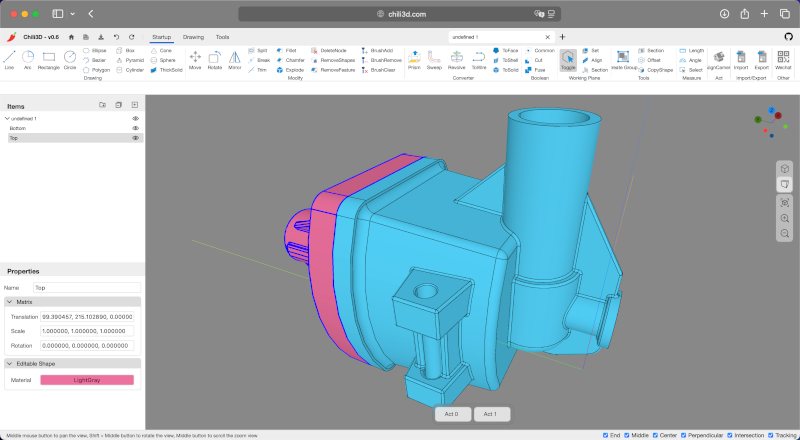
Chili3D is an open source browser-based 3D CAD application built with TypeScript. It uses OpenCascade compiled to WebAssembly and integrates with Three.js for visualization. Unlike script-only tools, Chili3D aims to feel more like a direct modeling application inside the browser, with tools for creating shapes, editing geometry, snapping, sketching, and visualizing models.
This type of project shows where browser CAD may be headed: a blend of accessible web UI, serious geometry processing, and local-first modeling. It is still wise to treat newer browser CAD apps as evolving tools rather than polished industrial platforms, but the direction is exciting. The browser is no longer just a place to check email, watch videos, and lose arguments in comment sections. It can also host a real design environment.
CADmium
CADmium attracted attention as a local-first, browser-based CAD project with open source ambitions. It aimed to create a simple, powerful CAD program that could run in a web browser and keep design work close to the user rather than locking everything behind a cloud account. Although the project has had changes in activity and availability, it remains a useful case study in what developers want from future CAD tools: openness, browser access, local control, and a smoother user experience.
The lesson from CADmium is clear. The demand is there. Users want CAD that is easier to access, easier to share, and less dependent on heavyweight installs. Building a full CAD system is extremely difficult, but open source experiments help the entire ecosystem learn faster.
Maker.js
Maker.js is an open source JavaScript library for creating modular line drawings, especially useful for CNC routers and laser cutters. It focuses more on 2D geometry than full 3D solid modeling, but it belongs in this conversation because browser-based CAD is not only about complex mechanical assemblies. Many real fabrication workflows begin with 2D profiles, slots, tabs, holes, panels, and vector exports.
If your project is a laser-cut enclosure, a decorative panel, a gear-like profile, or a CNC template, a 2D parametric drawing library can be exactly the right tool. Not every problem needs a 3D spaceship when a clean SVG or DXF will do the job.
How Open Source Browser CAD Compares With Desktop CAD
Desktop CAD tools such as FreeCAD, SolveSpace, and BRL-CAD remain important parts of the open source design world. FreeCAD is a major open source parametric 3D modeler for real-life objects. SolveSpace is a lightweight parametric 2D and 3D CAD tool with useful constraints and export options. BRL-CAD is a long-running open source solid modeling system with deep roots in engineering analysis.
Browser CAD does not erase the need for these tools. In fact, it often learns from them. Desktop CAD still has advantages in large assemblies, mature workflows, plugin ecosystems, file management, offline reliability, and advanced engineering functions. If you are designing an aerospace assembly with thousands of parts, you are probably not going to do the whole thing in a browser tab named “new-model-final-v7-actually-final.”
However, browser CAD has strengths that desktop software struggles to match. It is easy to access, easy to update, easy to share, and easier to embed in other workflows. It can be used in classrooms without complex installation. It can power online configurators. It can run on modest laptops, Chromebooks, and shared machines. It can support collaborative review. For many everyday design tasks, that convenience matters.
Best Use Cases for Open Source CAD in the Browser
3D Printing and Maker Projects
Browser CAD is a natural fit for 3D printing. Many printed parts are small, parametric, and practical: brackets, clips, spacers, trays, adapters, holders, fixtures, knobs, and repair parts. These objects do not always need a giant CAD suite. They need accurate dimensions, fast iteration, and export to STL or STEP.
A script-based browser CAD tool can let users adjust width, height, hole diameter, wall thickness, corner radius, and clearance values in seconds. That is far better than downloading a static file and discovering it is 2 millimeters too small, which is how many 3D printers become expensive spaghetti machines.
Education and Training
Open source browser CAD is excellent for teaching. Students can open a link and start modeling without waiting for installation, activation, system requirements, or IT approval. Teachers can demonstrate geometry, constraints, parametric thinking, and manufacturing exports in a controlled environment.
Because the software is open source, students can also learn how CAD tools work internally. They can explore geometry kernels, rendering pipelines, file formats, code-based modeling, and web development. That makes browser CAD not only a design tool but also a learning platform for engineering, computer science, digital fabrication, and product design.
Custom Product Configurators
One of the most promising uses of browser CAD is product customization. A small business can offer a web-based configurator where customers choose dimensions, hole patterns, engraved text, mounting options, or material thickness. The browser generates a model or manufacturing file automatically.
This approach can reduce back-and-forth emails, prevent order mistakes, and make custom manufacturing more scalable. Instead of asking customers to describe a part in a message that says “make it about this big,” the configurator can produce exact geometry. Everyone wins, including the poor person who used to decode those messages.
Design Review and Collaboration
Browser-based CAD also makes design review easier. A team can share a model through a link, inspect geometry, rotate parts, check dimensions, and discuss changes without requiring every reviewer to install the same software. Even when the browser tool is only a viewer or lightweight editor, it can speed up communication.
Open source tools are especially appealing for organizations that want control over hosting, data privacy, and customization. A company can self-host a tool, adapt it to internal workflows, or integrate it with project management systems, manufacturing databases, and version control.
Important Limitations to Understand
Open source CAD in the browser is exciting, but it is not magic. Browser CAD tools may face limits around memory, large assemblies, advanced constraints, file compatibility, performance consistency, and professional support. Some tools are experimental or maintained by small communities. Others may focus on code-based modeling and feel unfamiliar to users trained in traditional CAD interfaces.
File interoperability is another challenge. STEP, STL, OBJ, SVG, and DXF are common, but CAD formats are complicated. Importing a file is one thing; preserving full design history, constraints, features, metadata, and assemblies is another. A browser CAD tool may export a usable manufacturing file while still lacking the deep parametric editing features of a desktop system.
There is also the user experience challenge. Serious CAD requires precision. Snapping, constraints, selection, sketch solving, measurement, undo history, and feature editing must feel reliable. A pretty web interface is not enough. CAD users are patient, but only up to the exact moment a fillet fails for no obvious reason.
What to Look for in a Browser-Based Open Source CAD Tool
When evaluating an open source browser CAD project, start with the modeling approach. Is it code-based, direct modeling, sketch-based, constraint-based, or mainly a viewer? Next, check export formats. For 3D printing, STL may be enough. For mechanical design and manufacturing, STEP is often more useful. For laser cutting or CNC routing, SVG and DXF matter.
Then look at the geometry engine. Tools based on Open CASCADE or similar mature kernels may handle precise solids better than tools built only around mesh operations. Also check whether the project runs fully in the browser, requires a server, supports local files, or uploads data to the cloud. For privacy-sensitive projects, local-first behavior can be a major advantage.
Finally, inspect community health. A good open source CAD tool should have documentation, examples, active issues, recent updates, clear licensing, and a path for contributions. CAD is complex software. A healthy community is not a bonus feature; it is part of the engine.
The Future of Open Source CAD in the Browser
The future of open source browser CAD will likely combine several trends. WebAssembly will keep improving. Geometry kernels will become easier to compile and use on the web. JavaScript and TypeScript CAD libraries will mature. AI-assisted modeling may help users generate editable CAD code from text or images. Better web GPU support may improve rendering and simulation. Local-first storage may give users more privacy and control.
One especially interesting direction is hybrid CAD: direct manipulation plus code. Many users love the precision of parametric scripts but struggle with spatial understanding. Others love visual modeling but want better reproducibility. Future browser tools may allow users to drag geometry in the viewport while automatically updating the underlying code or parameter tree. That would make CAD feel less like choosing between a spreadsheet and a sculpture.
Another major opportunity is specialized CAD. Instead of one giant tool for everyone, open source browser CAD can power focused applications: enclosure generators, furniture configurators, robotics part libraries, architectural layout tools, educational sketch solvers, laser-cut design systems, jewelry previews, or parametric 3D-printing utilities. The browser is excellent at distribution, and open source is excellent at adaptation. Together, they make niche tools easier to build.
Experiences Related to Open Source CAD in the Browser
Working with open source CAD in the browser feels different from using traditional CAD software. The first experience many users notice is the speed of entry. There is no installer, no license server, no “please wait while we configure 900 components” ritual. You open a page, load an example, and begin. For students, makers, and developers, that low-friction beginning can be the difference between experimenting and giving up.
In practical use, browser CAD shines when the project is small, parametric, and repeatable. For example, imagine designing a wall-mounted cable holder. In a script-based tool, you can define the base width, screw hole diameter, hook radius, wall thickness, and number of slots as variables. If the first print is too tight, you change a clearance value and regenerate the part. No dramatic remodeling. No emotional support snack required.
Another enjoyable experience is sharing. With many browser CAD tools, a model can be shared through a file, a script, a link, or a Git repository. That makes collaboration easier, especially for open hardware projects. Someone can fork a design, adjust parameters for a different printer or material, and send improvements back. The workflow feels closer to software development, where version control and reusable components are normal.
However, browser CAD can also teach patience. Some operations take longer than expected. Complex fillets may fail. Imported files may behave unpredictably. A tool may support exports but not advanced editing. Documentation may be good in one area and thin in another. Because many open source browser CAD projects are young, the user sometimes becomes part designer, part tester, and part bug detective wearing a tiny magnifying glass.
The best approach is to match the tool to the job. Use JSCAD or replicad when you want clean parametric code and repeatable geometry. Try Cascade Studio when you want a live-scripted CAD environment with strong kernel features. Explore Chili3D when you want a more visual browser-based CAD application. Use Maker.js when the project is 2D and fabrication-focused. Keep FreeCAD, SolveSpace, or another desktop tool nearby for deeper workflows that browser CAD may not handle yet.
For teams, the biggest experience benefit is accessibility. A browser CAD tool can be introduced in a design review without asking every participant to install software. A product manager can rotate a model. A teacher can open the same example as the class. A customer can adjust dimensions in a configurator. A developer can embed modeling into a larger web application. CAD becomes less isolated and more connected to the rest of the digital workflow.
The most rewarding part is the sense of possibility. Open source browser CAD feels like the early web meeting the maker movement. It is not perfect, but it is creative, practical, and full of energy. It gives small teams the ability to build custom design tools. It gives learners a way to explore geometry without a large software budget. It gives developers a path to bring manufacturing intelligence into web apps. And it gives everyone one more reason to respect the humble browser tab, which is apparently now capable of email, spreadsheets, video calls, games, and designing a bracket for your 3D printer. Not bad for something that also keeps 47 unread tabs open.
Conclusion
Open source CAD in the browser is not a passing novelty. It is a practical and growing approach to design software, supported by WebAssembly, modern web graphics, mature geometry kernels, and active open source communities. While desktop CAD still leads in many professional workflows, browser-based CAD offers unmatched accessibility, shareability, and customization potential.
For makers, it can speed up 3D printing and fabrication projects. For educators, it removes installation barriers. For developers, it creates opportunities to build specialized modeling tools and product configurators. For businesses, it offers a path toward local-first, customizable, web-based design workflows. The browser may not replace every CAD workstation, but it has already earned a seat at the design table. And unlike some old CAD licenses, it does not require a treasure map to activate.