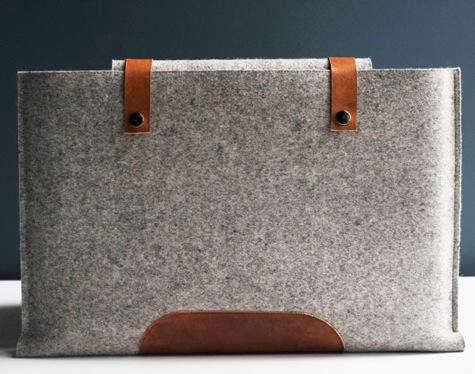

A laptop sleeve is one of those accessories people ignore until the day their computer performs an accidental sidewalk audition. One minute your laptop is a sleek productivity machine; the next, it is testing gravity, your reflexes, and your emotional resilience. A good laptop sleeve cannot turn your backpack into a bank vault, but it can protect your device from scratches, scuffs, light bumps, bag chaos, and the mysterious crumbs that appear even when you swear you never eat near your electronics.
Today’s laptop sleeve is no longer just a thin pouch with a zipper and a dream. Modern options include shock-absorbing padding, plush interiors, water-resistant shells, reinforced corners, accessory pockets, magnetic closures, recycled fabrics, leather finishes, and even premium sleeves designed to double as a mobile desk pad. Whether you carry a MacBook Air, MacBook Pro, Dell XPS, Microsoft Surface Laptop, Chromebook, gaming laptop, or business ultrabook, the right sleeve helps your computer travel like it has a tiny personal bodyguard.
What Is a Laptop Sleeve?
A laptop sleeve is a fitted protective cover designed to hold a laptop securely while keeping it slim enough to slide into a backpack, tote, messenger bag, briefcase, or carry-on. Unlike a full laptop bag, a sleeve is usually minimalist. It focuses on protecting the laptop itself rather than carrying your entire digital life, your lunch, and three emergency charging cables from 2018.
Most laptop sleeves are made from materials such as neoprene, polyester, nylon, canvas, leather, vegan leather, recycled fabric, felt, or structured EVA foam. Inside, many include microfiber, faux fur, fleece, or soft fabric lining to help prevent scratches. The better models also add padding along the edges and corners, because corners are where laptop accidents love to gather for a party.
Why a Laptop Sleeve Is Worth It
Laptops are thinner, lighter, and more portable than ever. That is wonderful for your shoulders but less wonderful when the device is tossed into a backpack with keys, pens, notebooks, adapters, sunglasses, and a granola bar that has lost its original shape. A laptop sleeve creates a dedicated protective layer between your computer and the outside world.
It Protects Against Everyday Scratches
The most common laptop damage is not always dramatic. It is the slow build-up of cosmetic wear: tiny scratches, worn corners, shiny patches, and marks from other items in your bag. A soft-lined laptop sleeve helps prevent the surface of your computer from rubbing against rough objects.
It Adds Light Impact Protection
A padded laptop sleeve can reduce the effect of small bumps during commuting, travel, and daily handling. It is not a magic force field, so please do not throw your laptop across the room to test it. But a sleeve with dense foam, cushioned corners, or a structured shell can help protect against minor knocks.
It Keeps Your Bag Organized
If your backpack is basically a fabric junk drawer, a sleeve gives your laptop a clean zone. Some sleeves also include front pockets for chargers, cables, USB drives, notebooks, pens, or a slim mouse. This is helpful if you like traveling light without carrying a full laptop bag.
It Makes Travel Easier
A laptop sleeve is especially useful at airports, coffee shops, coworking spaces, classrooms, libraries, and meetings. You can pull out the laptop quickly, keep accessories together, and avoid placing your computer directly on sticky tables that have seen too many caramel lattes.
How to Choose the Right Laptop Sleeve
1. Start With the Exact Laptop Size
The first rule of buying a laptop sleeve is simple: do not buy by screen size alone. A “13-inch laptop sleeve” may fit one 13-inch laptop perfectly and another like a sweater from a confused laundry cycle. Screen size refers to the diagonal display measurement, not the full width, depth, or thickness of the laptop.
Check your laptop’s official dimensions before buying. Measure width, depth, and height, then compare those numbers with the sleeve’s internal dimensions. A good fit should be snug but not suffocating. If the sleeve is too loose, the laptop slides around. If it is too tight, the zipper may scrape the edges or put pressure on the device.
2. Look for Quality Padding
Padding is the difference between a sleeve that protects and a sleeve that merely dresses your laptop nicely. Common padding materials include neoprene, foam, memory foam, EVA foam, and layered cushioning. EVA foam is often used in more structured protective cases because it holds shape well and absorbs impact better than very soft materials.
For daily office or school use, moderate padding may be enough. For travel, public transportation, cycling, or frequent movement, choose thicker padding and reinforced edges. The laptop’s corners are especially vulnerable, so corner protection is a major plus.
3. Choose the Right Exterior Material
Neoprene is lightweight, flexible, and commonly water-resistant. Nylon and polyester are durable, affordable, and often used in modern tech accessories. Canvas has a casual look and can be sturdy, though it may need better coating for water resistance. Leather and vegan leather look polished and professional, but they can be heavier and may require more care.
If you commute in rain or carry your laptop in unpredictable weather, look for a water-resistant exterior. Water-resistant does not mean waterproof. A water-resistant sleeve may handle drizzle or light splashes, but it should not be treated like a submarine. Your laptop has many talents; swimming is not one of them.
4. Check the Interior Lining
A soft interior matters because the laptop surface rests directly against it. Microfiber, fleece, faux fur, and plush linings help reduce scratches. Avoid sleeves with rough seams, exposed zipper tracks, or stiff internal edges that could rub against the device.
5. Consider the Closure Type
Zippers are secure and common, but they should move smoothly and avoid touching the laptop’s edges. Magnetic flaps look clean and are convenient, though they may not seal as tightly as a zipper. Velcro is practical but noisy enough to announce your arrival in a silent meeting. Envelope-style sleeves are elegant, but they are best for careful users who do not overpack.
6. Decide Whether You Need Extra Pockets
A slim sleeve is ideal if you only want laptop protection. A sleeve with pockets is better if you carry a charger, cable, mouse, stylus, adapter, external drive, or small notebook. Be careful with bulky pockets, though. A large charger pressing against the laptop lid can create pressure points, especially in an overstuffed backpack.
Best Laptop Sleeve Styles for Different Users
For Students
Students need a laptop sleeve that can survive backpacks, crowded hallways, library tables, and the occasional “I put my bag down a little too enthusiastically” moment. A padded polyester or neoprene sleeve with a front pocket is a practical choice. It should be lightweight, affordable, and easy to slide in and out between classes.
For Office Professionals
Professionals may prefer a clean, minimalist sleeve that looks polished in meetings. Leather, vegan leather, premium nylon, or structured fabric sleeves work well. A slim design is ideal for slipping into a briefcase or carrying under one arm without looking like you are transporting secret government pancakes.
For Travelers
Travelers should prioritize protective padding, reinforced corners, water resistance, and easy access. A sleeve that fits inside a carry-on or backpack laptop compartment adds an extra layer of security. If you often work at airports or hotels, consider a sleeve with accessory storage for cables and adapters.
For Creatives
Designers, photographers, writers, and content creators often carry more than a laptop. A sleeve with pockets for an external SSD, stylus, USB-C hub, SD card reader, or notebook can be extremely useful. A soft interior is especially important for premium laptops with delicate finishes.
For Minimalists
If you love clean lines and hate bulk, choose a thin sleeve with precise sizing and a soft lining. Minimalist sleeves are best for people who already carry their laptop inside a larger bag and only need scratch protection plus light cushioning.
Laptop Sleeve vs. Laptop Bag: Which One Do You Need?
A laptop sleeve is best when you already own a backpack, tote, messenger bag, or carry-on. It protects the laptop while keeping your setup flexible. A laptop bag is better if you want one dedicated carrier for your computer, charger, documents, accessories, and personal items.
Many people use both. The sleeve protects the laptop inside the bag, while the bag carries everything else. This combination is especially smart for travelers, students, remote workers, and anyone whose daily bag has more loose objects than a kitchen drawer.
Common Laptop Sleeve Mistakes to Avoid
Buying Too Big
A loose sleeve looks harmless, but it allows the laptop to shift around. That movement can reduce protection and make the sleeve annoying to carry. Always compare internal sleeve dimensions with your laptop’s actual measurements.
Ignoring Thickness
Some laptops are thin ultrabooks, while others are chunkier workstations or gaming machines. A sleeve that fits the width and depth may still be too tight if the laptop is thicker than expected.
Overloading the Pocket
A front pocket is convenient, but stuffing it with a large charger, hard drive, power bank, and every adapter known to civilization can press against the laptop. Keep bulky items in a separate pouch if possible.
Choosing Looks Over Protection
A beautiful sleeve is nice. A beautiful sleeve with no padding is basically a formal outfit for a fragile rectangle. Style matters, but protection should not be optional.
How to Care for a Laptop Sleeve
Good laptop sleeve care is simple. Empty the sleeve occasionally and shake out dust, crumbs, and tiny backpack debris. Spot-clean fabric sleeves with a damp cloth and mild soap. Let the sleeve dry completely before putting the laptop back inside. For leather sleeves, use leather-safe cleaners and conditioners as recommended by the manufacturer.
Do not store a wet sleeve in a closed bag. Moisture plus electronics is a bad romance. Also, avoid placing sharp items inside the sleeve with the laptop, even if the lining feels thick. Pens, keys, and metal adapters are surprisingly talented at creating scratches.
of Real-World Laptop Sleeve Experience
Using a laptop sleeve every day teaches you something important: protection is not only about disasters. It is about reducing small annoyances before they become expensive problems. The first time you slide a laptop into a backpack without a sleeve, it feels fine. The tenth time, you notice a tiny scratch. The thirtieth time, the corner looks like it has been negotiating with your house keys.
A good sleeve changes the routine. You close the laptop, slip it into the sleeve, zip it up, and suddenly your device has a dedicated home. That small habit makes commuting calmer. In a coffee shop, you can place the sleeve on the table and use it as a soft landing pad. In a meeting, you can carry the laptop without hugging it awkwardly against your chest like a nervous penguin. On a plane, you can pull it out of your personal item without dragging half your bag contents into the aisle.
The best sleeves are the ones you barely notice. They fit smoothly, do not fight the zipper, do not add unnecessary bulk, and do not make the laptop feel like it is wearing a winter coat in July. A sleeve that is too thick may protect well but become annoying if it no longer fits your favorite bag. A sleeve that is too thin may look elegant but leave you worried every time your backpack taps a chair leg. The sweet spot is enough padding to inspire confidence and enough slimness to keep life simple.
Accessory pockets are useful, but only when used wisely. A flat USB-C cable, a small notebook, or a slim adapter can live happily in a front pocket. A bulky charger brick is another story. Pressing a heavy charger against the laptop lid is like protecting your sandwich by putting a soup can on top of it. Technically organized, emotionally questionable.
Water resistance also matters more than people expect. Even if you never hike through storms, you may still deal with rain between the parking lot and the office, spilled water on a desk, or a damp umbrella sharing space in a tote. A water-resistant exterior gives you extra time to react. It does not make the laptop invincible, but it may prevent a minor splash from becoming a very expensive email to customer support.
The biggest lesson is this: the right laptop sleeve encourages better habits. You become less likely to toss your laptop loosely into a bag. You stop letting cables rub against the lid. You notice when your backpack is overloaded. You treat the computer less like a random object and more like the valuable tool it is. For students, freelancers, office workers, travelers, and anyone who lives between desks, that daily protection is worth far more than the sleeve’s price tag.
Conclusion
A laptop sleeve is a simple accessory with a surprisingly important job. It protects your device from scratches, light impacts, bag clutter, and daily wear while keeping your setup slim and portable. The best laptop sleeve for you depends on your laptop’s exact size, your commute, your style, your storage needs, and how much protection you want.
For everyday use, choose a sleeve with a soft lining, reliable padding, and a snug fit. For travel, look for reinforced edges, water-resistant materials, and smart storage. For professional settings, a minimalist leather or premium fabric sleeve may be the perfect balance of style and function. Whatever you choose, remember that a sleeve is not just a laptop outfit. It is affordable insurance against the tiny accidents that love to happen when you are late, caffeinated, and carrying too many things.