
“`
Sometimes the most honest technology is not the flashiest one. It does not need a glossy touchscreen, a subscription plan, a cloud login, or a dramatic startup chime that sounds like a tiny robot clearing its throat. Sometimes, the technology that changes a person’s day is a sturdy board full of tactile buttons, each one ready to speak a phrase that matters: “I need help,” “I am hungry,” “Thank you,” “Stop,” “Yes,” “No,” or the ever-powerful “I have something to say.”
That is the heart of the story behind a tactile communication board: it speaks the truth. Not because the device is magical, but because it gives a person a reliable way to express what was already there. Communication was never missing. Access was.
A tactile communication board is part of augmentative and alternative communication, often called AAC. AAC includes tools and strategies that support people who cannot always rely on speech. Some AAC is no-tech, such as gestures or facial expressions. Some is low-tech, such as picture cards, object symbols, or printed communication boards. Some is high-tech, such as speech-generating devices and tablet apps. A tactile AAC board sits in a beautiful middle ground: physical enough to be felt, durable enough for daily use, and powerful enough to produce speech.
What Is a Tactile Communication Board?
A tactile communication board is a communication tool designed around touch. Instead of asking a user to swipe, tap a flat glass screen, read tiny text, or navigate several digital menus, the board uses raised buttons, textures, objects, symbols, or physical labels that can be identified by feel. When paired with sound output, pressing a button can trigger a spoken phrase.
For people with visual impairments, motor challenges, cognitive disabilities, autism, cerebral palsy, traumatic brain injury, aphasia, progressive disease, or combined hearing and vision loss, touch can be more dependable than vision or speech. A raised button says, “Here I am.” A crisp tactile click says, “You pressed me.” A consistent location says, “You can find me again tomorrow.” That reliability matters. Nobody wants their communication system to feel like a video game boss level before breakfast.
Tactile AAC can use many forms. Some systems use tangible symbols, such as a piece of a spoon to represent eating or a strip of towel to represent bath time. Others use standardized tactile symbol cards, braille labels, textured icons, or physical key grids. More advanced systems combine tactile input with recorded speech, synthesized speech, vibration, lights, or wearable components. The best system is not the one with the most features. The best system is the one the person can actually use when life is noisy, rushed, emotional, boring, messy, or all of the above.
The Project That Made People Pay Attention
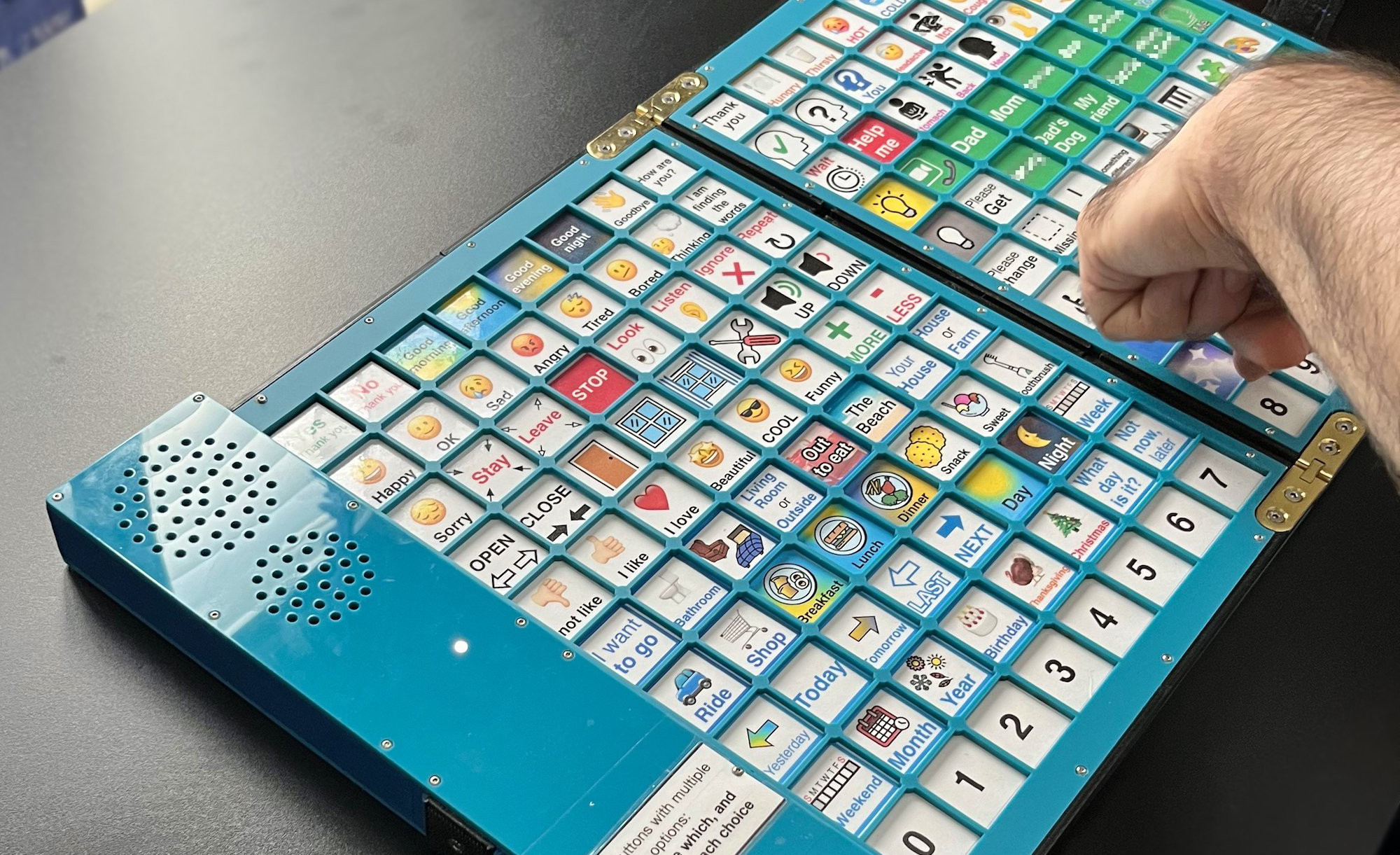
The phrase “Tactile Communication Board Speaks The Truth” became widely discussed after a maker project showcased a tactile AAC board designed for a largely nonspeaking client who had difficulty using touchscreens. The device used a 10-by-16 grid of snap-dome buttons, giving access to 160 prerecorded phrases. When the user pressed a button, the board spoke the phrase aloud through a speaker.
The build was practical in the best possible way. It ran on CircuitPython, used an Adafruit RP2040 Prop-Maker Feather, and included keypad matrix hardware to manage the large number of inputs. The buttons were covered by a membrane with icons, offering spill resistance and a smoother surface. The builder also created a smaller 16-button portable version with a neck strap for communication away from the desk.
That combination is what made the project stand out. It was not technology for technology’s sake. It was technology shaped around one person’s body, routines, access needs, and communication goals. In the accessibility world, that is not a small detail. That is the whole enchilada.
Why Touch Can Beat a Touchscreen
Touchscreens are everywhere, but “everywhere” does not mean “accessible to everyone.” A tablet can be wonderful for many AAC users, especially when the person can see the screen, isolate a finger, control movement, tolerate glare, and navigate digital pages. But for someone with limited motor control, visual fatigue, poor fine-motor accuracy, tremors, sensory differences, or difficulty with screen navigation, a touchscreen can become a shiny rectangle of frustration.
Tactile feedback reduces uncertainty
A physical button gives immediate sensory information. The user can feel its edge, pressure, and movement. A snap-dome switch adds a crisp response, confirming that the button has been activated. That feedback can reduce repeated pressing, accidental selections, and the “Did it work?” moment that makes users and support partners stare at a device like it owes them money.
Fixed locations build motor memory
Consistent placement is another major advantage. If “yes” is always in the same corner and “help” is always near the top, the user can learn the board through routine. Over time, locating a phrase may become less about searching and more about reaching. That supports independence, speed, and confidence.
Physical layouts can be easier to customize
A tactile board can be built around the user’s strongest movements. Buttons can be spaced farther apart. Raised borders can guide the hand. Frequently used phrases can be placed where the user can reach them fastest. Less urgent phrases can sit farther away. The layout can honor real life instead of forcing real life to obey a template.
AAC Is Not a Last Resort
One stubborn myth about AAC is that it should be tried only after speech fails. That idea deserves a polite but firm trip to the recycling bin. AAC does not replace a person’s intelligence, personality, or potential. It gives communication more routes. For some people, AAC supplements speech. For others, it becomes the primary way to communicate. For many, the method changes depending on setting, fatigue, health, stress, and who is listening.
Communication is not just vocabulary. It is control, timing, humor, privacy, refusal, curiosity, complaint, affection, and personality. A strong AAC system makes room for more than needs. “Bathroom” is important, yes. But so are “That was funny,” “I disagree,” “Leave me alone,” “I love this song,” and “Please stop talking about me like I am furniture.”
This is where tactile communication boards speak the truth most clearly: people deserve access to full human expression, not just emergency phrases. A board that only says “eat,” “drink,” and “toilet” may keep someone alive, but it will not let them fully live.
Design Lessons From a Board That Talks
A tactile AAC board looks simple from the outside, but good simplicity is engineered. It is the result of many decisions made carefully: what phrases to include, how large the buttons should be, how much pressure is required, how loud the speaker should be, how the device is powered, how it survives spills, and whether it can travel.
1. Start with the user’s real routines
The vocabulary should come from daily life, not from a generic list created by someone who has never watched the user move through a day. What does the person need at home, school, work, therapy, medical visits, restaurants, transportation, and social situations? What phrases reduce stress? What phrases increase independence? What phrases help the person participate instead of merely comply?
2. Make the buttons physically reliable
For users with motor challenges, a button is not just a button. It is a doorway. The actuation force should be high enough to prevent accidental presses but not so high that it becomes tiring. The tactile response should be clear. The spacing should reduce errors. The surface should be cleanable, because real life contains juice, crumbs, hand lotion, mystery stickiness, and the occasional “How did peanut butter get there?” event.
3. Use meaningful symbols
Icons, textures, braille, printed words, object parts, and color contrast can all help, depending on the user. For someone with limited vision, tactile symbols may be more useful than pictures. For someone transitioning toward literacy, pairing tactile symbols with print or braille can support word exposure. For someone who recognizes objects better than abstract symbols, a piece of real material may make more sense than a cute icon.
4. Include both core and personal language
Core words such as “more,” “stop,” “go,” “help,” “want,” and “different” are flexible across many situations. Personal phrases matter too: names, favorite activities, routines, jokes, emotional statements, and social comments. A communication board should not sound like a vending machine. It should sound like a person.
5. Plan for portability
A desk board can be wonderful, but people do not live only at desks. A smaller wearable or portable version can provide quick access outside the home, in hallways, vehicles, clinics, stores, or community spaces. Even a limited 16-phrase board can be powerful if it includes the right high-priority messages.
Low-Tech, High-Tech, and the Sweet Spot Between
A tactile communication board reminds us that assistive technology does not have to choose between cardboard and supercomputer. Low-tech tools are often reliable, affordable, lightweight, and easy to repair. High-tech tools can offer speech output, large vocabularies, customization, data storage, and multiple access methods. Hybrid tactile boards borrow strengths from both worlds.
The physical interface provides stability and touch-based access. The electronics provide voice. The result can be faster and less demanding than a touchscreen for some users, while still offering the public clarity of spoken output. That spoken output can be especially helpful when communication partners do not know sign language, tactile sign, braille, or the user’s personal gestures.
Of course, no device is perfect. A prerecorded board has limited phrases. Changing vocabulary may require editing audio files, labels, or code. The device needs power. It may need repairs. It may not support spontaneous spelling unless designed for it. But perfection is not the goal. Useful communication today beats imaginary perfect communication someday.
Where Tactile AAC Fits Best
Tactile AAC can be especially valuable for people who need communication to be concrete, consistent, and physically discoverable. Deafblind learners may use tactile symbols as a bridge from objects to more abstract language. Blind or visually impaired users with additional disabilities may rely on textures and object cues. People with motor disabilities may benefit from raised guides, large buttons, and clear switch feedback. People with sensory processing differences may find a predictable physical layout calmer than a bright screen.
The key is assessment. A speech-language pathologist, teacher of students with visual impairments, occupational therapist, assistive technology specialist, family members, direct support professionals, and the AAC user should all have a voice in the process. Most importantly, the user’s response should guide design. If the user avoids the board, gets tired quickly, presses accidentally, or cannot find desired messages, the board is not “failed.” It is giving feedback. Good design listens.
Real-World Examples of Tactile Communication
At school
A student might use tactile symbols to choose between music, snack, break, reading, and outside time. Over time, the same symbols can support a calendar system, helping the student anticipate what comes next. Predictability can reduce anxiety and make transitions less dramatic. Teachers enjoy fewer meltdowns. Students enjoy more control. Everybody enjoys fewer hallway negotiations that feel like international diplomacy.
At home
A person might use a tactile board near a bed, wheelchair, or favorite chair to request comfort, pain relief, entertainment, repositioning, or conversation. The board may include phrases such as “I need quiet,” “Call Mom,” “Turn on the fan,” or “I want to watch the game.” These are not luxuries. They are daily-life language.
In healthcare
Hospitals and clinics can be communication obstacle courses. A tactile AAC tool can help a patient express pain, fear, consent, refusal, symptoms, needs, and questions. Effective communication is not only kind; it is essential to safety. A patient who can say “That hurts,” “I cannot breathe,” or “I do not understand” is better protected than one who must hope someone guesses correctly.
In the community
A portable board can help a person greet others, order food, ask for help, participate in activities, or simply be recognized as a communicator. Public communication matters. It tells the world, “Do not talk over me. Talk with me.”
The Truth This Technology Speaks
The truth is that communication access changes how people are perceived. When a nonspeaking person receives a reliable way to communicate, others often discover preferences, opinions, humor, memory, frustration, and imagination that were there all along. The device does not create the person’s mind. It creates a doorway to it.
The truth is also that accessibility is personal. A sleek tablet may be ideal for one AAC user and useless for another. A tactile board may look old-school beside a modern app, but if it works, it is not outdated. It is appropriate. The goal is not to impress technology reviewers. The goal is to help someone say what they mean.
Finally, the truth is that good assistive technology is a partnership. It requires listening, testing, revising, and respecting the user’s autonomy. A tactile communication board should not become a control panel for caregivers. It should become a voice tool for the person using it.
Experience Section: What a Tactile Communication Board Teaches in Real Life
The first experience many people have with a tactile communication board is surprise. It may look straightforward: press a button, hear a phrase. Easy, right? Then real life walks in wearing muddy shoes. The user may press more slowly than expected. A support partner may accidentally rush. A phrase may be technically correct but emotionally wrong. The speaker may be too quiet in a busy room. The “favorite” button may turn out to be less important than a phrase nobody thought to include, like “I need a minute.”
That is when the board becomes more than a device. It becomes a conversation about communication itself. One of the most valuable lessons is patience. Speaking people often treat silence as empty space that must be filled immediately. AAC teaches a different rhythm. You ask, then wait. You offer choices, then wait. You watch the hand move, hesitate, correct, and press. That waiting is not dead air. It is respect.
Another experience is the power of small victories. The first independent “yes” can feel like fireworks. The first “stop” may change how care is provided. The first joke, even a prerecorded one, can shift the mood in a room. Suddenly the board is not just helping someone request water. It is helping them participate in the social dance of being human: teasing, refusing, greeting, complaining, choosing, and reacting.
There is also a practical lesson in humility. Designers and caregivers may think they know what vocabulary belongs on a board, but users reveal the truth through use. A phrase that adults consider essential may sit untouched for weeks. A phrase added casually may become the star of the system. In one setting, “I need help” may be the most important message. In another, “Please move back” may protect personal space. In another, “That is funny” may open the door to friendship.
Working with tactile AAC also highlights the importance of maintenance. Labels wear out. Batteries need charging. Audio levels need checking. Buttons should be cleaned. Backup options matter. A communication system should never depend on one fragile object with no plan B. If the board is the user’s voice, then caring for it is not a tech chore. It is communication access.
Most of all, tactile boards teach that accessibility is not charity. It is design justice with screws, switches, symbols, and sound. The user is not lucky to have a board. The world is better when the user can be heard. A tactile communication board speaks the truth because it challenges the lazy assumption that speech equals intelligence and silence equals absence. The person was always there. The message was always there. The board simply helps it arrive.
Conclusion
A tactile communication board may not look futuristic in the Hollywood sense. It does not hover, glow ominously, or call anyone “Commander.” But in the ways that matter, it is deeply advanced. It turns touch into speech. It turns access into agency. It turns assumptions into questions. And sometimes, it turns a quiet room into a place where a person can finally be understood.
The best tactile AAC boards are not built around gadgets first. They are built around people first. They respect movement, vision, hearing, fatigue, memory, emotion, routine, and dignity. They remind us that communication is not a luxury feature of being human. It is part of being human.
So yes, a tactile communication board speaks the truth. The truth is that every person deserves a voice. The truth is that simple technology can be profound. And the truth is that when design starts with listening, even a grid of buttons can say something powerful.
“`