
There are two kinds of people in the VR world: the ones who buy a controller, pair it, and move on with life, and the ones who look at a pile of sensors, an Arduino, and a spare weekend and whisper, “I can make that weirder.” This story is for the second groupand for the first group, who secretly envy them.
The idea of a homebrew controller working inside SteamVR sounds like the kind of sentence that usually ends with smoke, driver errors, and someone on a forum typing in all caps. But the surprise is that it is not only possible, it makes real technical sense. SteamVR’s evolving input architecture, OpenVR’s device-agnostic driver model, and the rise of customizable bindings have created a playground where experimental hardware can do more than blink LEDs dramatically. It can actually become usable.
That is what makes the phrase homebrew controller working in SteamVR so exciting. It is not just a clever one-off hack. It is a glimpse of how VR input can be stretched, remixed, and customized beyond the standard plastic wand. A DIY controller can combine tracking, gesture input, buttons, haptics, and software emulation in ways that commercial hardware often avoids because mass-market products have to be tidy. Makers do not. Makers are allowed to be gloriously specific.
Why This Reveal Matters
When a DIY controller successfully appears in SteamVR, the achievement is bigger than “look, I got it to connect.” It means a homemade device can speak a language the platform understands well enough to participate in real VR experiences. That is the difference between a toy prototype and a working input system.
Historically, VR controllers have been tightly tied to specific hardware ecosystems. If you bought into a headset platform, you typically used the controllers designed for it. SteamVR helped loosen that lock. Its input systems gradually moved toward action-based mapping, controller-agnostic bindings, and flexible remapping. That shift matters because it lowers the barrier for custom devices. A controller no longer has to look exactly like a commercial model to become useful. It just has to provide the right signals in the right place.
In practical terms, that means a creator can build around hand-mounted sensors, finger gestures, microcontrollers, inertial measurement units, optical tracking, or even weird hybrid setups that sound like they were invented during a caffeine storm. Once the device can present recognizable input and tracking data, SteamVR becomes far more willing to play along.
What “Homebrew Controller” Really Means Here
A homebrew controller in the SteamVR context is usually not a single magic part. It is a stack of systems pretending to be one elegant invention. There is typically a hardware layer, a sensing layer, a translation layer, and a platform layer.
1. Hardware on the body
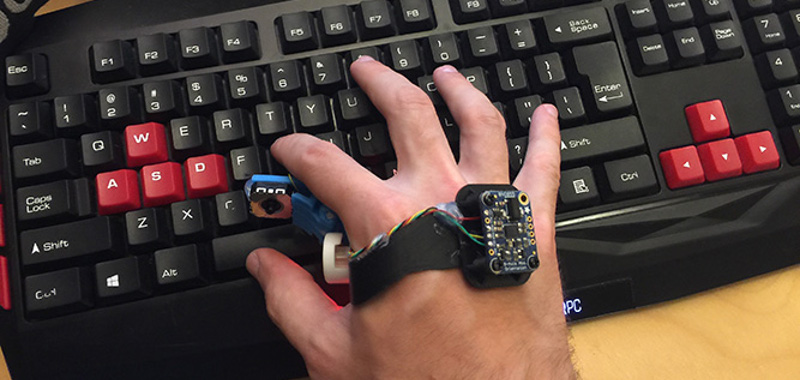
This can include Arduino-class microcontrollers, hand-mounted boards, custom buttons, triggers, flex sensors, or compact IMUs. The goal is to collect input from the user in a way that feels natural enough to be worth building.
2. Motion and orientation sensing
Many DIY projects rely on IMUs because they are compact, affordable, and surprisingly capable. They can provide rotation, acceleration, and motion data that is essential for anything pretending to be a VR controller. The catch is that raw IMU data can drift like a shopping cart with a broken wheel, so sensor fusion becomes important.
3. Optical or hand tracking assistance
This is where systems like Leap Motion or newer Ultraleap-style tracking concepts become useful. Optical hand tracking can help estimate finger positions and hand posture, while onboard sensors handle motion. When those sources are fused in software, the result can feel much richer than either approach alone.
4. Software translation into SteamVR-compatible input
This is the secret sauce. SteamVR does not care how emotionally attached you are to your breadboard. It cares whether the software feeding it data behaves like a tracked device with defined inputs. Once that bridge exists, a homemade controller can emulate a known controller profile, expose inputs through a driver, or hook into configurable bindings that make the device useful inside games.
The Original “Reveal” That Got People Interested
The headline that kicked this idea into wider view centered on a project that combined Arduino-based custom hardware, Leap Motion hand tracking, and software fusion to emulate an HTC Vive controller inside SteamVR. That combination was clever for one major reason: it avoided the boring-but-deadly trap of trying to replace everything at once.
Instead of inventing an entirely new VR runtime from scratchwhich is a fantastic way to lose six months and your remaining patiencethe project focused on getting recognized by the existing SteamVR ecosystem. That made it relevant immediately. A homebrew controller that works in SteamVR has a future. A controller that only works in a private demo and one YouTube clip has a very supportive aunt, but not much else.
Another appealing part of the concept was that it aimed to work without interfering with a traditional mouse-and-keyboard setup. That hybrid mindset is more important than it sounds. PC players do not always want a controller to replace every input. Sometimes they want it to augment what is already there. In that sense, the project was not just hacking VR hardwareit was rethinking how many different input styles could coexist.
How SteamVR Makes This Possible
SteamVR deserves some credit here. Modern VR input on Valve’s stack is far less rigid than many people assume. The platform has supported the idea that applications define actions while bindings map those actions to specific hardware. That is a huge philosophical shift. It means software can think in terms like “grab,” “teleport,” or “menu,” while users and device makers decide how those actions are physically triggered.
For a homebrew controller, that is excellent news. If the controller can present trackable motion and a usable set of inputs, SteamVR’s binding system can do a lot of the social work needed to make the device fit into real applications. That includes shared bindings, alternate layouts, left-handed customization, and support for devices that did not exist when a game originally shipped.
Valve’s underlying driver model also helps. OpenVR has long allowed hardware to interact with SteamVR through a driver interface designed to be device-agnostic. In normal human language: your weird controller does not need every game developer on Earth to patch their title just because you decided to wear electronics on your knuckles.
Key Technical Ingredients Behind a Working DIY SteamVR Controller
Tracking that is stable enough to trust
Nothing ruins immersion faster than a controller that behaves like it is being haunted. DIY VR hardware lives or dies on stability. Orientation can come from IMUs, but position often needs help from external tracking, optical references, or clever fusion with camera-based systems. Homebrew projects that combine multiple signals usually feel more believable because each component covers another component’s weakness.
Input abstraction
A commercial controller has labeled buttons and expected behaviors. A homebrew controller can be much stranger: a pinch gesture for trigger, a pressure sensor for grip, a touch strip for locomotion, or a thumb button mounted somewhere ergonomically questionable. SteamVR input mapping makes that strangeness manageable because the system can interpret diverse physical controls as standard actions.
Emulation and compatibility
Sometimes the fastest path is not to create a brand-new device profile from zero, but to emulate an existing one well enough that SteamVR and games accept it. This is both practical and slightly mischievousthe engineering equivalent of wearing a fake mustache to get into a private club. If the result is stable, responsive, and configurable, users rarely complain.
Low latency
VR is cruel about lag. In a desktop app, a little delay is annoying. In VR, delay can make a controller feel disconnected or even make the whole experience uncomfortable. That is why makers obsess over sensor fusion, efficient data handling, and minimal overhead. Fancy features mean very little if the virtual hand arrives late to the party.
Where Homebrew Controllers Can Beat Commercial Ones
This is where things get fun. Commercial VR controllers are designed for broad usability, manufacturing cost, and support headaches. A homebrew controller has no such respect for convention.
- Custom ergonomics: A maker can build around a glove, palm mount, wrist rig, or hybrid controller that keeps fingers more open and available.
- Task-specific layouts: A controller can be optimized for cockpit sims, VR drawing, robotics, accessibility, or mixed mouse-plus-VR workflows.
- Experimental haptics: The VR industry has long chased better tactile feedback, and DIY projects can experiment faster than mainstream hardware makers.
- Hybrid interaction: One hand can hold a physical controller while the other remains free for hand tracking, menus, or object manipulation.
That last point is especially interesting. Even hand-tracking experts often point out that “hands only” is not always the answer. In some experiences, a controller in one hand and direct hand interaction in the other can feel more effective than going all-in on either approach. Homebrew design thrives in that middle ground.
The Big Challenges Nobody Can Ignore
Before we crown every soldering iron the king of PC VR, a reality check is in order. Building a working homebrew controller for SteamVR is hard. Not “mildly inconvenient” hard. Real hard.
Drift and calibration
IMUs are wonderful until they are not. Without strong fusion, calibration, or external correction, orientation data can wander. That is fine for a quick demo and terrible for a twenty-minute game session.
Physical durability
Commercial controllers survive drops, sweat, panic, and the occasional accidental meeting with a desk. DIY prototypes often survive careful admiration. The gap matters.
Software maintenance
Getting a custom driver or emulation layer working once is an achievement. Keeping it working across SteamVR updates, game quirks, operating system changes, and input-binding oddities is the long war.
User onboarding
If setup requires twelve utilities, three unsigned drivers, and a prayer, the project remains a lab experiment. The best homebrew controllers reduce setup pain until the hardware starts to feel approachable rather than mythical.
What This Means for the Future of VR Input
The deeper message behind a homebrew controller working in SteamVR is that VR input is becoming more modular. The platform is moving away from rigid one-device-one-layout thinking and toward a world where actions, bindings, and device translation matter more than brand labels.
That opens the door for accessible controllers, niche controllers, research hardware, rehabilitation tools, training systems, and oddball maker inventions that would never survive a corporate product meeting. A hobbyist can test ideas quickly. A studio can prototype specialized interaction before committing to hardware. A community can share bindings and collectively improve usability. In other words, the barrier between “experimental” and “usable” is getting thinner.
And that should make every VR enthusiast a little excited. Today it is a hacked controller emulating familiar inputs. Tomorrow it could be a modular glove, a surgical training rig, a better accessibility device, or a controller that finally understands that your thumb deserves options.
Hands-On Experiences: What It Actually Feels Like
Using a homebrew controller in SteamVR is one of those experiences that swings between wizardry and chaos, often in the same five-minute span. The first successful moment is unforgettable. You move your hand, and the virtual controller moves with it. You press a homemade trigger or pinch your fingers, and something in SteamVR responds like it is totally normal for a stack of improvised electronics to exist. For a brief moment, you feel like a genius. Then the calibration shifts two degrees and your virtual hand points at the ceiling like it has just spotted a UFO.
Still, the charm is real. A homemade setup can feel more personal than any retail controller because every decision reflects an opinion. Maybe the grip button sits exactly where your hand naturally tightens. Maybe the device leaves your fingers free so you can type, sketch, or reach for a keyboard without dropping everything. Maybe the haptics are rough around the edges, but the shape fits your hand better than a polished commercial wand ever did. That kind of intimacy is hard to mass-produce.
There is also a special thrill in testing custom bindings. SteamVR’s flexibility means you can tweak interactions until they stop feeling like a science project and start feeling like a tool. Teleport on a thumb tap. Grab on pressure. Menu on a wrist button. Swap dominant hands. Mix traditional controls with experimental ones. It is a little like building your own musical instrument and then teaching the orchestra not to panic.
Of course, the rough edges never fully disappear. DIY hardware can be temperamental. Cables snag. Sensors need recalibration. One minute the controller feels futuristic; the next minute you are sitting on the floor muttering about serial ports. But even that frustration has a strange appeal. It turns VR from a consumer product into a workshop.
What stands out most is how quickly the experiment stops feeling abstract. Once a homebrew controller works inside SteamVR, it is no longer just a concept about alternative input. It becomes embodied. You can feel the difference between a click that is too stiff and one that is just right. You notice whether hand tracking complements the controller or fights it. You learn, fast, that comfort matters as much as code.
That is why these projects matter beyond their novelty. They give makers firsthand experience with the future of interaction design. They reveal what standard controllers still do well, where they fall short, and how much room there is for devices that are stranger, smarter, or simply better suited to a particular task. Even when a prototype is imperfect, it teaches the right lessons. And sometimes the best lesson is this: the future of VR input may not arrive in a glossy box. It may show up taped together, running custom firmware, and working far better than anyone expected.
Final Thoughts
The reveal of a homebrew controller working in SteamVR is more than a neat hack headline. It is proof that the wall between custom hardware and mainstream VR software is lower than it used to be. With the right blend of sensors, software translation, and SteamVR-friendly bindings, a DIY input device can do something remarkable: it can stop being “experimental hardware” and start being a controller.
That shift matters for makers, developers, accessibility advocates, and anyone who thinks the future of VR should be more flexible than whatever ships in the box. A homemade controller may not replace every commercial design, and frankly it does not need to. Its real power is that it expands the conversation. It asks a better question than “Which controller should I buy?” It asks, “What kind of controller should exist?”
And honestly, that is a much more interesting question.