
Your Nissan key fob is one of those tiny everyday heroes you barely think about until it stops doing its job. One day, it unlocks the doors from across the parking lot like a magic wand. The next day, you are standing beside your Nissan Rogue, Altima, Sentra, Murano, Pathfinder, Leaf, or Maxima pressing the button like you are trying to send Morse code to the moon. Good news: in most cases, your key fob is not broken. It probably just needs a new coin battery.
Learning how to change the battery in a Nissan key fob is a simple DIY task that usually takes only a few minutes. You do not need a mechanic, a service appointment, or a toolbox that looks like it belongs in a spaceship. You need the correct replacement battery, a small flathead screwdriver or plastic pry tool, and a gentle hand. That last part matters because the inside of a key fob is small, delicate, and not especially fond of being attacked like a jar of pickles that will not open.
This guide walks you through the process in six easy steps, explains how to choose the right Nissan key fob battery, and shares practical troubleshooting tips if your fob still refuses to cooperate after the battery swap. Whether your dashboard says “Key Battery Low,” your remote range has become embarrassingly short, or your fob is completely silent, this article will help you bring it back to life.
Before You Start: What Battery Does a Nissan Key Fob Use?
Most modern Nissan key fobs use a CR2032 3V lithium coin battery. However, the word “most” is doing some important work here. Some older Nissan key fobs may use a CR2025 or, less commonly, a CR1620. The safest way to identify the correct Nissan key fob battery is to check your owner’s manual or open the fob and read the number stamped on the old battery.
The battery number matters because coin batteries can look almost identical at a glance. A CR2032 and CR2025 are both round 3V lithium batteries, but they are not exactly the same thickness. Installing the wrong size can lead to poor contact, a loose fit, or a key fob that works only when it feels emotionally available.
Tools and Materials You Need
- A new CR2032 battery, unless your fob requires a different type
- A small flathead screwdriver or plastic pry tool
- A clean cloth to protect the fob case from scratches
- Clean, dry hands
- A small tray or table space so the mechanical key does not disappear into another dimension
You can usually find key fob batteries at auto-parts stores, hardware stores, big-box retailers, pharmacies, and many grocery stores. Choose a fresh, name-brand battery when possible, and check the packaging date if available. A bargain battery that has been sitting in a drawer since flip phones were trendy may not be a bargain after all.
Signs Your Nissan Key Fob Battery Is Dying
A weak Nissan key fob battery rarely quits without warning. It usually drops hints first. The remote range may shrink, meaning you have to stand closer to the vehicle for the lock or unlock button to work. The buttons may respond only sometimes. Your Nissan may display a “Key Battery Low” or “No Key Detected” message. In push-button-start models, the vehicle may ask you to hold the fob closer to the start button.
If the key fob still works sometimes, replace the battery soon. Waiting until it completely dies is not the end of the world, but it can turn a quick errand into a dramatic parking-lot performance. Fortunately, Nissan Intelligent Key fobs usually include a hidden mechanical key that can unlock the driver’s door if the remote battery fails.
How to Change the Battery in a Nissan Key Fob in 6 Easy Steps
Step 1: Confirm the Battery Type
Before you pry open anything, confirm which battery your Nissan key fob needs. For many Nissan models, the correct replacement is a CR2032 battery. Still, check your owner’s manual, inspect the old battery, or look for tiny markings on the fob or inside the case.
If you are replacing the battery for a Nissan Altima, Rogue, Sentra, Murano, Pathfinder, Maxima, Versa, Kicks, Frontier, Titan, Armada, or Leaf, the process is generally similar, but the exact fob shape can vary by model year. That is why confirming the battery number is smarter than guessing. Guessing is fine for jellybean flavors, not for electronics.
Step 2: Remove the Mechanical Key
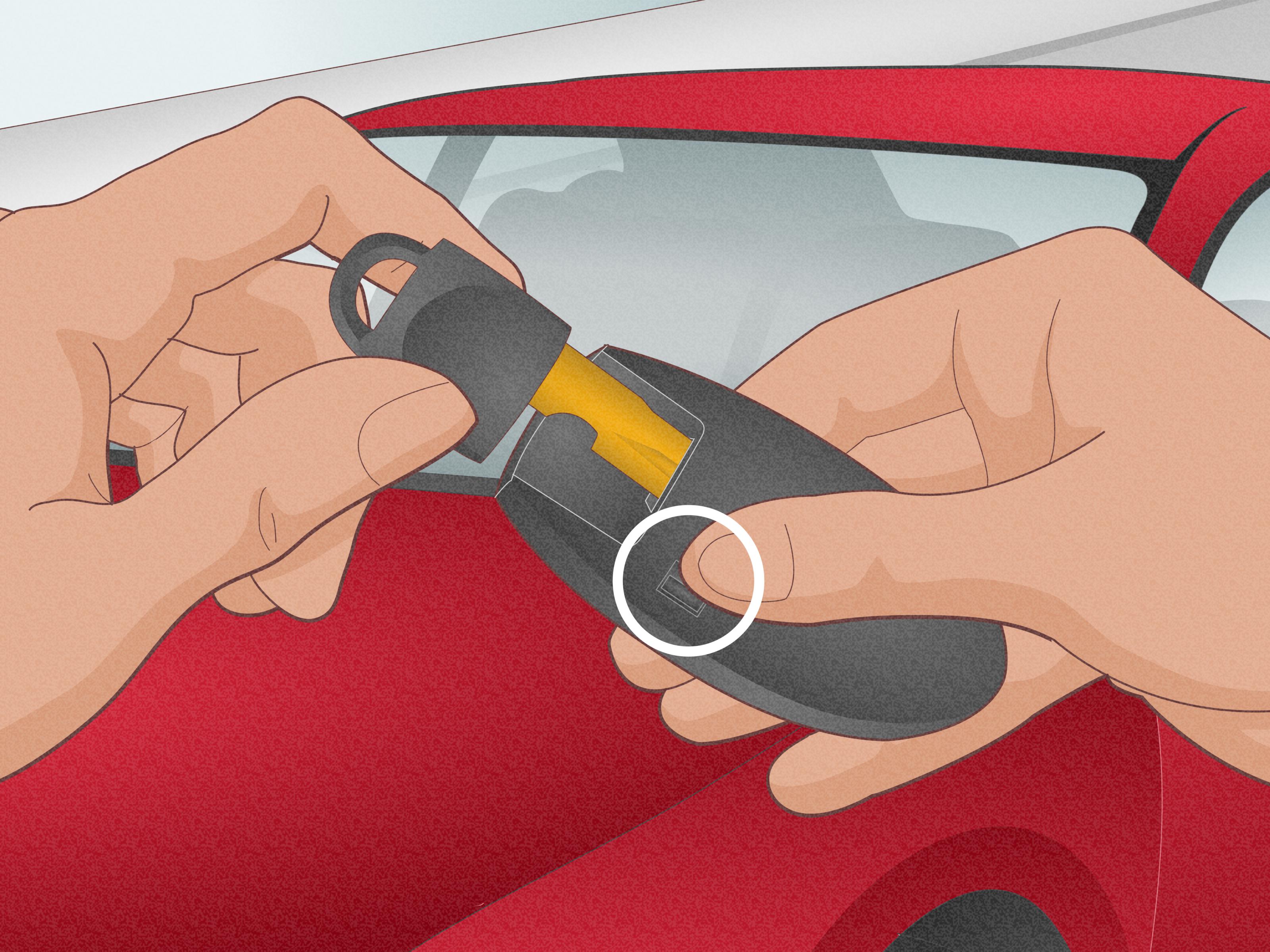
Turn the Nissan key fob over and look for a small release latch or sliding switch on the back. Press or slide the latch while pulling out the hidden mechanical key. Set the key aside somewhere safe.
Removing the mechanical key does two things. First, it gives you access to the seam or slot where the fob case can be opened. Second, it reminds you that even if the remote battery dies completely, you still have a backup way to unlock the vehicle. Some Nissan door handles have a visible keyhole, while others hide it under a small cover near the driver’s door handle.
Step 3: Open the Key Fob Case Carefully
Find the seam where the two halves of the key fob meet. Insert a small flathead screwdriver or plastic pry tool into the slot near the area where the mechanical key was removed. If you are using a metal screwdriver, wrap the tip in a thin cloth to reduce the chance of scratching the plastic case.
Gently twist the tool until the case begins to separate. Do not force it. A Nissan key fob case should pop open with light pressure when you are in the right spot. If it feels like you are about to crack the shell, pause and reposition the tool. The goal is to open the fob, not audition for a home demolition show.
Once the case loosens, separate the two halves with your fingers. Pay attention to how the internal parts are positioned. Some fobs have a rubber button pad, a circuit board, and the battery sitting neatly in one half of the case. Keep everything facing upward so small pieces do not fall out.
Step 4: Remove the Old Battery
Locate the round coin battery inside the fob. Before removing it, note its orientation. Look for the plus sign, minus side, and how the battery sits in the holder. In many Nissan key fobs, the positive side may face up, but some official Nissan instructions specify the positive side facing the bottom of the case depending on the fob design. The best rule is simple: match the orientation of the old battery exactly.
Use your fingernail, a plastic tool, or the edge of a small screwdriver to gently lift the old battery out. Avoid touching the internal circuit board, metal contacts, or electronic terminals. These parts are small and sensitive, and they do not enjoy fingerprints, moisture, or aggressive poking.
Dispose of the old battery properly according to local recycling or battery-disposal rules. Coin batteries should also be kept away from children and pets because they can be dangerous if swallowed.
Step 5: Insert the New Battery
Hold the new battery by the edges instead of pressing your fingers across the flat surfaces. Oils and dirt from your skin can reduce contact quality and may shorten battery performance. Place the new battery into the holder in the same orientation as the old one.
Make sure the battery sits flat and snug. If one side is raised, remove it and try again. A loose or tilted battery can cause intermittent key fob problems, including buttons that work one minute and ignore you the next. Once the battery is seated correctly, visually check that the contacts are touching the battery properly and that no rubber button pad or small part has shifted out of place.
Step 6: Reassemble and Test the Key Fob
Align the two halves of the key fob case and press them together until they snap securely into place. Check the seam all the way around the fob. There should be no large gaps, uneven edges, or corners that look half-closed.
Slide the mechanical key back into its slot until it clicks. Then test the fob near your Nissan. Press lock, unlock, trunk release, panic, or remote-start buttons if your model has them. If the lights flash, the doors respond, or the vehicle recognizes the key again, congratulations. You have successfully changed the battery in your Nissan key fob, and your tiny plastic rectangle has returned to active duty.
What If the Nissan Key Fob Still Does Not Work?
If your Nissan key fob does not work after replacing the battery, do not panic. Start with the simple checks. First, confirm that the new battery is the correct type. If your old battery was a CR2025 and you installed a CR2032, or the other way around, the battery may not sit correctly. Next, reopen the fob and check the battery orientation. A reversed coin battery is one of the most common reasons a fob stays dead after replacement.
Also inspect the battery contacts. If they look bent, dirty, or pushed too far away from the battery, the fob may not receive power. You can gently wipe the contact area with a dry, lint-free cloth. Avoid liquids unless you know exactly what you are doing, and never soak the fob.
If the fob works only when you stand very close to the car, the new battery may be weak, old, or poorly seated. Try another fresh battery from a sealed package. If the fob still fails, the issue may be a damaged circuit board, worn button pad, broken case, or programming problem. At that point, a Nissan service center, locksmith, or qualified key specialist can inspect it.
Can You Start a Nissan With a Dead Key Fob Battery?
Many push-button-start Nissan vehicles can still start even when the key fob battery is weak or dead. The common method is to hold the fob close to the start button while pressing the brake pedal and pushing the button. The exact process may vary by model, so your owner’s manual is the best reference.
This backup feature is useful, but it is not a replacement for installing a fresh battery. Think of it like the spare tire in your trunk: very helpful in a pinch, but not something you want to rely on for weeks.
How Long Does a Nissan Key Fob Battery Last?
A Nissan key fob battery often lasts one to three years, depending on usage, climate, battery quality, and storage habits. If you keep the fob near the vehicle all the time, the fob and car may communicate more often, which can drain the battery faster. Extreme heat or cold can also affect battery performance.
If your household has two Nissan key fobs and one battery dies, consider replacing the battery in the spare fob too. They were likely made and activated around the same time. The second fob may be quietly waiting for the least convenient moment to join the drama.
Helpful Tips for a Cleaner, Safer Battery Swap
Work on a clean, flat surface with good lighting. A kitchen table, desk, or garage workbench is much better than your lap in a dark parking lot. Keep the old and new batteries separate so you do not accidentally reinstall the dead one. It sounds silly until you do it once and spend five minutes questioning your life choices.
Use a plastic pry tool if you have one. A small screwdriver works, but plastic is gentler on the case. If you must use metal, wrap the tip with a cloth. Never use excessive force around the circuit board. The battery is cheap; the fob is not.
Finally, test every button after reassembly. Do not test only the unlock button and assume everything is perfect. Try lock, unlock, trunk, remote start, and panic if your fob includes them. This quick check confirms that the rubber pad and button contacts are aligned correctly.
Common Mistakes to Avoid
The biggest mistake is installing the wrong battery. Always confirm the battery number. The second mistake is reversing the battery orientation. If the fob does not respond, this should be your first suspect. The third mistake is forcing the fob open from the wrong point. Nissan key fob cases are designed to separate at the seam, usually near the mechanical-key slot, not randomly from the middle like a stubborn clam.
Another mistake is touching the circuit board or battery surfaces too much. A quick battery swap should be clean and minimal. Remove the key, open the case, swap the battery, close the case, test the fob. That is the whole mission. No heroic improvisation required.
Real-World Experience: What It Is Actually Like to Change a Nissan Key Fob Battery
Changing a Nissan key fob battery sounds almost too easy until you are doing it for the first time. The most common experience is a mix of confidence and mild suspicion. You buy a CR2032 battery, hold the fob in your hand, and think, “Surely this little thing opens somehow.” Then you stare at the seam for a few seconds like it owes you money.
The first useful lesson is to slow down. Most people get into trouble because they rush the pry step. The fob case can feel tighter than expected, especially if it has never been opened before. A gentle twist with a small screwdriver usually works better than trying to dig, scrape, or pry upward with force. Once the first corner separates, the rest of the case usually follows easily.
The second lesson is to look before you remove the old battery. Taking a quick phone photo of the battery orientation is a smart move. It gives you a reference if the battery pops out suddenly or if you forget which side was facing up. This is especially helpful because online guides may describe orientation differently depending on the exact fob style. Your old battery is the best local expert in the room.
The third lesson is that a fresh battery can make the fob feel new again. Many drivers do not realize how weak the old battery had become until the replacement is installed. Suddenly the doors unlock from farther away, the vehicle recognizes the fob faster, and the dashboard warning disappears. It is a tiny repair with a surprisingly satisfying payoff.
Another practical experience: keep a spare coin battery at home, not in the car. If the fob battery is dead and the spare is locked inside the vehicle, the plan has a small design flaw. Store one in a drawer, tool kit, or emergency basket. If your Nissan uses two fobs, label the spare battery package with the correct size so you do not have to research it again later.
People also learn quickly that not all cheap batteries are equal. A no-name battery from a forgotten drawer may technically fit, but it may not last. A fresh lithium coin battery from a reliable brand is usually worth the small extra cost. Since replacing a Nissan key fob battery is already inexpensive compared with a service visit, this is not the place to save twenty cents and invite future inconvenience.
Finally, there is the confidence factor. Once you have changed the battery one time, the process becomes easy. The hidden mechanical key is no longer mysterious, the case seam is no longer intimidating, and the next replacement takes less time than making coffee. It is one of those small car-maintenance skills that makes you feel oddly powerful, like you have unlocked a secret level of adulthood.
Conclusion
Changing the battery in a Nissan key fob is a quick, affordable DIY fix that can save you from remote-entry frustration, “Key Battery Low” warnings, and awkward parking-lot button mashing. Most modern Nissan key fobs use a CR2032 battery, but the smartest approach is always to confirm the exact battery type in your owner’s manual or by checking the number printed on the old battery.
Once you have the correct replacement, the process is simple: remove the mechanical key, open the fob carefully, take out the old battery, insert the new one in the same orientation, snap the case closed, and test every button. Handle the battery by the edges, avoid touching internal circuits, and do not force the case. Treat the fob gently and it should reward you by going back to its quiet little job of unlocking your Nissan like nothing ever happened.
Note: This article is written for general educational and web-publishing purposes. Nissan key fob designs vary by model and year, so always confirm the correct battery type and orientation for your specific vehicle before replacement.