
There is a special kind of modern mystery that begins with one tiny question: Does this person have my number saved on WhatsApp? Maybe you met someone at work, shared your number after a group project, chatted with a new client, or wondered whether an old friend still has you in their contacts. WhatsApp, being polite and privacy-focused, does not hand you a glowing sign that says, “Congratulations, your number is saved!” That would be convenient, yes, but also wildly awkward.
The honest answer is this: there is no guaranteed, official button that tells you whether someone has saved your phone number. However, there are several clues you can use to make a reasonable guess. Some signs are stronger than others. The most useful method involves WhatsApp Broadcast Lists, while other clues come from profile photos, status updates, privacy settings, read receipts, and how messages behave.
This guide explains how to know if someone has your number on WhatsApp, what signs actually mean, what signs are unreliable, and how to check without being creepy, spammy, or turning into a detective with too much free time.
Can You Directly See If Someone Saved Your Number on WhatsApp?
No, WhatsApp does not directly show whether someone saved your phone number in their contacts. You cannot open a profile and see a label that says “saved you” or “did not save you.” WhatsApp is designed around privacy, which means the app usually avoids revealing behind-the-scenes contact details.
That said, WhatsApp does use phone contacts in several features. Depending on how someone has set up their privacy options, you may be able to infer whether they saved your number. The key word is infer. You are working with clues, not courtroom evidence.
The Best Clue: Use a WhatsApp Broadcast List
The most widely discussed method for checking whether someone has your number saved is the WhatsApp Broadcast List test. A Broadcast List lets you send one message to multiple people at once without creating a group chat. The important detail is that broadcast messages are generally delivered only to recipients who have saved your phone number in their phone’s address book.
How the Broadcast List Method Works
If you send a broadcast message to someone and it gets delivered, that can be a strong clue that the person has saved your number. If it does not get delivered, it may suggest they have not saved your number. However, it is not a perfect test because delivery can also be affected by phone status, internet connection, privacy settings, app issues, or whether the person has blocked you.
How to Try It Politely
Create a broadcast list that includes the person you want to check and at least one contact you know has saved your number. Send a normal, harmless message, such as “Hi, just checking if this message goes through.” Avoid sending anything dramatic, emotional, salesy, or suspicious. WhatsApp users have enough weird messages in life already; do not add seasoning.
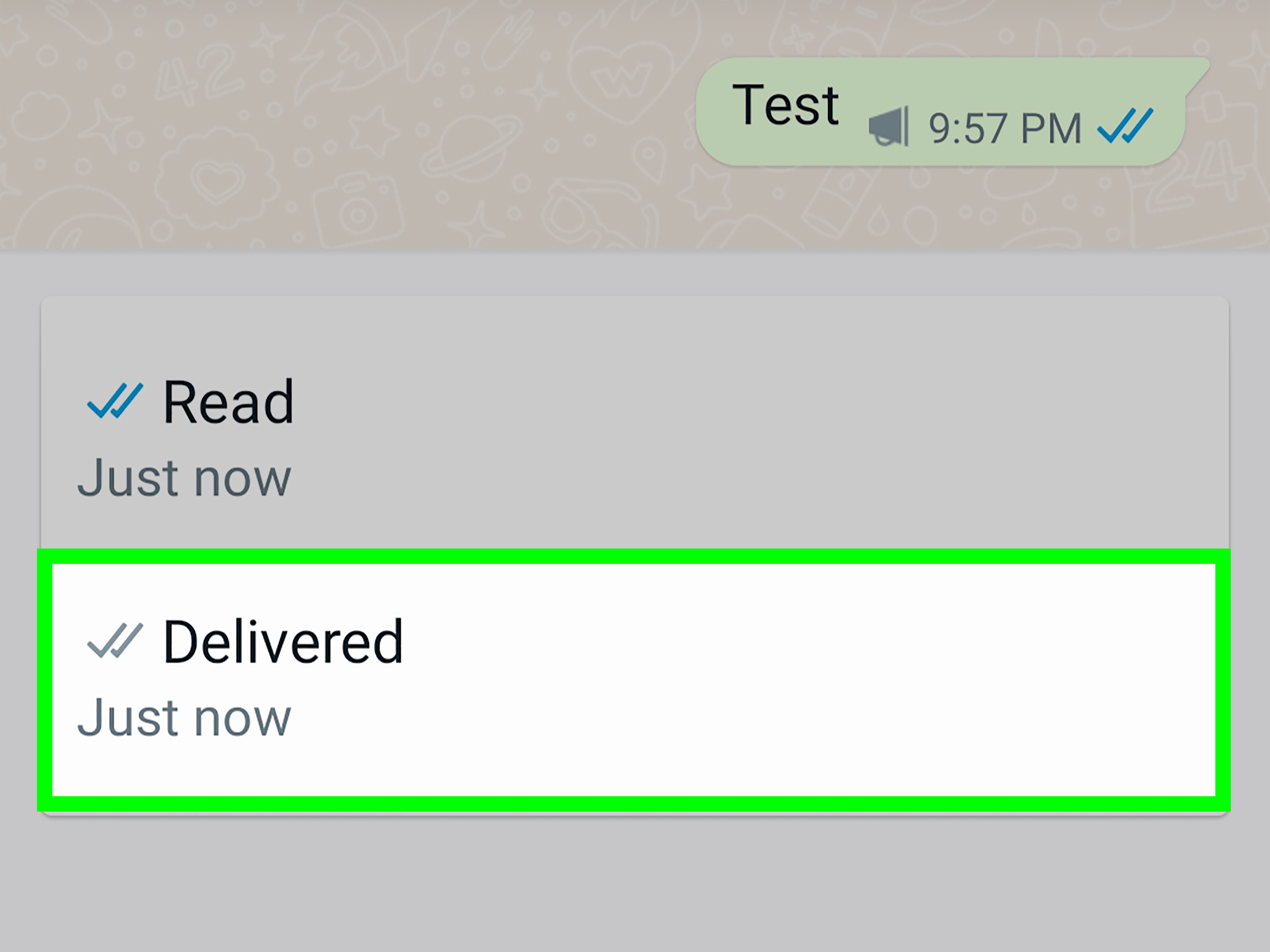
After sending the broadcast, check the message info. If your known contact receives the message but the other person does not, that may indicate the second person has not saved your number. If both receive it, there is a good chance both have your number saved.
Why This Is Not 100% Accurate
The Broadcast List method is useful, but it is not magic. A message might fail to deliver because the person’s phone is off, their WhatsApp account is inactive, they changed numbers, they blocked you, or there is a temporary connection problem. Treat the result as a clue, not a final verdict.
Check Whether You Can See Their WhatsApp Status Updates
WhatsApp Status works a bit like temporary stories. Users can post photos, videos, text, or updates that disappear after a period of time. Status visibility often depends on contact settings. If someone uses the “My Contacts” setting, only people saved in their phone contacts can see their status updates.
If you can see someone’s status updates, it may mean they have saved your number. But again, do not frame it as absolute proof. They may have customized their audience, excluded certain contacts, or changed settings recently. WhatsApp gives users several privacy options, and people use them in unpredictable ways. Some people organize privacy settings like a spreadsheet. Others tap randomly and hope for peace.
What It Means If You Cannot See Their Status
If you cannot see their status, it does not automatically mean they have not saved your number. They may not post statuses at all. They may have muted you, excluded you, limited their status to selected contacts, turned off certain settings, or simply be the kind of person who has not posted a status since 2018.
Look at Their Profile Photo, About, and Last Seen
WhatsApp lets users control who can see their profile photo, About section, Last Seen, and Online information. Options may include everyone, contacts only, contacts except selected people, or nobody, depending on the feature and app version. Because of this, seeing someone’s profile details may suggest that you are in their contacts, but it does not prove it.
If You Can See Their Profile Photo
If their profile photo is visible to you, one possible reason is that they saved your number and set profile visibility to contacts. Another possible reason is that their profile photo is visible to everyone. In other words, the profile photo clue is useful only when combined with other clues.
If Their Profile Photo Disappears
A missing profile photo can mean many things. The person may have removed it, changed privacy settings, blocked you, deleted WhatsApp, changed numbers, or never uploaded one in the first place. Before jumping to conclusions, remember that some people treat profile pictures like seasonal decorations: sometimes up, sometimes gone, sometimes replaced by a blurry sunset.
Understand Read Receipts and Check Marks
WhatsApp check marks tell you about message status. A single gray check usually means the message was sent from your phone. Two gray checks usually mean the message was delivered to the recipient’s device. Two blue checks usually mean the message was read, assuming read receipts are enabled.
These check marks can tell you whether a message reached someone, but they do not tell you whether that person saved your number. A person can receive your direct message even if they do not have you saved. So, message delivery alone is not proof.
Why Direct Messages Are Not Enough
Many people think, “If my message shows two check marks, they must have my number saved.” Not necessarily. WhatsApp can deliver direct messages to a person even when you are not in their contacts. The recipient may see your phone number instead of your saved name. That means direct message delivery proves the account exists and the message reached the device, not that your number is stored in their address book.
Check Group Chats Carefully
If you and the person are in the same WhatsApp group, you may be able to see how your name appears in the group. If they saved your contact, your name may appear to them as whatever they saved you as. But you cannot see their screen, so this does not help much unless they mention it. Group chats are better for communication than investigation.
Also, being in the same group does not mean they saved your number. WhatsApp groups can include people who have not saved one another. The group may show numbers, names, or profile information depending on settings and contact lists.
Ask Directly If It Matters
The simplest method is also the most underrated: ask. If there is a real reason you need to know, a polite message works better than digital guesswork. For example, you could say, “Hey, could you save my number so my messages do not get missed?” This is especially appropriate for work, school, freelance projects, appointments, neighborhood groups, and customer communication.
Directness may feel awkward for three seconds, but it saves you from spending twenty minutes analyzing check marks like ancient symbols on a temple wall.
Signs That May Suggest Someone Has Your Number Saved
Here are the strongest clues, ranked from most useful to least useful:
1. Your Broadcast Message Gets Delivered
This is the strongest clue because WhatsApp Broadcast Lists are designed so recipients generally need to have your number saved to receive the broadcast message.
2. You Can See Their Status Updates
If their status privacy is set to contacts only and you can view their updates, they may have saved your number. But custom privacy settings can complicate this clue.
3. You Can See Contact-Only Profile Details
If their profile photo, About, or Last Seen is visible only to contacts, and you can see it, they may have saved you. The problem is that you usually do not know which visibility setting they chose.
4. They Recognize Your Name Without Asking
If they message you and use your name naturally, they may have saved you. Of course, they might also remember you, copy your name from a previous chat, or be better at social memory than the rest of us.
Signs That Do Not Prove They Saved Your Number
Some clues sound convincing but are actually weak. Avoid relying on these alone:
They Reply to Your Message
Someone can reply to your WhatsApp message even if they have not saved your number. They may simply recognize the conversation or respond from the chat screen.
You See Two Check Marks
Two check marks show delivery, not contact status. Delivery is about the message reaching the device, not whether your number is saved.
You Can Add Them to a Group
Group settings vary. The ability to add someone to a group does not automatically reveal whether they saved your number.
Their Name Appears in Your Contacts
If their name appears on your phone, that only means you saved them. It says nothing about whether they saved you.
What If Someone Blocked You?
Blocking can make the situation more confusing. If someone blocks you, you may stop seeing certain profile updates, your messages may not deliver, and your calls may not connect. WhatsApp does not notify people when they are blocked, so the signs remain intentionally vague.
However, being blocked is not the same thing as not being saved. Someone might have saved your number and blocked you. Someone might not have saved your number but still receive your messages. These are separate issues, even if they can look similar from your side.
Privacy Matters: Do Not Turn This Into Surveillance
It is natural to be curious, but it is important to respect boundaries. Do not harass someone with repeated messages, create fake accounts, pressure them to respond, or use tricks to invade their privacy. WhatsApp’s privacy settings exist for a reason. If someone limits what you can see, that choice should be respected.
The healthiest approach is simple: use the Broadcast List method only when there is a practical reason, ask directly when appropriate, and accept uncertainty when the situation is personal. Not every unanswered WhatsApp mystery needs a full investigation board with red string.
Practical Examples
Example 1: A New Client
You are a freelancer and want to know whether a client saved your number so they receive updates properly. In this case, the best approach is direct and professional: “Please save this number so you can receive my WhatsApp updates.” You do not need to test secretly.
Example 2: A Classmate or Coworker
You shared numbers for a project. If your broadcast message is delivered and they can see your updates, they may have saved you. But for project communication, it is better to ask everyone to save each other’s numbers in the group chat.
Example 3: A Friend Who Stopped Replying
If messages are not being delivered, do not assume they deleted your number. Their phone may be offline, they may have changed numbers, or they may need space. One respectful follow-up is enough. After that, let the conversation breathe.
How to Increase the Chance Someone Saves Your Number
If your goal is not detective work but better communication, make it easy for people to save you. Send a short introduction with your name and reason for messaging. For example: “Hi, this is Daniel from Monday’s design meeting. Please save my number for project updates.” Clear context reduces confusion and makes you look organized instead of random.
For businesses, use a professional profile photo, complete your WhatsApp Business profile, add business hours, and avoid spammy broadcast behavior. People are more likely to save numbers that feel useful, trustworthy, and human.
Real-Life Experience: What This Looks Like in Everyday WhatsApp Use
In real life, figuring out whether someone has your number on WhatsApp is rarely as clean as online tutorials make it sound. The app gives you clues, but people behave in wonderfully messy human ways. One person saves every contact with full name, company, birthday, and possibly blood type. Another person has 300 unsaved chats and somehow functions normally. That is why the same WhatsApp sign can mean different things depending on the person.
A common experience happens after meeting someone at an event. You exchange numbers, send a quick “nice meeting you” message, and then wonder whether they saved you. If your direct message gets two check marks, that only tells you it was delivered. If they reply with your name, that feels promising, but it still might not mean they saved you. They could be reading your name from your WhatsApp profile or simply remember the conversation. The Broadcast List method may offer a stronger clue, but even then, it should be used with common sense. Sending a strange test message out of nowhere can make the situation more awkward than helpful.
Another everyday situation appears in work communication. Suppose a manager, customer, or teammate says, “Send it to me on WhatsApp.” You send important information, but later they say they missed it. In this case, the issue is not emotional mystery; it is practical communication. The best move is to ask them to save your number directly. A message like “Please save this number so my updates come through properly” is clear, polite, and professional. Nobody has to feel weird, and nobody has to decode check marks like a puzzle from an escape room.
Personal relationships are trickier. If you are checking because you feel ignored, the clues can easily become emotional. A hidden profile photo may feel personal, but it could simply be a privacy setting. No visible status updates may feel like exclusion, but maybe they never post. A single check mark may feel dramatic, but maybe their phone is off. WhatsApp is useful, but it is not a mind-reading machine. The app cannot tell you someone’s intentions, feelings, priorities, or whether they are currently buried under homework, work deadlines, family duties, or a dead battery.
The most useful experience-based rule is this: combine clues, but do not obsess over them. If a broadcast message delivers, you can see their status, and they interact with you normally, they probably have your number saved. If none of those things happen, they may not have saved you, or they may have strict privacy settings. If the relationship or communication matters, ask directly. If it does not matter, let it go. Peace of mind is worth more than a perfectly solved WhatsApp mystery.
For business owners, teachers, team leaders, freelancers, and community organizers, the lesson is even simpler: do not rely on people guessing who you are. Introduce yourself clearly, ask contacts to save your number, and avoid sending random broadcasts without context. A friendly, clear message works better than clever testing. Something like “Hi, this is Maria from Greenfield Tutoring. Please save this number for schedule updates” is practical and respectful.
At the end of the day, WhatsApp gives hints, not guarantees. The best way to know if someone has your number on WhatsApp is to use the Broadcast List clue carefully, compare it with visibility signs like status or profile details, and remember that privacy settings can hide almost everything. The best way to handle it like an adult is even easier: communicate clearly, respect privacy, and avoid turning a messaging app into a personal investigation headquarters.
Conclusion
So, how do you know if someone has your number on WhatsApp? The closest thing to a reliable test is the Broadcast List method, because broadcast messages are generally received only by people who have saved your number. Other clues, such as seeing someone’s status updates, profile photo, About section, Last Seen, or read receipts, can support your guess but cannot prove it alone.
The smartest approach is to treat WhatsApp clues as probabilities, not proof. If the situation is practical, ask the person to save your number. If the situation is personal, avoid overanalyzing every check mark and privacy setting. WhatsApp is a communication tool, not a crystal ball with Wi-Fi.