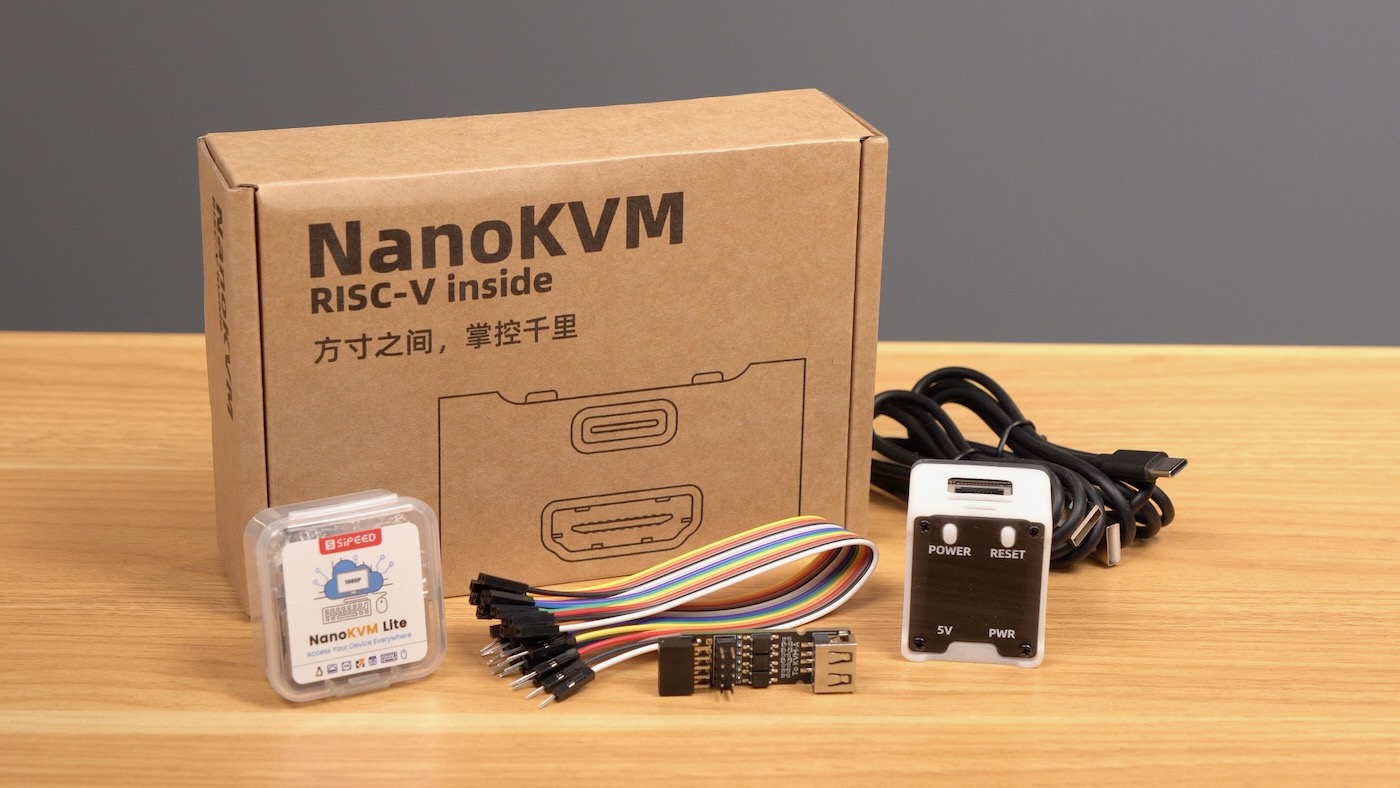

The Sipeed NanoKVM became popular by solving an expensive problem with a remarkably tiny and affordable device. Plug it into a computer’s HDMI and USB ports, connect it to a network, and you can remotely view the screen, operate the keyboard and mouse, mount installation media, enter the BIOS, and even control the machine’s power. It is essentially a miniature remote technician that never asks for coffee.
Then security researchers noticed something that was not prominently advertised: certain NanoKVM models contained a working microphone. The operating system also included audio utilities capable of recording sound. Suddenly, the harmless-looking box beside the server rack was being described as a potential listening device.
The resulting controversy produced dramatic headlines, defensive statements, useful security research, and enough online arguing to overheat a small data center. The truth is more nuanced than either “secret Chinese spy device” or “nothing to worry about.” The microphone appears to have been inherited from a reused development-board design, but its presence still exposed real weaknesses in documentation, product hardening, and user trust.
What Is the Sipeed NanoKVM?
NanoKVM is a compact IP KVM, meaning it provides keyboard, video, and mouse access over a network. Unlike ordinary remote-desktop software, an IP KVM does not depend on the controlled computer’s operating system. It can remain useful when Windows has crashed, Linux refuses to boot, the network configuration is broken, or the machine is sitting inside a BIOS screen wondering what it did to deserve this.
The original NanoKVM Cube and Lite products are based on Sipeed’s LicheeRV Nano platform. They combine HDMI capture, USB human-interface-device emulation, Ethernet connectivity, microSD storage, and a small Linux environment. The Full version adds a case, OLED display, auxiliary power connection, and hardware for controlling a computer’s power switch. Sipeed’s current documentation lists support for video capture, virtual keyboard and mouse input, virtual storage, WebSSH, Tailscale, Wake-on-LAN, and remote installation tasks.
Those abilities make an IP KVM extremely useful. They also make it highly privileged. A compromised KVM may be able to watch the screen, type commands, restart the computer, alter BIOS settings, or mount a malicious disk image. In other words, the microphone is not the only component worth worrying about. It is simply the component that knows what everyone said during the incident-response meeting.
How the NanoKVM Microphone Was Discovered
Security researcher Matej Kovačič examined an early NanoKVM and reported a miniature surface-mounted microphone measuring roughly 2 by 1 millimeters. He found that audio support was functional and that standard ALSA utilities, including tools such as amixer and arecord, could be used through an SSH session to capture audio.
According to the researcher’s demonstration, a person with sufficient access to the NanoKVM could record nearby sound, save it on the device, and copy the recording elsewhere. Real-time streaming would require additional work, but not an exotic laboratory or a trench coat with seventeen hidden pockets.
The discovery attracted attention because the microphone was not clearly identified in the original NanoKVM product description. Buyers purchasing a remote server-management device had little reason to expect an ambient audio sensor inside it. A component can be visible in a schematic or development-board photograph yet still be effectively undisclosed to an ordinary customer.
Was the Microphone Actually Hidden?
The word hidden is where the argument becomes complicated.
Sipeed disputes the claim that it intentionally concealed the microphone. The company says NanoKVM was built around the existing LicheeRV Nano system-on-module, whose documentation identified its audio hardware. Early NanoKVM documentation linked users to the LicheeRV Nano specifications rather than repeating every component on the dedicated KVM product page.
That explanation is technically meaningful. The Cube and Lite versions were not designed entirely from scratch. They reused a general-purpose board that also contained display, touch, speaker-amplifier, and microphone circuitry. Removing or redesigning individual components would have created additional manufacturing, inventory, and certification work. Sipeed says it retained the microphone partly to keep the NanoKVM hardware consistent with the existing LicheeRV Nano production process.
However, Tom’s Hardware noted an important distinction after receiving Sipeed’s response: the microphone may have appeared in linked LicheeRV Nano materials, but it was not directly mentioned on the original NanoKVM page. Sipeed later added an explicit explanation to the NanoKVM documentation and asked authorized distributors to update relevant listings.
Therefore, calling it a deliberately concealed surveillance microphone goes beyond the available evidence. Calling it well disclosed would also be generous. “Inherited hardware that was insufficiently communicated to buyers” is less exciting than “hidden microphone,” but it is probably the fairest description.
Why a Reused Development Board Included a Microphone
The NanoKVM story illustrates a common feature of inexpensive electronics: hardware platforms are often reused across several products. A manufacturer may build one versatile board containing camera, display, audio, networking, and general-purpose input/output circuits, then create multiple devices by changing the carrier board, enclosure, firmware, and enabled functions.
This approach reduces engineering time and manufacturing costs. It also means products sometimes contain components that are irrelevant to their advertised purpose. Your television may contain debugging interfaces you never use. Your router may run services inherited from a generic software-development kit. Your smart refrigerator may possess more processing power than the computer that guided Apollo 11, yet still struggle to make ice consistently.
Hackaday’s analysis supported the platform-reuse explanation, observing that the NanoKVM Cube was essentially a LicheeRV Nano development board paired with HDMI-input hardware and KVM software. From that perspective, both the microphone and some audio-related Linux components were leftovers rather than evidence of a purpose-built spying feature.
Reusing a board is not inherently suspicious. Failing to disable unnecessary sensors and services before selling the result as a network-management appliance is still poor security hygiene.
The Microphone Was Not the Only Security Concern
The microphone received the best headlines, but early NanoKVM software findings were more consequential. Community reports described default web credentials, SSH enabled with a predictable root password, a hardcoded encryption secret, missing cross-site request forgery protections, long-lived authentication tokens, and no convenient way to invalidate a stolen session.
One GitHub report documented an early image accepting SSH connections with the username and password combination root:root. Another audit listed an admin:admin fallback for the web interface, a shared hardcoded encryption key, absent CSRF protection, and authentication tokens with a 30-day lifetime.
Researchers also questioned the device’s outbound network behavior, update-verification process, default DNS configuration, and inclusion of tools such as tcpdump and aircrack. Sipeed replied that several packages came from the original SG2002 software-development kit and were retained for diagnostics or image consistency rather than malicious use. The company acknowledged that hardcoded keys and insufficient update verification were improper practices left over from rapid development and said they would be corrected.
This distinction matters. Diagnostic utilities are not backdoors by themselves. A packet analyzer is no more automatically evil than a screwdriver. Nevertheless, unnecessary tools expand the software inventory and may give an attacker additional capabilities after a compromise. Production firmware should contain only what the product genuinely needs.
Does the Microphone Create a New Vulnerability?
Not exactly. A microphone is a capability, not usually an entry point. An attacker generally needs to exploit another weakness, steal credentials, access an exposed management interface, or compromise the local network before issuing commands that activate it.
If an attacker already controls an IP KVM, the situation is serious even without ambient audio. The intruder may be able to see sensitive information, enter commands, install software, manipulate boot settings, or control attached systems. The microphone does not magically unlock the device.
However, the microphone can increase the consequences of a successful compromise. It introduces a separate source of information from the physical environment: conversations, alert tones, equipment noises, telephone calls, or spoken credentials. That additional collection opportunity is relevant even when it is not the initial vulnerability.
Sipeed argues that an attacker controlling a KVM could potentially reach audio devices attached to the target computer anyway. That may be true in certain configurations, but it does not make an onboard ambient microphone irrelevant. The target computer may have no microphone, its operating system may be offline, or its audio permissions may be restricted. A sensor physically connected to the management appliance creates its own privacy consideration.
What Sipeed Changed
Sipeed says it addressed many of the reported security problems as NanoKVM matured from a developer-oriented project into a product used by a broader audience. The company acknowledged that enabling developer-friendly services by default was less appropriate once nontechnical users began deploying the device.
Current Sipeed documentation explicitly states that NanoKVM Cube hardware retained microphone and amplifier circuits to remain consistent with LicheeRV Nano manufacturing. It also says application version 2.2.6 and firmware version 1.4.1 or later remove the relevant drivers, and that the components are intended to be eliminated from future production.
Removing a driver reduces ordinary software access to the microphone, but software controls and physical absence are not identical assurances. Organizations with strict privacy requirements may prefer a hardware revision that omits the component entirely. Others may accept driver removal when the device is properly isolated and maintained.
How to Secure a NanoKVM
Update Both Firmware and Applications
Check the installed system-image, firmware, and application versions rather than assuming that a recently purchased unit contains recent software. Follow the official release notes and install security updates through a trusted path. Secure, authenticated software updates are part of NIST’s recommended baseline for connected devices.
Replace Every Default Credential
Change web, SSH, and any other administrative credentials before placing the device on a production network. Use unique passwords that are not shared with routers, servers, or other management appliances. CISA repeatedly recommends eliminating default passwords and restricting internet-facing administrative services.
Disable Services You Do Not Use
Turn off SSH, remote tunnels, routing functions, virtual storage, or other features when they are unnecessary. A service that is not running cannot forget to authenticate someone. Review listening ports after updates because firmware changes can occasionally re-enable defaults.
Place the KVM on a Management Network
Do not connect a privileged KVM appliance directly to the public internet. Put it on a dedicated management VLAN or isolated network, limit which administrative systems can reach it, and use a properly secured VPN for remote access. CISA guidance for communications infrastructure recommends dedicated management zones and avoiding direct internet-based device administration.
Monitor Outbound Connections
Use firewall and DNS logs to identify the servers contacted by the NanoKVM. Permit only the destinations and protocols required for your chosen configuration. Monitoring does not require assuming malicious intent; it is simply what responsible administrators do with devices that hold powerful access to other machines.
Choose the Right Microphone Mitigation
For ordinary homelab use, updated firmware, driver removal, strong authentication, and network isolation may provide a reasonable level of protection. In a boardroom, legal office, research laboratory, or regulated environment, select a confirmed microphone-free revision or have the component professionally removed.
Desoldering a microscopic surface-mounted microphone is not a beginner repair. One enthusiastic slip can convert a working NanoKVM into an unusually small paperweight.
What the NanoKVM Controversy Teaches Us
The most useful lesson is not that all inexpensive hardware is malicious. It is that every networked management device deserves scrutiny, regardless of price or country of origin.
Manufacturers should publish accurate component lists, disable unused sensors, remove development credentials, minimize installed software, verify updates cryptographically, and make secure initial setup unavoidable. Users should treat IP KVMs like other administrative infrastructure rather than harmless accessories.
Open-source code and public schematics are valuable because they allow independent researchers to test vendor claims. They do not automatically produce secure defaults, complete documentation, or flawless implementation. Transparency makes inspection possible; it does not perform the inspection for us.
The NanoKVM microphone appears more consistent with cost-saving hardware reuse and rushed productization than with a deliberate espionage design. Even so, users were justified in asking why an unadvertised audio sensor was active inside a device with privileged network access. Good security depends not only on intent but also on eliminating unnecessary capabilities and documenting the ones that remain.
A Practical Homelab Experience With the NanoKVM Controversy
Consider a typical homelab user who buys a NanoKVM because one server occasionally freezes before the operating system loads. Remote desktop software cannot help at that stage, and walking downstairs at 2 a.m. to press a reset button has lost its charm. The NanoKVM arrives, connects quickly, displays the BIOS screen, and immediately feels like a bargain.
The first experience is usually about convenience. The user can reboot the server, change boot order, mount an installation image, and repair a broken network configuration from another room. The device is tiny, quiet, and powered from USB. It performs the unglamorous work that normally requires a monitor, keyboard, extension cable, and several minutes of crawling behind furniture.
Then the microphone story appears online.
The user looks at the same little box and feels differently. Nothing about its behavior has visibly changed, but the trust model has. Was it recording? Was audio transmitted? Why was the component installed? Is the dramatic headline accurate, or is this another case of the internet putting on a detective hat before reading the schematics?
A sensible investigation begins without panic. The user checks the exact NanoKVM model and hardware revision, compares installed application and firmware versions with current releases, reviews Sipeed’s updated documentation, and examines which services are listening on the network. SSH is disabled when not needed. Every default password is replaced. The device is moved from the general home network to a management VLAN that can be reached only from an administrator’s computer.
Next comes outbound monitoring. Firewall logs show which update, DNS, and remote-access services the unit contacts. Unnecessary destinations are blocked. Automatic remote-access features remain disabled unless there is a clear reason to use them. The microphone driver is checked, and the owner confirms whether the installed versions match Sipeed’s stated mitigation.
At this point, the decision becomes contextual rather than emotional. The NanoKVM sits in a basement rack beside humming fans, not in a conference room. The most exciting sound it could capture is a hard drive reconsidering its career choices. Network isolation and updated software may therefore be sufficient for that environment.
A small business handling legal discussions, financial information, unreleased product plans, or medical data should make a stricter decision. Even a low probability of ambient audio capture may be unacceptable. That organization might replace the device, choose a hardware revision without the microphone, or have the component removed and the result inspected by a qualified technician.
The practical experience reveals why both sides of the controversy contain part of the truth. The microphone does not automatically turn every NanoKVM into an active bug. At the same time, dismissing the concern because an attacker would need device access ignores the entire purpose of layered security. Good defenses assume that one control may eventually fail and reduce what an attacker can do afterward.
Most users will not need to throw their NanoKVM into a volcano. They should update it, isolate it, inspect it, and decide whether its hardware matches the sensitivity of the room in which it operates. That is less cinematic than an international spying conspiracy, but considerably more useful.
Conclusion
The “hidden” microphone inside the Sipeed NanoKVM was real on certain Cube and Lite hardware, but the evidence points toward reuse of the LicheeRV Nano development platform rather than a microphone secretly designed for surveillance. The component was insufficiently disclosed on early NanoKVM product pages, and audio support made it usable by anyone who gained adequate control of the device.
The larger concern was the combination of that microphone with immature security defaults, including predictable credentials, exposed SSH access, weak session protections, hardcoded secrets, and questions about update verification. Sipeed has acknowledged or addressed several issues, added clearer documentation, removed relevant audio drivers in later software, and stated that future hardware production will omit unnecessary components.
NanoKVM can still be useful, particularly in carefully managed homelabs. It should not be connected casually to a sensitive network and forgotten. Treat it as a privileged administrative computer: update it, restrict it, monitor it, and verify exactly what its hardware can see and hear.
Note: NanoKVM features and mitigations vary by model, hardware revision, application version, and firmware image. Verify the current Sipeed documentation and inspect the specific device before using it in a security-sensitive environment.