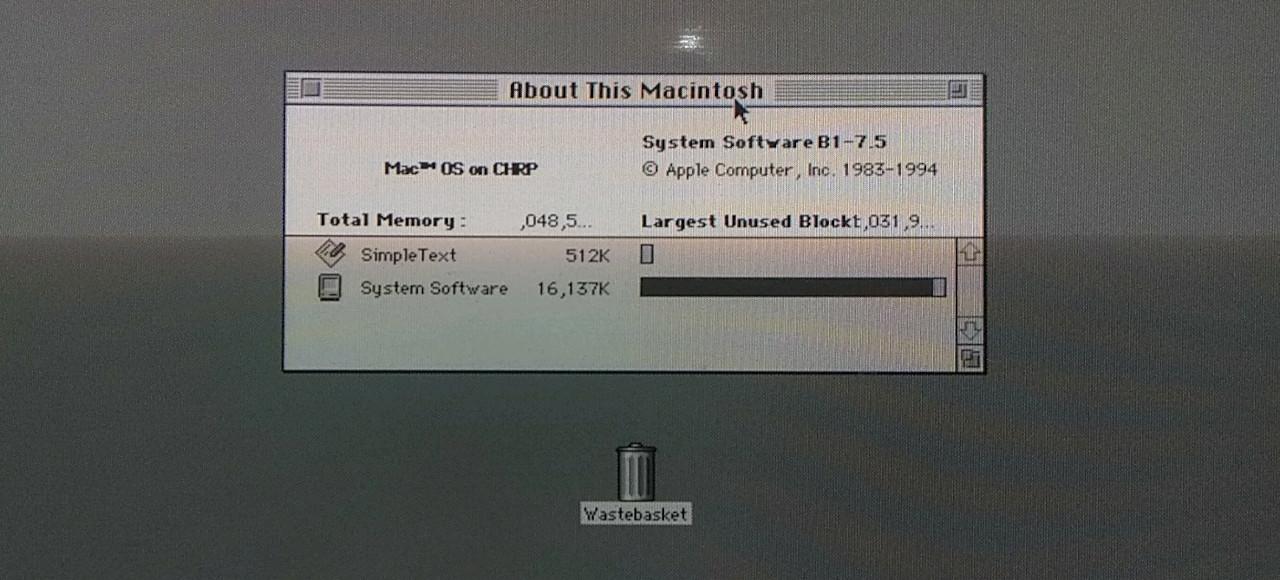

Some ideas are so gloriously unnecessary that they become irresistible. Running Mac System 7 on a G4 is one of them. It is the retro-computing equivalent of putting whitewall tires on a rocket: no one needs it, a lot of people will ask “why,” and the correct answer is usually, “Because it would be amazing if it worked.”
That oddball question has a real technical backbone, too. System 7 belongs to an earlier Macintosh era, the age of beige boxes, floppy disks, chunky icons, and software that assumed the future would arrive politely and in 256 colors. The G4, by contrast, came from a later generation of PowerPC Macs built for Mac OS 9, Mac OS X, AltiVec bragging rights, and much faster hardware. On paper, these two worlds should not casually shake hands. In practice, hobbyists, archivists, and Mac tinkerers have spent years finding ways to introduce them anyway.
This is what makes “Mac System 7 on a G4” such a fun topic. It is part history lesson, part compatibility puzzle, and part love letter to the weird persistence of old software. If you have ever wanted to know whether this is possible, why anyone would bother, and what it says about Apple’s winding platform evolution, pull up a Platinum-era chair. We are going in.
Why This Sounds Ridiculous at First
To understand the joke, you need to understand the timeline. System 7 arrived in the early 1990s, long before the G4 tower became the poster child for late-classic and early OS X-era Mac power. System 7 was built for the classic Mac OS world: cooperative multitasking, extensions that could either save your day or destroy your weekend, and a user experience that felt elegant until one misbehaving control panel turned your machine into a moody toaster.
The G4 belongs to a different chapter. By the time Power Mac G4 systems rolled around, Apple was straddling Mac OS 9 and Mac OS X. Some G4 models could still boot Mac OS 9 directly. Others were better suited to running older software through the Classic environment inside OS X. In other words, the G4 is old by modern standards, but it is still “too new” in the context of System 7. That is the whole punchline.
So when someone says, “Let’s put System 7 on a G4,” the normal reaction is not confidence. The normal reaction is a long, thoughtful silence followed by, “You mean natively?”
A Quick Refresher on What Made System 7 Matter
System 7 Was More Than Just a Pretty Set of Icons
System 7 was a major step for the Macintosh. It brought built-in cooperative multitasking, better memory handling through 32-bit addressing, virtual memory, aliases, and a more mature user experience that helped the Mac feel less like a clever appliance and more like a serious personal computer. It also helped define the emotional texture of classic Mac computing: approachable, visual, a little quirky, and oddly personal.
For many users, System 7 was the version that turned the Mac into their Mac. It was where the Finder felt familiar, where networking and multimedia ambitions became more visible, and where the machine started to grow into the desktop publishing and education legend that still fuels Apple nostalgia today.
Then PowerPC Changed the Game
Apple’s move to PowerPC complicated everything in an interesting way. Early Power Macintosh machines could run a PowerPC-native version of the Mac OS while still leaning on emulation for older 68K software. That gave the Mac platform continuity without demanding that every user throw out every app on day one. System 7.5.2 became especially important because it marked the first System 7 branch intended for Power Macintosh hardware.
This matters because it proves System 7 was not permanently chained to 68K hardware. It already had one foot in the PowerPC world. The catch is that the PowerPC world of the mid-1990s is not the same as the G4 world of the early 2000s. “PowerPC-compatible” is not a magical phrase that erases every generation gap. It is more like saying a cassette deck and a streaming box both play music. True, technically. Helpful, emotionally. Interchangeable, absolutely not.
Where the G4 Fits Into the Story
The G4 Was Built for a Later Classic Era
The G4 family sits in a fascinating middle ground. It is new enough to feel modern compared with a System 7-era Macintosh, but old enough to remain deeply connected to Apple’s pre-Intel transition years. Depending on the model, a G4 may boot Mac OS 9, run Classic under Mac OS X Tiger or earlier, or serve as a dream machine for vintage creative software, older games, and legacy workflows.
That is why G4 machines remain popular among collectors. They are fast, flexible, relatively easy to maintain compared with much older Macs, and close enough to the classic era to make experimentation fun. Want to run Mac OS 9? Maybe. Want to run Classic apps? Often yes. Want to go full time-capsule mode without dealing with the limitations of an early 1990s hard drive that sounds like a coffee grinder full of marbles? The G4 starts looking very attractive.
But Officially, System 7 and a Stock G4 Were Never a Normal Pairing
This is the important distinction. A stock G4 was never the obvious home for System 7. Apple’s official compatibility story for G4 hardware centered on later classic Mac operating systems and then Mac OS X, not a casual hop back to the early 1990s. Some G4 models can boot Mac OS 9 directly, while later models lean on the Classic environment for older applications. That is still not the same thing as saying, “Sure, go ahead and boot System 7 like it is 1994.”
For years, the practical answer was simple:
- If you wanted the look and feel of early Mac software, use emulation.
- If you wanted classic app compatibility on later PowerPC hardware, use Classic or Mac OS 9 where supported.
- If you wanted true System 7 on period-correct hardware, get an older Macintosh.
That was the sensible answer. Naturally, retro enthusiasts took that as a challenge.
The Three Main Ways People Get Close to the Dream
1. Classic Environment
Classic was Apple’s bridge solution inside early versions of Mac OS X on PowerPC Macs. It allowed many Mac OS 9 applications to run within OS X without rebooting into the old system. For users with legacy software, Classic was practical, elegant, and occasionally grumpy. It was not a true System 7 environment, but it kept a lot of older software alive longer than many expected.
Classic also explains why the G4 remains central to vintage Mac conversations. Leopard dropped Classic support, and Intel Macs left it behind entirely. That made Tiger-era PowerPC machines, including many G4s, the last comfortable official home for a huge pile of legacy Mac applications.
2. Emulation
If your goal is specifically System 7, emulation has long been the smarter route. Basilisk II is famous for emulating 68K Macintosh systems, which makes it a natural fit for many System 7 setups. SheepShaver, meanwhile, targets PowerPC-era classic Mac operating systems and can cover later classic versions, depending on the configuration.
Emulation wins on convenience. You get flexibility, file exchange, snapshots, and fewer moments where a thirty-year-old SCSI drive decides that mortality is real. It is the “be practical” answer, which is exactly why some enthusiasts keep chasing native or near-native solutions anyway.
3. Community Hacks and Preservation Work
This is where the title “Mac System 7 On A G4? Why Not!” starts sounding less like a joke and more like a project log. In late 2025, hobbyist reporting highlighted a breakthrough in getting a System 7-era build to run on G4-class hardware by combining preserved software, unusual ROM knowledge, and compatibility tricks that were never part of ordinary consumer life. That does not magically turn every G4 into a System 7 machine. It does prove that the line between “impossible” and “deeply impractical but technically achievable” is where vintage computing has the most fun.
That sort of work matters beyond bragging rights. It preserves knowledge about how Apple’s old systems actually fit together, rescues forgotten branches of compatibility, and helps historians understand that platform transitions are never as neat as marketing slides pretend.
So, Why Would Anyone Want System 7 on a G4?
First, speed. A G4 has far more processing headroom than a true System 7-era Mac. Even if the pairing is awkward, the idea is seductive: what if you could enjoy old software with fewer hardware bottlenecks, faster storage options, and a machine that does not demand the patience of a saint every time it boots?
Second, availability. Finding a healthy, period-correct Macintosh can be harder than finding someone who still remembers where they put their old ClarisWorks disks. G4 systems are comparatively easier to locate, maintain, and modify.
Third, curiosity. The retro-computing community runs on a blend of scholarship and mischief. People do not just want to preserve software; they want to understand its limits. They want to know where the walls are. Then they want to tap on those walls with a wrench.
And finally, there is the emotional reason: System 7 has a vibe. It is fast in a different way, focused in a different way, and less interested in doing everything all at once. For some users, that environment is not merely nostalgic. It is refreshing.
The Catch: Cool Does Not Always Mean Convenient
Before anyone starts imagining a flawless beige-and-graphite dream machine, let us inject a little realism. Even when System 7 on a G4 becomes possible in some form, that does not mean every feature works perfectly, every device has drivers, or every setup is worth the trouble. Vintage compatibility is full of caveats. Networking may be limited. Some hardware support may be incomplete. Certain utilities may behave oddly. Stability can range from “surprisingly solid” to “do not breathe near it.”
There is also a philosophical limit here. If what you really want is old software that works well, a properly configured Mac OS 9 system, a Classic-capable G4, or a reliable emulator may be the better answer. System 7 on a G4 is often less about productivity and more about proving that history still has secret doors.
What the Setup Says About Apple’s History
One reason this subject is so satisfying is that it exposes how layered Apple’s platform history really is. The Macintosh did not jump from one clean era to another. It dragged old assumptions forward, embedded emulators to protect users, experimented with transition strategies, and kept compatibility alive longer than outsiders sometimes realize.
System 7 on a G4, whether achieved through emulation, hybrid workflows, or deeper technical hacks, is a reminder that operating systems are not just software releases. They are accumulated habits. They are ROM expectations, driver models, developer compromises, and millions of user workflows that refuse to vanish just because a keynote says the future has arrived.
Apple is often remembered for cutting cords decisively, and sometimes that reputation is deserved. But the longer arc of Macintosh history shows repeated efforts to soften transitions. The existence of Classic, built-in emulation on PowerPC Macs, and the long tail of legacy software support proves that even Apple had to negotiate with its own past.
The Experience: What It Feels Like to Chase This Kind of Retro Mac Madness
Using, testing, or even just thinking seriously about a “Mac System 7 on a G4” setup feels a little like wandering through a house where every room belongs to a different decade. You touch one part of the machine and it is all early-2000s confidence: translucent plastics, cleaner industrial design, faster buses, bigger drives, better displays. Then you open the software side and suddenly you are back in the land of Chicago fonts, tiny control panels, cheerful alert sounds, and a Finder that feels less like a platform and more like a desk you actually use.
That contrast is the whole thrill. On a normal modern computer, software from thirty years ago feels distant. It is boxed in, abstracted, flattened into a compatibility layer. On a G4, the distance shrinks. The machine is still old enough to understand the emotional grammar of classic Mac software. It is still from the era when Apple assumed users might have one foot in the past and one foot in the future. That makes the experience less like museum viewing and more like time travel with better cooling.
There is also a weird joy in the startup ritual. Vintage Mac people love startup rituals. The right chime, the right splash screen, the right folder icon, the right moment of suspense before the desktop appears. When you are attempting something as odd as System 7 on a G4, that ritual gets even better because there is always a small chance the machine will greet you with success and a slightly larger chance it will remind you that computers, despite their reputations, can still be incredibly dramatic.
Once things do work, the experience can be charmingly immediate. Older applications often launch with a kind of snappiness that feels almost rude compared with modern software. HyperCard stacks pop open. Small utilities do one job and get out of the way. Word processors are not trying to sell you cloud storage, build a social network, or guess your feelings. You click, it opens, and off you go. There is a reason so many retro users describe classic Mac software as focused. It really is.
At the same time, the limitations become part of the texture. You notice where drivers get weird. You notice where networking feels more like archaeology than configuration. You notice that convenience today is built on decades of invisible engineering that old systems simply did not have. But instead of ruining the fun, those constraints often sharpen it. They make each success feel earned.
That is why projects like this resonate. They are not just about getting an old OS to boot on newer old hardware. They are about recovering a style of computing that felt personal, comprehensible, and occasionally mischievous. A G4 running something as ancient, improbable, or cleverly adapted as System 7 becomes more than a machine. It becomes a conversation between eras. And honestly, that is catnip for the kind of person who still smiles at a Platinum dialog box.
Conclusion
So, can you put Mac System 7 on a G4? In the ordinary, official, Apple-intended sense, no, not really. The G4 was built for a later stage of the Mac story, where Mac OS 9 and the Classic environment were the practical bridges to the past. But in the hands of enthusiasts, preservationists, and wonderfully stubborn tinkerers, the answer gets more interesting. Through emulation, creative compatibility strategies, and recent community breakthroughs, the idea has moved from punchline to proof-of-concept.
That is what makes this topic so delightful. “Mac System 7 On A G4? Why Not!” is not just a technical question. It is a celebration of the Mac’s layered history and of the people who refuse to let that history flatten into trivia. Sometimes the best retro projects are not the most useful ones. They are the ones that reveal how much life is still hidden inside old machines.