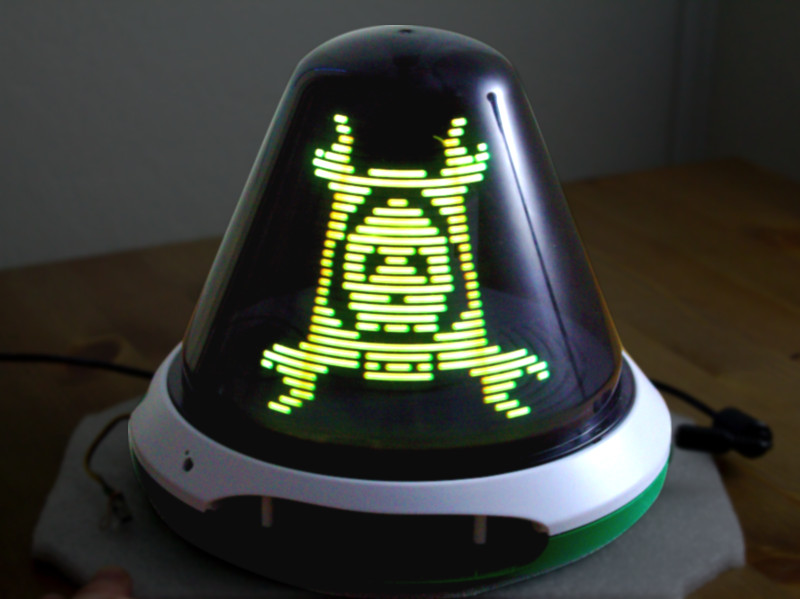

Some toys are fun for a season. Others become legends in the back corner of a closet, waiting for the exact right kind of person to find them again. The Crayola Digital Light Designer belongs firmly in the second group. It arrived in the early 2010s looking like a futuristic art toy, half spaceship, half glowing mushroom, and somehow managed to feel more advanced than many gadgets that were actually trying very hard to be “the future.” Kids could draw with light on a spinning dome, save creations, trigger effects, and make simple animations. Adults, meanwhile, looked at it and immediately had a different thought: what on earth is happening inside that dome?
That question is where the fun starts. In the harmless, creative, maker-style sense of the word, hacking the Crayola Digital Light Designer is not about ruining a toy. It is about understanding why this weirdly brilliant product worked so well, why it inspired reverse-engineering curiosity, and why it still feels like a hidden gem from the golden age of experimental kid tech. In a market crowded with plastic gadgets that beep for no reason, the Digital Light Designer actually had a point of view. Literally. It was a persistence-of-vision art machine wrapped in Crayola branding, which is a sentence so gloriously odd it deserves a standing ovation.
What the Crayola Digital Light Designer Actually Was
The Digital Light Designer launched as part of Crayola’s 2012 lineup and was marketed as a 360-degree domed drawing surface that let kids create with colored LED light instead of crayons, markers, or paper. It offered multiple creative modes, saved artwork, and encouraged animation-style play instead of one-and-done doodling. In product descriptions and reviews, it was pitched as a self-contained art studio: draw, rotate, save, replay, erase, and start over without covering the house in marker streaks that would make every parent suddenly become an amateur detective.
That pitch worked because the toy really was different. The dome could display drawings around its curved surface, and the stylus acted less like a normal pen and more like a light-based input device. Crayola’s own support materials noted that the wand behaved more like a remote than a pencil, that bright room light could interfere with operation, that users could rotate images from the dock area, and that only the sides of the dome were drawable. In other words, this wasn’t just “draw on plastic.” It was a carefully choreographed interaction between motion, light, timing, and perception.
Retail and toy-press coverage from the time emphasized the wow factor. The toy was sold as a way to make drawings light up in 3D, create animations, save up to dozens of artworks, and play built-in games. Reviewers compared it to a high-tech Lite-Brite, though that comparison only tells half the story. Lite-Brite is static and charming. The Digital Light Designer was dynamic, a little theatrical, and weird enough to make tech-minded adults lean in closer. That is always a good sign. Whenever parents say, “Okay, but now I want a turn,” the product team has done something right.
Why This Toy Became Catnip for Hackers
It was secretly a persistence-of-vision machine
The biggest reason the toy drew attention from makers and reverse-engineering fans is simple: it was not using ordinary screen technology. Coverage of the hardware described a spinning internal assembly and a persistence-of-vision display, the same broad visual principle that makes fast-moving LEDs appear to form complete images in the air. That alone makes the toy fascinating. Instead of a flat LCD doing all the heavy lifting, the Digital Light Designer used motion and timing to fake a full image across a curved surface. It was less “tablet for kids” and more “tiny carnival ride powered by math.”
That design choice transformed the toy from a fun drawing product into a legitimate conversation piece for electronics enthusiasts. A device like this invites questions. How does the stylus position get detected? How is the image stabilized? How does the toy know where the user is drawing on a spinning dome? Why does ambient light matter? Why does the picture feel so surprisingly solid? Those are not questions people ask about ordinary plastic toys. Those are questions people ask right before they start using phrases like “signal timing,” “input sensing,” and “I promise I’m just looking.”
Its internals sounded way cooler than the box art
Maker coverage helped explain the excitement. One widely discussed teardown described a spinning assembly with a strip of 32 RGB LEDs and a strip of photodiodes used to detect pen position. Suddenly the toy sounded less like a kid’s art gadget and more like a compact interactive display experiment that happened to be sold in a colorful box. That is exactly the sort of hardware that attracts tinkerers: not because it is dangerous or rebellious, but because it hides a clever engineering trick under a friendly surface.
In the hacker imagination, closed consumer devices often become irresistible when they contain unexpectedly elegant ideas. The Digital Light Designer hit that sweet spot. It was inexpensive compared with custom display hardware, visually impressive, mechanically unusual, and sold to the mass market. It had built-in limitations, too, which only made it more tempting. You could draw, animate, and play games, but you could not freely program it in the way an electronics hobbyist would want. That gap between “what it does” and “what it could do” is the birthplace of many tinkering projects.
What “Hacking” Means Here
Let’s make one thing very clear: in the context of this toy, hacking is best understood as creative reverse-engineering, not harmful intrusion and definitely not reckless tampering. The most interesting part of the Digital Light Designer story is not how to force it to do something dangerous. It is how a mass-market children’s toy accidentally became a case study in curiosity-driven design.
That distinction matters because the product’s real magic was conceptual. It taught a subtle lesson without ever announcing itself as educational. When kids drew on the dome, they experienced the results as immediate magic. When adults looked closer, they saw a system built from timing, sensing, interface design, and motion. One user saw art. Another saw engineering. The best products can support both readings at the same time.
That is why articles, reviews, and maker posts about the device often feel so affectionate. Even when reviewers mentioned drawbacks like battery hunger, optional power adapters, or a noisy motor, they still sounded charmed. The toy was not polished in a slick, glass-slab modern way. It was charmingly mechanical. You could sense that something interesting was happening under the hood, and that mystery added personality.
The Real Appeal of Reverse-Engineering a Toy Like This
It reveals how playful interfaces are built
One of the most rewarding things about studying the Digital Light Designer is how it demonstrates interface design without looking like a textbook. Reviews and support documents described menu navigation, color selection, line-width control, saved drawings, and drawing modes that gradually unlocked more functions. That structure mattered. Crayola wasn’t just selling lights; it was selling a learning curve that felt playful instead of intimidating.
From a design perspective, that is a terrific trick. The product met children where they were: a stylus, a dome, big visual feedback, immediate delight. But underneath that simplicity was a surprisingly layered system. Users could free-draw, animate, rotate, save, replay, and jump into activities and games. In an era when many toys confuse “digital” with “loud,” the Digital Light Designer managed to be interactive in a way that felt purposeful.
It turns old hardware into design inspiration
Even today, the Digital Light Designer still matters because it offers a reminder that imaginative hardware does not have to look like a smartphone. Plenty of modern devices are technically powerful but emotionally flat. This Crayola toy was the opposite. It had limited computing power compared with almost any modern gadget, yet it delivered a memorable experience because the physical form, the light behavior, and the user interaction all worked together.
For makers, product designers, and collectors of oddball tech, that makes it a useful reference point. It shows that delight often comes from constraints. The dome shape forced a new type of interaction. The stylus behavior made the user slow down and learn the system. The persistence-of-vision effect created spectacle without requiring a conventional screen. It was a toy, yes, but it also felt like a little design manifesto: stop copying flat rectangles and build something interesting.
Why the Crayola Digital Light Designer Still Feels Special
Part of the answer is timing. The toy debuted when consumer tech was rapidly becoming more touch-driven, app-based, and screen-centered. Crayola responded by making something digital that did not feel like a shrunk-down tablet. That was smart. It preserved the physicality of drawing while introducing light, animation, and software-style menus. It bridged analog creativity and digital spectacle without becoming just another screen demanding attention.
Another reason it endures is scarcity. Crayola now lists the Digital Light Designer as no longer part of its current product line, which means the toy now lives in that very online afterlife reserved for discontinued devices people suddenly remember with suspiciously intense devotion. The moment a product disappears, nostalgia puts on a leather jacket and starts acting dramatic. That has absolutely happened here. A discontinued art toy with a weird internal display system was always going to develop a cult following.
And then there is the deeper reason: the Digital Light Designer rewarded curiosity. It looked magical from the outside and technical from the inside. That is rare. Plenty of products are polished on the surface and boring underneath. This one was exciting in both directions. You could enjoy it casually, or you could stare at it like a puzzled engineer in a garage at 11:47 p.m. asking, “So… what are you hiding in there, little cone?”
Lessons From Hacking the Crayola Digital Light Designer
- Great toy design respects curiosity. The best products invite wonder first and analysis second.
- Physical computing can feel magical. Screens are not the only way to create digital delight.
- Constraints make products memorable. A dome, a stylus, and a light-based interface created a far more distinctive experience than a generic display would have.
- Reverse-engineering is often a compliment. When people want to understand your product deeply, it usually means the idea inside it was worth discovering.
- Kid tech does not have to be disposable. Sometimes a toy can double as an accidental inspiration machine for future makers.
Final Thoughts
The phrase “Hacking The Crayola Digital Light Designer” sounds mischievous, and that is part of the charm. But the real story is more interesting than simple rebellion. This was a toy that inspired admiration because it blended art, mechanics, and display technology in a way that felt delightfully out of step with boring consumer trends. It let kids draw with light, but it also let adults rediscover the joy of wondering how things work.
That is why the Digital Light Designer continues to attract attention long after its retail moment passed. It was not just a novelty. It was a memorable piece of design, a surprisingly clever light-drawing system, and a reminder that playful hardware can have far more personality than another generic screen. In the safest and most generous sense of the word, it was absolutely hackable: not because it was broken, but because it was interesting enough to earn a second life in the imagination of curious people.
Personal Experience: Why This Topic Sticks With You
The first time I seriously thought about the Crayola Digital Light Designer, I did what almost everyone does when faced with a strange old piece of tech: I underestimated it. From a distance, it looked like one of those products designed to create ten minutes of excitement, followed by a long career collecting dust beside half-finished craft kits and mysterious chargers that fit nothing currently alive. But the moment I started reading about how it worked, the whole thing changed. Suddenly it was not just a toy; it was a tiny performance.
That is what makes the topic so memorable. You are not looking at a conventional display. You are looking at a machine that convinces your eyes a full image exists where there is really a carefully timed sweep of light. There is something deeply satisfying about that. It feels almost theatrical, like a magic trick that politely allows engineering to peek out from behind the curtain. And once you know that, it becomes impossible to see the product as disposable.
What I find most relatable about the whole “hacking” angle is that it mirrors a very normal human reaction: when something feels unexpectedly clever, you want to know more. You want to peek behind the set. You want to figure out whether the magic is simple or complicated, elegant or improvised, or somehow both. The Digital Light Designer seems to provoke exactly that response. It is playful enough for a kid to enjoy, but strange enough that a technically curious person immediately starts building theories.
There is also a nostalgia factor that sneaks up on you. The toy belongs to a period when companies were still willing to make oddball digital products that did not fit cleanly into app ecosystems or yearly upgrade cycles. It had a specific purpose, a memorable form, and a kind of cheerful awkwardness. It spun. It glowed. It needed batteries like it was trying to consume a small hardware store. It made people smile anyway. That combination feels almost luxurious now.
And honestly, part of the appeal is emotional. The idea that a child could use it to make colorful moving drawings while an adult could look at the same object and see sensing systems, timing logic, and display engineering is kind of beautiful. It reminds you that wonder has layers. Some people see a toy. Some see a machine. The lucky ones get to see both. That is why a topic like Hacking The Crayola Digital Light Designer lingers in the mind long after the product itself leaves store shelves. It is not just about modifying hardware. It is about the pleasure of encountering an object that is more inventive than it first appears.
If anything, the Digital Light Designer feels like a small argument for making more products that invite curiosity. Not everything needs to be sleek, silent, and optimized into blandness. Sometimes a little weirdness is the whole point. Sometimes the product that spins, hums, flashes, and raises questions is the one people remember years later. And sometimes the best compliment a toy can receive is not that it was cute, but that it made people want to understand it.
Note: This article uses “hacking” to mean safe, creative reverse-engineering and design analysis, not harmful intrusion or unsafe tampering.