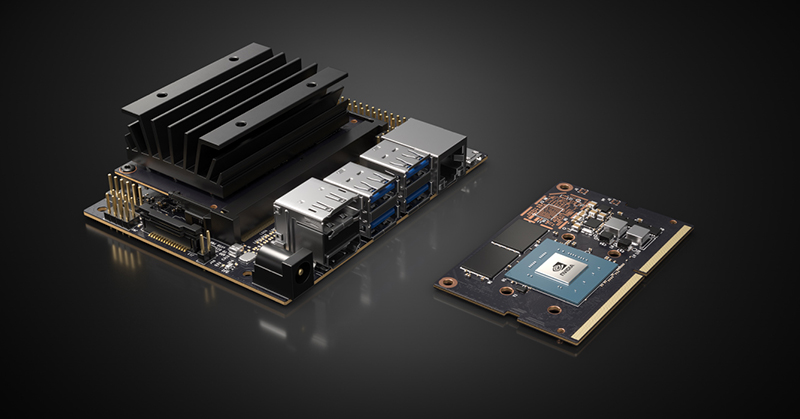

The Nvidia Jetson Nano has always felt like a tiny board with big ambitions. It looks innocent enough on a desk: a compact developer kit, a heat sink, a few ports, and the quiet confidence of a machine that knows it can run computer vision without phoning a giant cloud server every five seconds. But once you start building with it, the personality changes. Suddenly, this little edge AI computer becomes a robot brain, a smart camera engine, a classroom lab, and a weekend project magnet.
When Nvidia introduced the Jetson Nano Developer Kit, the big idea was simple: bring GPU-accelerated AI to makers, students, researchers, and embedded developers at a price and size that did not require a corporate purchase order or a forklift. The original Jetson Nano Developer Kit offered a 128-core Nvidia Maxwell GPU, a quad-core Arm Cortex-A57 CPU, 4GB of LPDDR4 memory, and 472 GFLOPS of AI performance in an 80 x 100 mm developer board. That was a serious “wait, this runs on my desk?” moment.
Today, the Jetson Nano name also sits in a broader family that includes the more modern Jetson Orin Nano and Jetson Orin Nano Super Developer Kit. The newer Orin Nano Super pushes the concept much further with Ampere GPU architecture, tensor cores, 8GB LPDDR5 memory, external NVMe support, and up to 67 INT8 TOPS of AI performance. In plain English: the small-board AI category grew up, drank a double espresso, and started running generative AI demos before lunch.
Why the Jetson Nano Still Matters
The phrase “smaller form factor” gets thrown around a lot in tech marketing, usually right before someone asks you to buy a dongle. With the Jetson Nano, however, compact size genuinely changes what you can build. A full desktop GPU system is powerful, but it is not going on a small rover, inside a smart kiosk, behind a camera enclosure, or into a student robotics kit. Jetson Nano brings AI inference closer to the sensors, which is exactly where many real-world projects need it.
That is the heart of edge AI. Instead of sending every video frame, audio clip, or sensor reading to the cloud, the device can process data locally. A Jetson Nano can classify images, detect objects, segment scenes, process camera feeds, and control robotics logic right on the board. That reduces latency, saves bandwidth, and makes projects feel more responsive. It also means your robot does not freeze awkwardly in the hallway just because Wi-Fi decided to have a dramatic moment.
Hands-On Hardware Impressions
The first thing you notice about the Jetson Nano Developer Kit is that it feels more like a serious embedded platform than a toy single-board computer. The board includes familiar maker-friendly connections such as USB, HDMI, Ethernet, a microSD slot, a camera connector, and a 40-pin GPIO header. That mix matters because it makes the Nano approachable. You can plug in a keyboard, mouse, display, camera, and network cable without needing a drawer full of mysterious adapters.
The original 4GB Jetson Nano Developer Kit featured four USB 3.0 ports, HDMI 2.0, DisplayPort 1.3, Gigabit Ethernet, M.2 Key E, MIPI CSI-2 camera support, and a 40-pin header. The 2GB version reduced memory to lower the price but kept the same general AI-learning mission, adding USB-C power and an included wireless adapter in many kits. For beginners, that lower-cost 2GB board made the Jetson ecosystem less intimidating. For experienced developers, the 4GB model offered more breathing room for heavier projects.
Performance: Not a Raspberry Pi Clone
It is tempting to compare the Jetson Nano with a Raspberry Pi because both are small boards that sit nicely on a desk and attract a suspicious number of jumper wires. But the comparison only goes so far. A Raspberry Pi is a fantastic general-purpose single-board computer. The Jetson Nano is more specialized. Its real advantage is the Nvidia GPU and the software stack built around CUDA, cuDNN, TensorRT, OpenCV, and machine learning frameworks.
In real use, that means the Nano is happiest when it is accelerating AI inference, computer vision, robotics, and GPU-aware workloads. You can run object detection models, experiment with image classification, build a smart camera, or create a small autonomous robot. If your project is mostly browsing, office work, or light Linux tinkering, another board may be cheaper and simpler. But if your project says “camera,” “model,” “inference,” or “robot,” the Jetson Nano starts grinning from underneath its heat sink.
The Software Stack Is the Secret Sauce
The hardware is only half the story. JetPack is what makes Jetson boards feel like an actual AI development platform instead of a tiny computer that happens to have a GPU. Nvidia JetPack provides a Linux-based development environment and includes key AI acceleration libraries such as CUDA, cuDNN, and TensorRT. It also supports common frameworks and tools used in AI, computer vision, and robotics development.
This is important because beginners do not want to spend three days fighting dependency errors before seeing one bounding box appear on a camera feed. Professionals do not want to rebuild the universe every time they deploy a prototype. JetPack gives the Jetson Nano a ready-made foundation for AI applications, which lowers the frustration tax. And yes, in embedded development, frustration tax is real. It is usually paid in coffee, forum searches, and muttering at terminal windows.
What You Can Actually Build With It
The Jetson Nano is most impressive when attached to a camera. A simple USB webcam or CSI camera can turn the board into a practical computer vision system. Common project examples include object detection, people counting, face detection, gesture recognition, plant monitoring, license plate experiments, defect detection, and small robot navigation. It is also a solid platform for learning how AI models behave outside a polished cloud notebook.
For robotics, the Jetson Nano fits naturally into small autonomous vehicles, JetBot-style builds, drones, smart carts, and sensor-heavy prototypes. The GPIO header and camera support make it friendly for maker projects, while the GPU acceleration makes it more capable than traditional microcontroller-based systems. A microcontroller can blink LEDs all day long with heroic dedication, but it is not going to run a neural network on live video with the same confidence.
Original Jetson Nano vs. Jetson Nano 2GB
The original Jetson Nano Developer Kit offered the better all-around experience thanks to its 4GB memory configuration and more generous I/O. It was ideal for makers who wanted flexibility and enough RAM to explore multiple frameworks, heavier demos, and more complex projects. The 2GB Jetson Nano Developer Kit, meanwhile, was designed as a lower-cost starter AI computer for education, classroom learning, and beginner robotics.
The 2GB model kept the same 128-core Maxwell GPU and quad-core Arm A57 CPU but reduced memory. That made it more affordable, but it also meant users had to be more thoughtful about model size, background services, browser tabs, and desktop overhead. In other words, the 2GB Nano teaches two lessons at once: AI fundamentals and the ancient engineering wisdom of “please close the 17 tabs you are not using.”
Where Jetson Orin Nano Super Changes the Conversation
The Jetson Orin Nano Super Developer Kit is not just a faster Nano; it represents a different era of edge AI. With up to 67 INT8 TOPS, a 1024-core Ampere GPU, 32 tensor cores, a 6-core Arm Cortex-A78AE CPU, 8GB of LPDDR5 memory, and support for SD storage plus external NVMe, it is built for far more demanding workloads than the original Nano. It can handle modern vision models, robotics stacks, and even compact generative AI experiments at the edge.
The jump from the original Nano to Orin Nano Super is similar to moving from a clever pocket calculator to a small workstation that happens to fit in your hand. The older Nano is still great for learning AI fundamentals and computer vision basics. The Orin Nano Super is better for developers who want to prototype modern AI agents, vision-language applications, robotics perception, and more ambitious edge systems.
Setup Experience: Friendly, But Not Magic
Getting started with a Jetson Nano is fairly straightforward. You flash the operating system image to a microSD card, connect power, display, keyboard, mouse, and network, then boot into the Jetson environment. Nvidia’s getting-started guides and community tutorials make the process easier than many embedded platforms. Still, this is a developer board, not a toaster. It rewards patience.
Power quality matters. Storage quality matters. Cooling matters. A cheap microSD card can turn a promising AI project into a slow-motion tragedy. A weak power supply can cause random crashes that feel like ghost stories for engineers. A fan or proper airflow becomes useful when running sustained AI workloads. The board is small, but the rules of physics remain full size.
Real-World Strengths
1. Local AI Inference
The Jetson Nano shines when running inference locally. For camera-based projects, the difference between cloud processing and edge processing is huge. Local inference reduces lag and keeps the device useful even when the internet is unreliable.
2. Strong Learning Ecosystem
Nvidia has built a large education and developer ecosystem around Jetson. Tutorials, forums, sample projects, JetBot resources, and AI courses make the board easier to learn than many embedded AI alternatives.
3. GPU-Accelerated Development
CUDA support is a major advantage. Developers who already understand Nvidia’s software ecosystem can transfer knowledge from desktop AI development to embedded projects more smoothly.
4. Compact and Power Efficient
The original Nano’s 5W and 10W power modes made it practical for small devices. The newer Orin Nano family raises the performance ceiling while keeping the small edge AI form factor alive.
Real-World Limitations
The Jetson Nano is not perfect, and pretending otherwise would be rude to reality. The original Nano’s CPU is older, memory is limited, and newer AI frameworks may require careful version matching. The 2GB model can feel cramped for heavier demos. Some software installs require patience, especially when following tutorials written for different JetPack versions.
Another important point: Jetson Nano is mainly an inference and prototyping board. You can train small models or fine-tune lightweight experiments, but serious model training still belongs on a more powerful GPU machine or cloud instance. The Nano is the smart edge worker, not the entire data center in disguise.
Who Should Buy a Jetson Nano?
The Jetson Nano is best for students, makers, robotics hobbyists, computer vision learners, and embedded developers who want hands-on AI without building a full desktop GPU system. It is especially useful for projects involving cameras, sensors, small robots, smart displays, and local AI decision-making.
If you are starting from scratch and can choose from the current Jetson lineup, the Jetson Orin Nano Super is the more future-proof option. It has much more performance and a stronger path for modern AI workloads. But if you already own an original Jetson Nano, it remains a valuable learning board. It can still teach the core ideas behind edge AI: model optimization, inference speed, sensor integration, power limits, and practical deployment.
Hands-On Experience: What It Feels Like to Build With the Jetson Nano
Using the Jetson Nano for the first time feels a little like discovering that a lunchbox can run a machine learning lab. The unboxing is modest. There is no dramatic RGB lighting, no giant tower case, and no “behold my power” fan roar. You connect the board, flash the microSD card, plug in a camera, and suddenly you are staring at a Linux desktop on a device small enough to misplace under a notebook.
The first satisfying moment usually comes when a live camera demo starts drawing boxes around objects. A chair becomes a chair. A person becomes a person. A coffee mug becomes, depending on the model, either a cup or a very suspicious vase. That is when the board stops being a collection of specs and starts feeling like a real AI computer. It is not just running code; it is interpreting the world through a sensor.
In hands-on use, the Jetson Nano teaches practical engineering quickly. You learn that AI performance is not only about raw compute. It is also about camera resolution, model size, frame rate, memory use, thermal behavior, and whether your power adapter is trustworthy. A model that runs beautifully in a cloud notebook may crawl on the edge unless it is optimized. TensorRT becomes more than a buzzword; it becomes the difference between “cool demo” and “usable project.”
One of the most enjoyable projects is a smart camera. Start with a USB webcam, install a sample object detection model, and test it on ordinary desk objects. The setup is simple enough for a weekend, but the learning curve is meaningful. You can experiment with lighting, object distance, model confidence thresholds, and frame rates. You quickly discover that real-world AI is messy. Shadows confuse models. Reflections cause surprises. Cats, as usual, refuse to cooperate with science.
A small robot project makes the Jetson Nano even more interesting. Add a camera, motor controller, chassis, and battery system, then use the Nano as the perception brain. The board can process visual input while another controller handles low-level motor timing. This division of labor works well: let the microcontroller manage precise signals, and let the Jetson handle higher-level vision and decision-making. It is a practical lesson in system design, not just AI.
The Nano also encourages careful resource management. You learn to disable unnecessary services, use lighter models, monitor memory, and keep your environment clean. On a desktop workstation, wasteful code can hide behind abundant RAM and a huge GPU. On a Jetson Nano, inefficient code walks into the room wearing tap shoes. You notice it immediately.
Working with the newer Jetson Orin Nano Super feels like the same idea with a much larger performance budget. The board is still compact, but the experience is more comfortable for modern models. NVMe support is a major quality-of-life improvement because storage speed affects development more than beginners expect. Larger memory bandwidth and tensor cores also make advanced AI demos feel less like a stunt and more like a practical workflow.
The biggest hands-on takeaway is that Jetson boards make AI physical. Instead of keeping models trapped in notebooks and dashboards, you connect them to cameras, wheels, sensors, displays, and real environments. That is where the fun begins. The Jetson Nano may be small, but it turns abstract AI concepts into something you can carry, mount, wire, test, break, fix, and proudly show off to someone who did not ask but is going to hear about it anyway.
Final Verdict
The Nvidia Jetson Nano succeeded because it made embedded AI feel reachable. It gave makers and students a compact, affordable way to work with computer vision, neural networks, robotics, and GPU acceleration. The original board is not the fastest option today, but its influence is still obvious in the modern Jetson lineup.
The newer Jetson Orin Nano Super carries that same spirit into a more demanding AI era. It is smaller than a desktop, stronger than a typical hobby board, and flexible enough for serious edge AI prototypes. For anyone interested in robotics, smart cameras, AIoT, or local inference, the Jetson Nano family remains one of the most compelling ways to put intelligence at the edge.
In short: the Jetson Nano is proof that big AI ideas do not always need big hardware. Sometimes they just need a small board, a decent power supply, a patient developer, and maybe a fanbecause even tiny geniuses get warm when they think too hard.