
A Kindle is usually treated like a quiet little book machine: open it, read a chapter, close it, forget it exists until the next literary craving arrives. But the moment its screen goes to sleep, something interesting happens. That e-ink display is still sitting there, visible, calm, and oddly underused. For most people, it shows a book cover, an Amazon lock-screen ad, or a tasteful default image that says, “I am asleep, please admire my grayscale personality.”
The idea behind the Kindle hack that adds value to the wallpaper is simple but clever: instead of wasting the lock screen, turn it into something useful. Weather, date, time, calendar events, tasks, reminders, reading goals, commute notes, or even a minimalist quote can live on that screen. Suddenly, the Kindle is not just an e-reader. It becomes a low-power dashboard that happens to read novels on the side.
This concept has been around in maker circles for years, especially after hobbyists showed how a jailbroken Kindle could display weather reports and calendar data as a custom screen saver. Today, the idea feels even more relevant. We are surrounded by glowing phones, buzzing watches, shouting tablets, and screens that act like tiny caffeinated billboards. A Kindle wallpaper hack offers the opposite: useful information without the noise.
What Is the Kindle Wallpaper Hack?
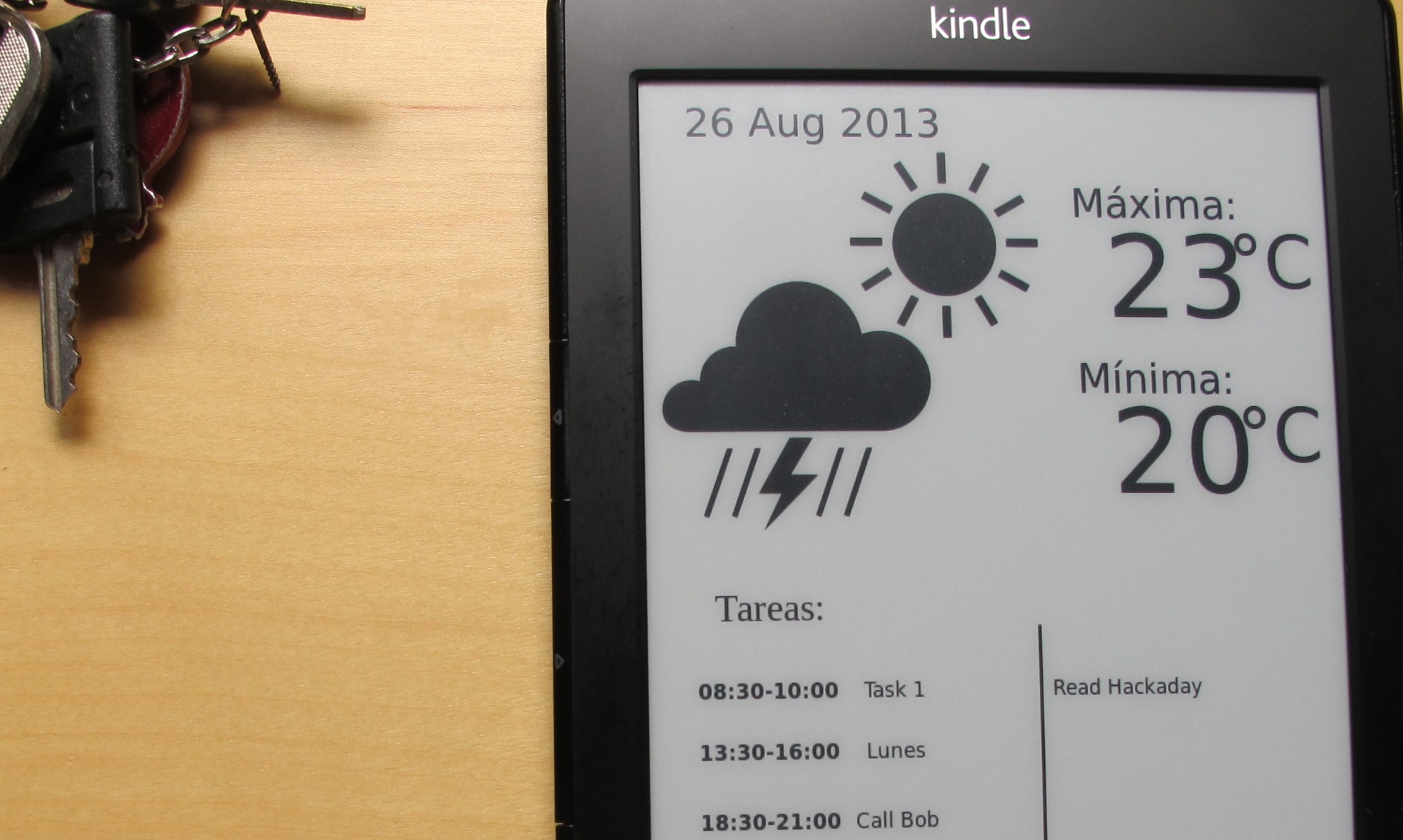
The Kindle wallpaper hack is a DIY customization that changes what appears on the Kindle’s sleep screen. In its most interesting form, it does not merely replace the default screen saver with a pretty picture. It turns the screen into a practical information panel.
Earlier projects used a server or computer to gather information from online sources, such as weather services and calendar feeds. That server generated an image, often from an SVG or PNG file, and the Kindle downloaded or displayed it as the screen saver. The Kindle itself remained usable as an e-reader, which is the magic trick. The device did not become a science-fair victim taped permanently to a refrigerator. It still read books. It just got a side hustle.
Some versions focused on weather forecasts. Others added time, date, to-do lists, Google Calendar events, or daily reminders. The best part is that e-ink does not need constant power to keep an image visible. Once the image is drawn, it stays there until the next update. That is why a Kindle can be transformed into a gentle dashboard without behaving like a battery-hungry tablet.
Why the Kindle Screen Is Perfect for Useful Wallpaper
The Kindle’s greatest weakness as a general-purpose screen is also its greatest strength. E-ink refreshes slowly, does not handle animation well, and looks more like printed paper than a glowing display. That makes it a terrible place to watch a movie, play a racing game, or doom-scroll until your soul asks for a receipt.
But for static information, e-ink is excellent. Weather icons, calendar blocks, task lists, daily habits, and minimalist dashboards do not need 120 frames per second. They need clarity, contrast, and patience. The Kindle has all three.
E-ink Holds an Image Without Constant Power
Traditional LCD and OLED screens require continuous energy to stay visible. E-ink works differently. It mainly uses power when the image changes. Once the image is displayed, it can remain visible with little or no additional display power. That makes the Kindle ideal for a lock-screen dashboard that updates only occasionally.
The Display Is Easy on the Eyes
A Kindle screen reflects light instead of blasting it at your face. This is one reason people enjoy reading on Kindles for long stretches. When used as wallpaper, the display feels less demanding than a phone screen. You can glance at it in the morning, absorb the information, and move on without being kidnapped by notifications.
It Gives Old Kindles a Second Life
Many households have an older Kindle in a drawer. Maybe the battery is not what it used to be. Maybe the owner upgraded to a Paperwhite, Oasis, Scribe, or Colorsoft. A wallpaper hack can turn an aging Kindle into a desk display, kitchen dashboard, weather station, or reading tracker. That is better than letting it become archaeological evidence in the junk drawer next to three mystery cables.
How the Hack Usually Works
The classic Kindle wallpaper hack generally involves three moving parts: information, image generation, and display replacement.
1. The Data Source
First, the system needs useful information. This might include weather from an online weather service, calendar events from Google Calendar, a task list from a productivity app, or manually written notes. The goal is not to turn the Kindle into a laptop. The goal is to show only what matters at a glance.
2. The Server or Script
Next, a script gathers the information and turns it into an image. Some projects use a separate computer, Raspberry Pi, web server, or home server. This approach keeps the Kindle from doing all the heavy lifting. The server fetches data, formats it, and creates a clean graphic that fits the Kindle’s screen.
This is where design matters. A Kindle screen is not a neon billboard. High-contrast black-and-white layouts work best. Big text, simple icons, generous spacing, and clear hierarchy make the wallpaper actually useful. Tiny gray text may look stylish in a design mockup, but on e-ink it can quickly become an eye exam nobody asked for.
3. The Kindle Displays the Image
Finally, the Kindle shows the generated image as its wallpaper or screen saver. Older hacks often required jailbreaking the Kindle and installing small scripts that periodically refreshed the image. Some modern users avoid deep modification by using Kindle’s Display Cover feature creatively, although that approach is more limited and depends on device settings, ad status, and supported formats.
Display Cover vs. True Custom Wallpaper
Amazon’s official Display Cover feature allows supported ad-free Kindle devices to show the cover of the book currently being read on the lock screen. This is a nice feature, especially for readers who love book art. It is also safer than jailbreaking because it uses built-in Kindle behavior.
However, Display Cover is not the same as a full custom wallpaper system. It is designed to show book covers, not live weather, task lists, or dashboards. Some users create a personal document with a custom cover image and then open that document before putting the Kindle to sleep. This can mimic custom wallpaper without deep modification, but it is not as smooth as a true automated hack.
If your Kindle still has lock-screen ads, customization is more limited. Amazon’s ad-supported models show sponsored screensavers in sleep mode. Users who want book covers or a cleaner lock screen usually need to remove ads through Amazon or buy an ad-free model. In other words, before your Kindle can become a tiny productivity monk, it may first need to stop auditioning as a billboard.
What Can You Put on a Kindle Wallpaper Dashboard?
The best Kindle wallpaper dashboards are simple. The screen should answer one question: “What do I need to know right now?” If it tries to answer every question in human civilization, it becomes a grayscale spreadsheet of sadness.
Weather Forecast
A weather dashboard is one of the most popular uses. It can show today’s temperature, rain probability, wind, sunrise and sunset, and a short forecast for the next few days. This is perfect for a kitchen counter, entryway table, or home office.
Calendar and Schedule
A Kindle can show today’s appointments, meeting blocks, school pickup times, or family reminders. This is useful because a calendar on e-ink feels calmer than a calendar on a phone. There is no temptation to check social media after looking at your 2 p.m. dentist appointment.
Task List
A daily task list can make the Kindle feel like a paper planner that updates itself. Keep it short: three priorities, one reminder, and maybe a motivational line. Do not cram in 47 tasks unless your goal is to be emotionally defeated by an e-reader before breakfast.
Reading Goals
Since the device is already a reading tool, a reading-focused wallpaper makes sense. It can show the current book, pages read this week, a daily reading streak, or a reminder like “Read 20 minutes before scrolling.” That last one may hurt, but it is a productive kind of hurt.
Household Information
Families can use a Kindle dashboard for trash day, recycling week, grocery reminders, chore rotation, or meal planning. A wall-mounted Kindle in the kitchen can become a quiet household command center.
Benefits of Turning Kindle Wallpaper Into Useful Information
It Reduces Screen Noise
The biggest benefit is not technical. It is psychological. A Kindle dashboard gives you useful information without dragging you into an app ecosystem. You glance, learn, and leave. That is a rare digital experience these days.
It Saves Power
Because e-ink only needs meaningful power when changing the display, a Kindle can be an efficient always-visible information screen. It is not always-on in the same way a tablet is always-on. It is more like a digital sticky note with manners.
It Looks Good in a Minimalist Setup
A well-designed Kindle wallpaper can look surprisingly elegant. Black text on a white e-ink screen fits nicely on a desk, nightstand, hallway shelf, or refrigerator. It has the charm of paper with just enough technology to feel clever.
It Encourages Repurposing Instead of Replacing
Many people upgrade electronics before the old device is truly useless. A Kindle wallpaper hack is a small act of practical sustainability. It extends the life of hardware that might otherwise sit forgotten. That is not just geeky; it is sensible.
Risks and Limitations to Know Before Hacking
Not every Kindle should be hacked, and not every user should attempt it. Jailbreaking can void warranties, break features, or cause problems after software updates. Some newer Kindle models are more difficult to modify than older ones. Amazon does not officially support these custom workflows, so you are entering DIY territory.
There are also technical limits. The Kindle browser is basic. The refresh rate is slow. Some scripts rely on older firmware or community tools. Weather APIs can change. Calendar permissions can break. A server can go offline. The Kindle may also enter sleep states that prevent scheduled updates unless the setup is carefully designed.
That does not mean the idea is bad. It means the project should be treated like a hobby hack, not a mission-critical hospital dashboard. Use it for weather, reminders, and personal productivity. Do not use it as the only system telling you whether your flight leaves in 20 minutes.
Design Tips for a Better Kindle Wallpaper
Use High Contrast
Black and white is your friend. Avoid subtle gray text unless you have tested it on the actual device. What looks soft and tasteful on a laptop may look like fog on a Kindle.
Keep the Layout Simple
Divide the screen into clear zones: date at the top, weather in the middle, tasks near the bottom. Use whitespace. Whitespace is not wasted space; it is where readability goes to breathe.
Use Large Fonts
A dashboard should be readable from a few feet away. If you need to pick up the Kindle, squint, and rotate it under a lamp, the design has lost the argument.
Update Only When Needed
Weather might update hourly. A calendar could update every 15 to 30 minutes. A daily quote only needs one update a day. Frequent updates can reduce battery life and increase complexity.
Make It Personal
The best wallpaper is not necessarily the most advanced. A simple layout with your schedule, a reading reminder, and the day’s weather may be more valuable than a complex dashboard filled with charts, icons, and tiny numbers.
Who Should Try This Kindle Hack?
This project is ideal for tinkerers, productivity nerds, e-ink fans, and anyone with an old Kindle collecting dust. It is also appealing to people who want useful information without another glowing rectangle in the house.
If you enjoy Raspberry Pi projects, home dashboards, automation, Linux scripts, or digital minimalism, the Kindle wallpaper hack is a satisfying weekend project. If you become nervous when a tutorial says “open a terminal,” you may want to start with safer customization options, such as Display Cover, custom book covers, or non-jailbreak personalization methods.
Real-World Examples of Kindle Wallpaper Value
Imagine a Kindle on a nightstand that shows tomorrow’s weather, your first meeting, and a reminder to charge your headphones. No notifications. No blue light. No accidental 45-minute detour into short videos of raccoons stealing cat food.
Picture a kitchen Kindle showing the weekly meal plan, grocery reminders, and recycling day. It is easier to glance at than a family calendar app, and nobody has to unlock a phone with flour-covered hands.
Or consider a home office Kindle that displays three daily priorities and your next calendar event. It becomes a quiet productivity anchor. Not a bossy one. More like a polite assistant wearing a cardigan.
Why This Hack Still Matters in 2026
The Kindle wallpaper hack may have started as a maker project, but the idea fits modern digital life beautifully. People want fewer distractions, longer battery life, and devices that serve a clear purpose. A Kindle dashboard checks all three boxes.
It also reveals something important about technology: value is not always about adding more features. Sometimes value comes from using one existing feature better. The Kindle already has a screen that can hold static information elegantly. The hack simply asks, “Why not make that screen useful?”
That question is powerful. It turns wallpaper from decoration into function. It turns an idle screen into an information surface. It turns an old e-reader into a small, quiet part of a smarter home.
Experience: Living With a Useful Kindle Wallpaper
The first thing you notice after setting up a useful Kindle wallpaper is how calm it feels. A phone widget gives you similar information, technically. But a phone widget lives inside a casino of distractions. You check the weather, then see a notification, then open an app, then somehow find yourself reading comments from strangers arguing about sandwich architecture. The Kindle does not do that. It just sits there with the forecast, looking innocent.
In daily use, the most valuable setup is usually the simplest one. A dashboard with the date, weather, top three tasks, and next calendar event is enough. The temptation is to add more: moon phase, air quality, unread email count, stock prices, habit tracker, inspirational quote, step count, server uptime, and whether Mercury is currently making everyone weird. Resist. A Kindle wallpaper should reduce mental clutter, not become a tiny command center for anxiety.
One practical experience is that placement matters. On a desk, the Kindle works well as a focus board. On a nightstand, it is good for tomorrow’s weather and morning reminders. In the kitchen, it becomes useful for household schedules. Near the front door, it can show “umbrella today” or “trash pickup tomorrow,” which is the kind of boring information that saves real-world annoyance.
Another lesson: design for distance. Many people create a beautiful wallpaper on a laptop and then discover it is too small on the Kindle. Use bigger fonts than you think you need. Make icons bold. Avoid thin decorative typefaces. E-ink rewards clarity and punishes fussiness.
Battery life is generally friendly if updates are infrequent. A wallpaper that changes every few hours is more practical than one that refreshes every minute. The Kindle is not trying to be a smartwatch. Let it be slow. Slow is part of the charm.
The emotional effect is surprisingly pleasant. A customized Kindle wallpaper makes the device feel owned in a deeper way. It is no longer just an Amazon reading rectangle. It becomes part of your routine. It can nudge you to read, remind you to take a jacket, or keep your daily priorities visible without shouting.
The best experience comes when the hack disappears into the background. You stop thinking about the system and simply glance at the screen when needed. That is when the project succeeds. Technology should not always demand attention. Sometimes it should quietly help, then politely shut up.
Conclusion
The Kindle hack that adds value to the wallpaper is a brilliant example of practical creativity. It takes a familiar device and asks it to do one more useful thing without losing its original purpose. By turning the sleep screen into a weather display, calendar board, task list, reading tracker, or household dashboard, users can make the Kindle more personal, more functional, and more valuable.
This is not a hack for everyone. Some methods require jailbreaking, scripting, and patience. But the larger idea is accessible: an idle screen does not have to be wasted. Whether you use official Kindle features, clever document covers, or a full DIY automation setup, the result is the same. Your Kindle wallpaper can become more than decoration. It can become a quiet little helper that never asks you to install another app.
Note: This article is written for web publishing in standard American English and synthesizes real Kindle customization concepts, e-ink display behavior, and practical DIY use cases without inserting source links into the article body.