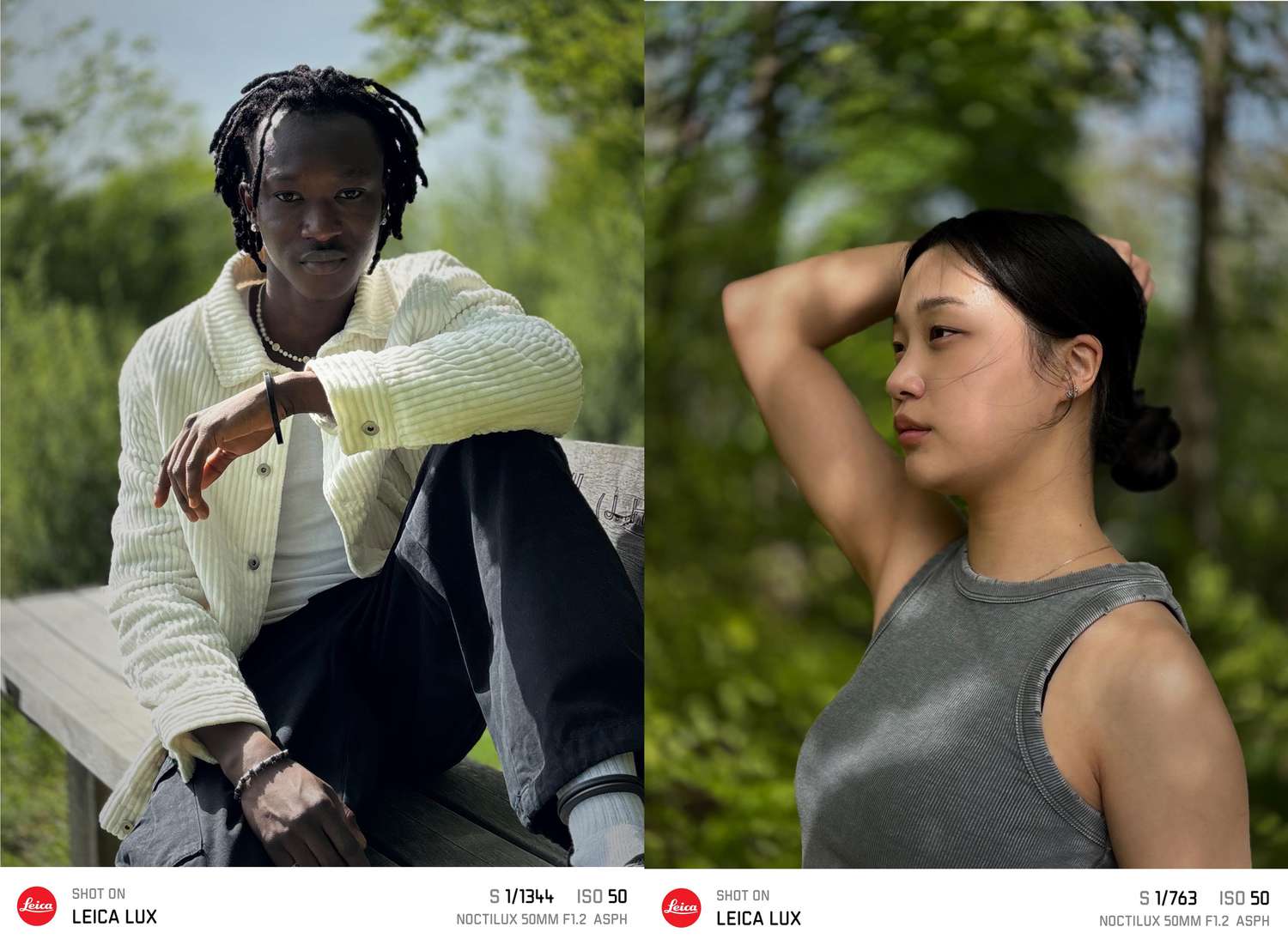

Let’s be honest: when a luxury camera brand launches an iPhone app, most people expect one of two thingseither a glorified logo sticker machine or a very expensive way to rediscover your phone camera. Leica LUX could have easily been both. Instead, it lands in a much more interesting category: a surprisingly thoughtful camera app that actually changes how you shoot.
That’s the real twist here. Leica LUX is not just “the Leica app.” It’s Leica’s attempt to bring its visual languagecolor science, lens character, and a more intentional shooting experienceto the iPhone in a way that feels useful rather than gimmicky. And while the app absolutely has limitations (we’ll get to those, because no app is perfect and your iPhone still isn’t secretly an M11), it’s much better than many people expect from a brand entering a crowded mobile photography space.
The app launched in 2024 and has continued to evolve with frequent updates, new lens simulations, new looks, interface refinements, and even artist collaborations. That matters. A lot of camera apps launch with fanfare, then disappear into the digital basement next to your 2018 meditation app and that one “smart scanner” tool you used once. Leica LUX, by contrast, looks like a product Leica is actively building into a real ecosystem.
If you’re curious whether Leica LUX is worth trying, worth subscribing to, or worth pairing with the LUX Grip, this guide breaks down what it does well, where it still misses, and why it has earned more praise than skepticism from many reviewers.
What Leica LUX Actually Is (And What It Isn’t)
Leica LUX is a pro-style manual camera app for iPhone that blends automatic and manual shooting controls with Leica-inspired “Looks” and lens simulations. In plain English: it lets you shoot with more control, then apply visual rendering styles that aim to feel more like Leica’s photographic aesthetic than a typical phone filter pack.
What it is
- A camera app with manual controls (ISO, shutter speed, white balance, focus options, exposure compensation, RAW, and more).
- A creative tool with Leica Looks and lens-inspired simulations that affect rendering and bokeh style.
- A design-forward shooting experience that encourages slower, more deliberate framing.
- A growing platform that receives regular updates, feature additions, and new simulated lenses/looks.
What it is not
- Not a magic upgrade to your iPhone sensor.
- Not a replacement for a dedicated Leica camera (or any serious interchangeable-lens camera).
- Not a one-tap shortcut to “pro photos” if composition, light, and timing are ignored.
- Not a universally cheap option once you factor in the Pro subscription or LUX Grip ecosystem.
In other words, Leica LUX is best understood as a creative camera app and image-rendering experiencenot a miracle machine. That framing makes all the difference when judging whether it’s “worth it.”
Why Leica LUX Feels Better Than Expected
1) It has a point of view
Many iPhone photography apps offer controls. Fewer offer taste. Leica LUX stands out because it has a clear visual philosophy. The app leans into Leica’s signature color approach and lens character rather than just throwing “CINEMATIC / VINTAGE / MOODY / TEAL-ORANGE” presets at the screen and hoping one looks expensive on Instagram.
This gives the app a stronger identity than most mobile camera tools. You’re not just adjusting slidersyou’re choosing a visual interpretation. That’s a big reason users and reviewers describe the app as feeling more like a camera product and less like a generic editing app wearing a fancy coat.
2) The lens simulations are more than novelty
Leica LUX’s lens simulations are one of its most compelling features. These aren’t literal optical replacements (your iPhone lens remains your iPhone lens), but they can change the rendering enough to make images feel distinct, especially in portrait-style or subject-isolated shots. The simulated bokeh and tonal shifts often create a more intentional, less “phone-default” look.
That’s why the app earns the “better than expected” label: it doesn’t just add filters on top of an image; it tries to shape the photographic character in a way that’s tied to Leica’s brand heritage. If you care about image mood, micro-contrast, or lens personality, this is much more interesting than the average tap-and-pray preset pack.
3) It encourages intentional shooting
One of the most underrated features of any camera tool is whether it changes your behavior. Leica LUX often does. Reviewers have noted that it can make mobile shooting feel more deliberate and less like rapid-fire screenshotting the world. That alone is valuable.
The app’s interface and controls nudge you toward making choices: which look, which lens simulation, how much exposure compensation, whether to go manual, whether to shoot RAW. It’s not trying to replace Apple’s convenience-first camera app; it’s trying to create a different mindset. And for many users, that’s the point.
The Feature Set That Makes It Legit
Leica LUX earns credibility because it combines style with actual camera functionality. If it only had “Leica vibes,” it would be a quick curiosity. The deeper controls and ongoing updates make it a tool you can keep coming back to.
Manual controls and RAW support
The app supports automatic and manual workflows, which makes it useful for both casual shooters and people who want more control. If you’re the kind of person who likes tweaking shutter speed, ISO, white balance, and focus, Leica LUX gives you room to work. If you just want the Leica Look without diving into settings, Auto mode still gets you there faster.
That flexibility matters for SEO-friendly real-world intent too (yes, we’re going there): users searching for a Leica iPhone app review or best manual camera app for iPhone are often split between “I want easy” and “I want control.” Leica LUX sits in the middle better than most.
Leica Looks, film-style rendering, and evolving presets
Leica LUX includes multiple Leica Looks out of the box and gates the full collection behind its Pro subscription. The app has continued to expand its collection over time, adding new looks, film-grain tools, and artist-inspired styles. Leica also introduced “Artist Looks,” including a Greg Williams collaboration, which points to a broader strategy: Leica isn’t treating this as a static preset library.
That update cadence is a good sign. It suggests the app’s long-term value may come as much from software evolution as from its launch feature list.
The LUX Grip ecosystem (optional, pricey, but interesting)
Leica also built hardware around the app: the Leica LUX Grip, a MagSafe-compatible iPhone grip with physical controls (including a two-stage shutter button, control dial, and function buttons). This is where Leica gets very Leicabeautiful design, tactile controls, and pricing that may cause your wallet to file a formal complaint.
Still, the grip makes the app’s philosophy easier to understand. Leica LUX is not just an app; it’s a mobile photography experience designed to feel more like using a camera. Whether that’s worth premium money depends on how often you shoot on your iPhone and how much you care about ergonomics.
Where Leica LUX Still Falls Short
Let’s keep this review honest and useful: Leica LUX is impressive, but it’s not flawless. In fact, the gap between “surprisingly good” and “perfect” is where the most practical buying/trial decisions live.
1) Subscription friction is real
Leica LUX offers a free tier and trial, but many of the most attractive features live behind the Pro subscription. If you’re already paying for cloud storage, editing apps, and three streaming services you forgot to cancel, another monthly or annual fee may feel like one polished red dot too many.
The app can absolutely be worth paying for if you use it often. But if you only shoot casually, the subscription model may be the biggest reason to admire the app and still not commit.
2) Simulated depth can still look like… simulated depth
Leica’s lens simulations are often excellent for mobile, but iPhone computational photography has limits. In difficult edges (hair, glasses, busy backgrounds, overlapping subjects), the illusion can wobble. You’ll occasionally get that “wow, nice shot” resultand occasionally get “why did the app blur half the chair but not the other half?”
This isn’t unique to Leica LUX. It’s a broader smartphone imaging challenge. But because Leica sets a premium expectation, users may notice these artifacts more.
3) Processing and preview lag can happen
Some users and reviewers have noted that certain modes (especially those previewing simulated aperture effects live) can introduce extra processing overhead and a less snappy viewfinder feel. For many people it’s a small trade-off and worth it for the final look. For fast-moving subjects, it can be more annoying.
Translation: Leica LUX is best when you want to shoot on purpose, not necessarily when you’re trying to photograph a toddler doing parkour off the couch.
Who Should Try Leica LUX (And Who Can Skip It)
Leica LUX is a great fit if you:
- Love mobile photography and want your iPhone images to look less “default iPhone.”
- Enjoy manual controls and experimenting with image character.
- Care about color science, lens personality, and film-inspired rendering.
- Want a camera app that feels like a creative tool, not just a utility.
- Like the idea of a growing ecosystem (app + optional grip + ongoing updates).
You can probably skip it if you:
- Mostly shoot quick snapshots in Apple’s Camera app and never edit.
- Don’t want another subscription, period.
- Prefer speed and simplicity over experimentation.
- Expect Leica LUX to magically turn your phone into a full-frame Leica camera.
A 500-Word Experience-Based Walkthrough: What Using Leica LUX Actually Feels Like
Imagine this: you’re heading out for a late-afternoon walk with your iPhone, planning to grab a few casual shots of storefronts, coffee cups, and that one dramatic patch of sunlight hitting a brick wall like it knows it’s being photographed. Normally, you’d open Apple’s Camera app, tap the screen, shoot six frames, and move on. With Leica LUX, the rhythm changes almost immediately.
You open the app andbefore taking a photoyou start making creative choices. Not heavy, complicated, camera-club choices. Just enough to make you pause. Which Leica Look fits the scene? Do you want something clean and neutral, something moodier, something with a classic film-like feel? It’s the difference between grabbing a random pen and picking a fountain pen because you actually care how the sentence looks on paper.
As you frame the shot, the app nudges you to pay attention. You notice the shadows. You notice the background. You notice that the image can take on a different personality depending on the selected lens simulation. Sometimes the effect is subtle; other times it’s obvious enough that you end up taking two versions of the same image just to compare. (Congratulations, you are now doing “tests,” which is how all photography hobbies quietly begin.)
On portraits, Leica LUX can be especially fun. The app’s simulated lens character and rendering can make a simple phone portrait feel more intentional, more styled, and a little less like an accidental screenshot from a group chat. When it works well, you get that satisfying “this came from a phone?” reaction. When it missesusually around complex edges or tricky lightingyou still often get a usable image, but you may need to dial back expectations and remember this is computational photography wearing very fancy shoes.
Manual mode is where the app really earns its keep for photography nerds and curious learners. You can leave it in auto and enjoy the Leica aesthetic, or you can start tweaking settings and see how your choices affect the outcome. That makes Leica LUX useful not only for creating images, but also for improving your eye. It encourages experimentation without feeling like a technical exam.
If you add the LUX Grip, the experience shifts again. Physical controls make your iPhone feel more like a camera and less like a tiny glowing rectangle that also contains your banking apps and memes. A two-stage shutter and tactile dial change your posture and pace. You tend to compose more carefully and shoot fewer throwaway frames. That won’t matter to everyonebut for people who enjoy the act of photography, it can be the app’s secret weapon.
The overall experience is this: Leica LUX doesn’t just try to make your photos look better. It tries to make you shoot betteror at least slower, more deliberately, and with more intention. That’s why it feels better than expected. It’s not simply an iPhone camera app with a luxury logo. It’s a creative workflow tool that makes mobile photography more enjoyable.
Final Verdict
Leica LUX is one of the more interesting iPhone photography apps to arrive in recent years because it combines brand heritage, genuine image-character experimentation, and practical camera controls in a way that feels coherent. It isn’t cheap if you go all-in, and it won’t eliminate the limitations of phone photography. But it does something many apps fail to do: it gives you a reason to keep using it after the first week.
If you’re serious about iPhone photography, enjoy manual camera apps, or just want your mobile images to feel less generic, Leica LUX is absolutely worth testing. And if your expectations are low because “luxury camera brand app” sounds like a punchline, this is one of those rare cases where the joke’s on us.