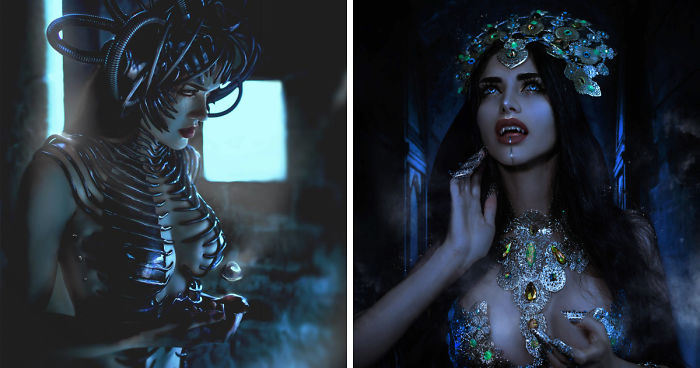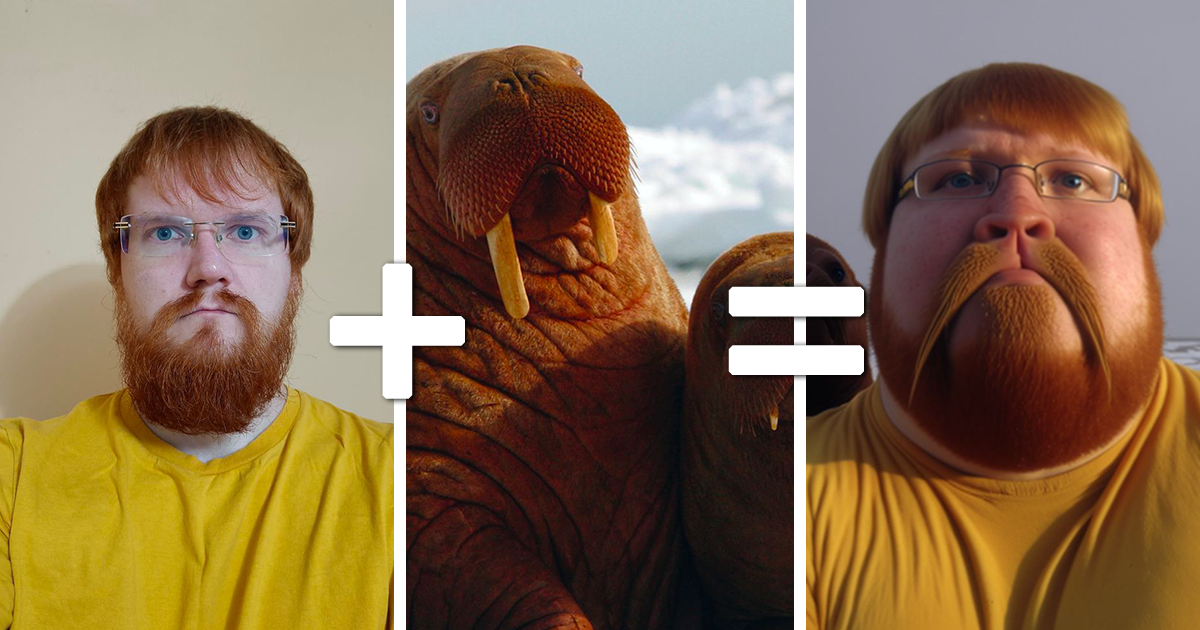
Midjourney AI Can Now Conjoin 2 Photos, And Here Are Some Of The Test Results Shared By A Telegram User (40 Pics)

There are ordinary internet discoveries, and then there are discoveries that make you stare at your screen and whisper, “Who gave the toaster imagination?” Midjourney’s ability to blend, combine, and reinterpret two photos belongs firmly in the second category. What started as a clever experiment shared by a Telegram user quickly turned into a miniature carnival of AI-generated weirdness: animals fused with food, objects acquiring personalities, familiar visual ideas melting together like digital cheese on a very confused pizza.
The headline sounds almost like a dare: Midjourney AI can now conjoin two photos. But the real story is bigger than a single button or a funny gallery. It shows how generative AI is changing visual creativity from a slow, technical process into something closer to visual brainstorming. You bring two images. The machine brings pattern recognition, style interpretation, and the occasional nightmare duck with the confidence of a fashion model.
In this article, we’ll explore what Midjourney photo blending actually does, why the shared test results became so entertaining, how creators can use image prompts responsibly, and why the best results often come from pairing things that absolutely should not be roommates.
What Does It Mean To Conjoin Two Photos In Midjourney?
In simple terms, Midjourney can take two or more image inputs and generate a new image inspired by them. It does not merely paste one photo on top of another like a rushed school poster. Instead, it analyzes visual traits such as shape, texture, color, subject matter, mood, lighting, and composition, then creates a fresh image that borrows from the source materials.
That distinction matters. A traditional photo-editing tool might layer a cat over a loaf of bread. Midjourney might ask, “But what if bread had whiskers, loaf posture, sleepy eyes, and the emotional energy of a house cat judging your life choices?” The result is not a collage in the classic sense. It is a generated interpretation.
Midjourney’s image-based workflow has evolved over time. Users can work with image prompts, the Discord-based blend command, web tools, style references, character references, and editing features that help guide the final result. The most accessible idea is simple: give the AI visual references, then let it imagine a new scene from them.
Why The Telegram User’s Test Results Went Viral
The viral set of 40 images reportedly came from experiments shared by a Telegram creator exploring how Midjourney could combine unrelated images. The fun came from the contrast. When two ordinary pictures become one strange visual concept, the brain gets a tiny comedy shock. You recognize both ingredients, but the final dish was cooked by a robot chef who has never been invited to Thanksgiving.
One reason the results caught attention is that they were easy to understand. You do not need a degree in machine learning to enjoy a hybrid creature or a surreal object. Viewers can instantly play the guessing game: “What two images made this?” That makes AI art highly shareable. It creates curiosity before explanation.
Another reason is timing. Around the rise of Midjourney V4 and later models, AI image generation began moving from abstract novelty to visually persuasive output. Earlier experiments often looked charmingly broken. Newer ones could be funny, polished, unsettling, and surprisingly elegant all at once. That combination is internet rocket fuel.
How Midjourney Blending Works For Everyday Users
For everyday creators, Midjourney photo blending is less about technical wizardry and more about clear visual direction. The user provides image references, and the AI uses them as creative anchors. Depending on the workflow, the creator may use only images or add a text prompt to guide the output more precisely.
Image-Only Blending
Image-only blending is the playground mode. Upload two images, give Midjourney minimal or no text, and let the model decide what matters most. This can produce wild results because the AI must infer the relationship between the images. If one picture is a tiger and the other is a teacup, the model might create a porcelain tiger, a striped teacup, or something that looks like it escaped from a luxury jungle café.
Image Prompts With Text
Adding text gives the system a steering wheel. Instead of simply asking Midjourney to merge two photos, you can tell it what kind of output you want: a realistic product shot, a children’s book illustration, a cyberpunk poster, a clay sculpture, a fashion editorial, or a vintage film still. The text prompt helps prevent the final image from wandering into “beautiful but what am I looking at?” territory.
Style And Character Guidance
Midjourney also supports workflows that help creators borrow a visual style or preserve certain subject traits. Style reference can push the look and feel of an image, while character reference can help maintain recognizable character features across generations. These tools are especially useful when a creator wants consistency instead of pure chaos. Chaos is fun, of course, but sometimes you need the cat-bread to look like the same cat-bread in scene two.
What Makes A Good Two-Photo Combination?
The best Midjourney conjoined photo tests usually have strong contrast. If the two source images are too similar, the result may look normal. Normal is fine for passport photos and tax documents, but not ideal when you are trying to make the internet gasp.
Strong combinations often include one living subject and one object. Think animal plus household item, person plus sculpture, vehicle plus insect, fruit plus building, or toy plus cinematic landscape. The AI has enough difference to create surprise, but enough structure to build a coherent visual idea.
Texture is another secret weapon. Fur, glass, metal, fabric, scales, clouds, leaves, bread crust, and neon lighting all give the model something to remix. A plain white mug plus a plain white chair might not excite the algorithm. A jellyfish plus a chandelier, however, practically walks into the room wearing a tuxedo.
Why The Results Can Look Funny, Creepy, Or Gorgeous
Midjourney does not “understand” images like a human does. It recognizes patterns and generates likely visual relationships. That is why the results can feel brilliant one moment and deeply confused the next. When it works, the AI captures the essence of both images and turns them into something new. When it fails, you may get too many limbs, melted shapes, strange shadows, or an object that looks like it is apologizing for being born.
The funny results often come from category confusion. A loaf is supposed to be food. A cat is supposed to be a pet. Combine them, and the viewer’s brain has to negotiate a peace treaty between the bakery and the living room. The creepy results often happen when the AI preserves too much biological detail in an object or gives an object too much personality. The gorgeous results usually happen when color, lighting, and composition align, making the blend feel intentional rather than accidental.
Creative Uses Beyond Viral Weirdness
Although surreal AI hybrids make great social media content, Midjourney’s ability to combine photos has practical creative uses as well. Designers can use it for mood boards, concept art, product ideation, character exploration, packaging inspiration, and visual storytelling. A furniture designer might blend a seashell and a lounge chair to explore organic shapes. A game artist might combine a beetle and a sports car to imagine a futuristic vehicle. A brand team might merge a product photo with a seasonal mood image to explore campaign directions.
For writers and bloggers, these experiments can also inspire narratives. A single generated hybrid image can become a character, a setting, or the beginning of a strange little story. A teapot shaped like a dragon is no longer just a teapot. It is clearly the mayor of a tiny mountain village and probably charges too much for herbal tea.
Important Limitations Creators Should Know
Midjourney’s photo-conjoining ability is powerful, but it is not perfect. The system may ignore one image, overemphasize another, misread important details, or generate something visually impressive but conceptually wrong. If you need precise commercial output, you should expect several rounds of prompting, variation, editing, and selection.
Identity preservation can also be difficult. If you use a person’s photo, the result may not maintain their exact face, proportions, or features. That can be a creative advantage for fictional inspiration, but it becomes a problem if you need accuracy. For real people, consent and context matter. The fact that an AI tool can remix images does not mean every photo should be fed into it like popcorn into a movie-night machine.
Copyright and privacy deserve attention too. Responsible creators should use images they own, have permission to use, or are clearly licensed for the intended purpose. AI-generated images can feel frictionless, but publishing them still involves editorial judgment. If the output could mislead viewers, imitate a living person, or misrepresent reality, label it clearly.
How To Get Better Results When Combining Two Photos
Start with high-quality source images. Clear subjects, strong lighting, and simple backgrounds make it easier for Midjourney to identify the core visual information. If both images are blurry, cluttered, or low-resolution, the final result may look like it was assembled during an earthquake.
Next, decide what kind of relationship the images should have. Do you want a true hybrid, where two subjects become one? Do you want one image’s style applied to the other? Do you want the subject from one photo placed into the environment of another? These are different creative goals, and your prompt should make that clear.
Use text prompts when you need direction. Words such as “realistic,” “editorial photography,” “children’s book illustration,” “product design concept,” “claymation,” “cinematic lighting,” or “minimalist poster” can dramatically change the output. Also, keep prompts focused. Midjourney is talented, but it is not a mind reader with a coffee subscription.
Why This Matters For The Future Of Digital Art
Midjourney’s ability to conjoin two photos points toward a future where visual creation becomes more conversational. Instead of starting from a blank canvas, creators can begin with references, experiments, and combinations. The workflow becomes faster, more playful, and more iterative.
This does not replace human creativity. It changes where creativity happens. The human still chooses the references, sets the intention, judges the result, edits the output, and decides what is worth sharing. The AI becomes a collaborator that never gets tired, never complains about revisions, and occasionally invents a fish-shaped lamp that looks emotionally available.
The real skill is not pressing a button. The real skill is taste. Good AI art still requires selection, direction, restraint, and a sense of when an image is surprising in a good way instead of surprising in a “please close the laptop” way.
Ethical Sharing: Funny Is Good, Misleading Is Not
Because AI image tools are becoming more realistic, creators should be transparent when publishing generated or altered visuals. A surreal cat-loaf is unlikely to fool anyone, unless someone has had a very unusual breakfast. But realistic blends involving people, news-like scenes, products, or public figures can create confusion.
Content provenance, watermarking, and disclosure are becoming more important across the AI industry. The safest editorial habit is simple: tell readers when an image is AI-generated or AI-edited. That does not make the work less creative. It makes the presentation honest.
Final Thoughts
The viral Midjourney test results shared by a Telegram user are more than a gallery of amusing AI experiments. They capture a moment when image generation became playful enough for casual users and powerful enough to make professionals pay attention. Two photos go in. A strange new visual idea comes out. Sometimes it is beautiful. Sometimes it is hilarious. Sometimes it looks like a museum exhibit from a civilization that made one very bold mistake.
Midjourney’s photo-conjoining features show how generative AI can act as a creative amplifier. It can speed up ideation, expand visual imagination, and turn unlikely combinations into polished images. But the best results still come from human curiosity. The machine may do the rendering, but the weird little spark that says “What if a croissant had the soul of a raccoon?” is still wonderfully, dangerously human.
Experience Notes: What It Feels Like To Experiment With Midjourney Photo Blending
Using Midjourney to combine two photos feels a little like handing a sketchbook to a very talented alien intern. You give it a simple instruction, expecting one obvious result, and it returns four possibilities that make you question whether obvious results were ever your friend. The most enjoyable part is not always the final image. It is the surprise between intention and interpretation.
One practical experience many creators notice early is that Midjourney rewards experimentation more than perfection. You may begin with two images that seem ideal, only to receive a bland result. Then you try a ridiculous pair, such as a houseplant and a sports helmet, and suddenly the output looks like concept art for a high-budget science fiction movie. The lesson is clear: do not only test sensible combinations. Sensible combinations wear beige socks. Weird combinations bring fireworks.
Another useful experience is learning to control the chaos gradually. At first, image blending can feel random. After a few rounds, patterns appear. If you use two images with strong silhouettes, Midjourney often creates a more readable hybrid. If you use one image with strong texture and another with a clear subject, the texture may become the visual skin of the subject. If both images have dramatic lighting, the result often feels more cinematic. If both images are visually busy, the output may become digital soup, and not the cozy kind.
Prompting also becomes more conversational with practice. A beginner might upload two images and hope for magic. A more experienced user adds a short text direction: “a realistic product photo,” “a whimsical children’s book character,” “a futuristic vehicle design,” or “a clean editorial portrait.” That small phrase can turn a confusing blend into something publishable. The text acts like a polite creative manager standing next to the AI and saying, “Lovely imagination, but please keep the frog chandelier on brand.”
The funniest results often happen when the AI takes the assignment too seriously. It may turn a sandwich into an animal with dignified posture or give a household object the emotional depth of a retired detective. These images work because they feel both wrong and strangely believable. The viewer laughs, but also studies the details. That double reaction is exactly why AI hybrid galleries spread so quickly online.
For bloggers, designers, and social media creators, the best workflow is to treat Midjourney blending as the beginning, not the end. Generate many options, save the strongest ones, refine with better prompts, and only publish images that are clearly labeled and legally safe to use. The tool is excellent for inspiration, but editorial taste remains the boss. In other words, let the AI cook, but do not let it plate dinner without supervision.