Purdue Meta-AR-App Allows Instructors And Students To Build Their Own AR Learning Content

Augmented reality in education has often sounded like one of those futuristic phrases that belongs in a glossy conference keynote: exciting, expensive, and probably requiring a headset that costs more than the classroom coffee machine. Purdue University’s Meta-AR-App, also referred to as MetaAR, takes a more practical route. Instead of treating augmented reality as a polished product handed down from software companies, it imagines AR learning content as something teachers and students can build, revise, share, and improve together.
That shift matters. In most classrooms, the real obstacle is not whether augmented reality can look impressive. It can. A spinning molecule floating above a desk will get attention faster than a worksheet ever could. The harder question is whether educators can create meaningful AR lessons without hiring a small army of 3D artists, programmers, and technical consultants. Purdue’s Meta-AR-App was designed around that exact pain point: making AR authoring easier, more collaborative, and more useful for STEM learning.
What Is Purdue’s Meta-AR-App?
Purdue’s Meta-AR-App is an authoring platform for collaborative augmented reality in STEM classrooms. In plain English, it is a system that helps instructors create AR-based lessons and allows students to contribute to those lessons as part of the learning process. Instead of simply consuming prebuilt content, students can interact with physical objects, view digital overlays through a device such as a tablet, receive feedback, and even suggest improvements that can be added back into the lesson.
The project came from Purdue’s Convergence Design Lab and was presented through research connected to the CHI Conference on Human Factors in Computing Systems. The team included researchers from Purdue University and the University of California, Irvine, with Karthik Ramani, Purdue’s Donald W. Feddersen Distinguished Professor of Mechanical Engineering, among the lead voices behind the work.
The big idea is refreshingly classroom-friendly: create AR content as easily as a teacher might build a slide deck. That does not mean augmented reality suddenly becomes effortless magic. Teachers still need to think carefully about objectives, pacing, student interaction, assessment, and accessibility. But it does mean the act of creating AR lessons can move closer to the world of everyday teaching tools and farther away from the world of “please call the engineering department.”
Why AR Learning Content Has Been So Hard To Build
Augmented reality overlays digital content onto the physical world. In education, that can mean showing labels on machine parts, demonstrating the flow of electricity through a circuit, placing a 3D skeleton in a biology lab, or guiding students step by step through an assembly task. The promise is huge because AR connects seeing, touching, moving, and thinking.
Unfortunately, traditional AR development has not been very teacher-friendly. Many AR experiences require 3D modeling, coding, calibration, interface design, cloud infrastructure, and device compatibility work. That is a lot to ask from an instructor who already has grading, office hours, lesson planning, emails, committee meetings, and possibly a copier jam that has achieved villain status.
This is where Meta-AR-App becomes interesting. It focuses on authoring, not just viewing. The platform is not only about giving students a cool AR experience. It is about giving educators a way to build AR experiences and giving students a way to participate in improving them. That turns AR from a one-way media object into a learning environment.
How Meta-AR-App Works In A STEM Classroom
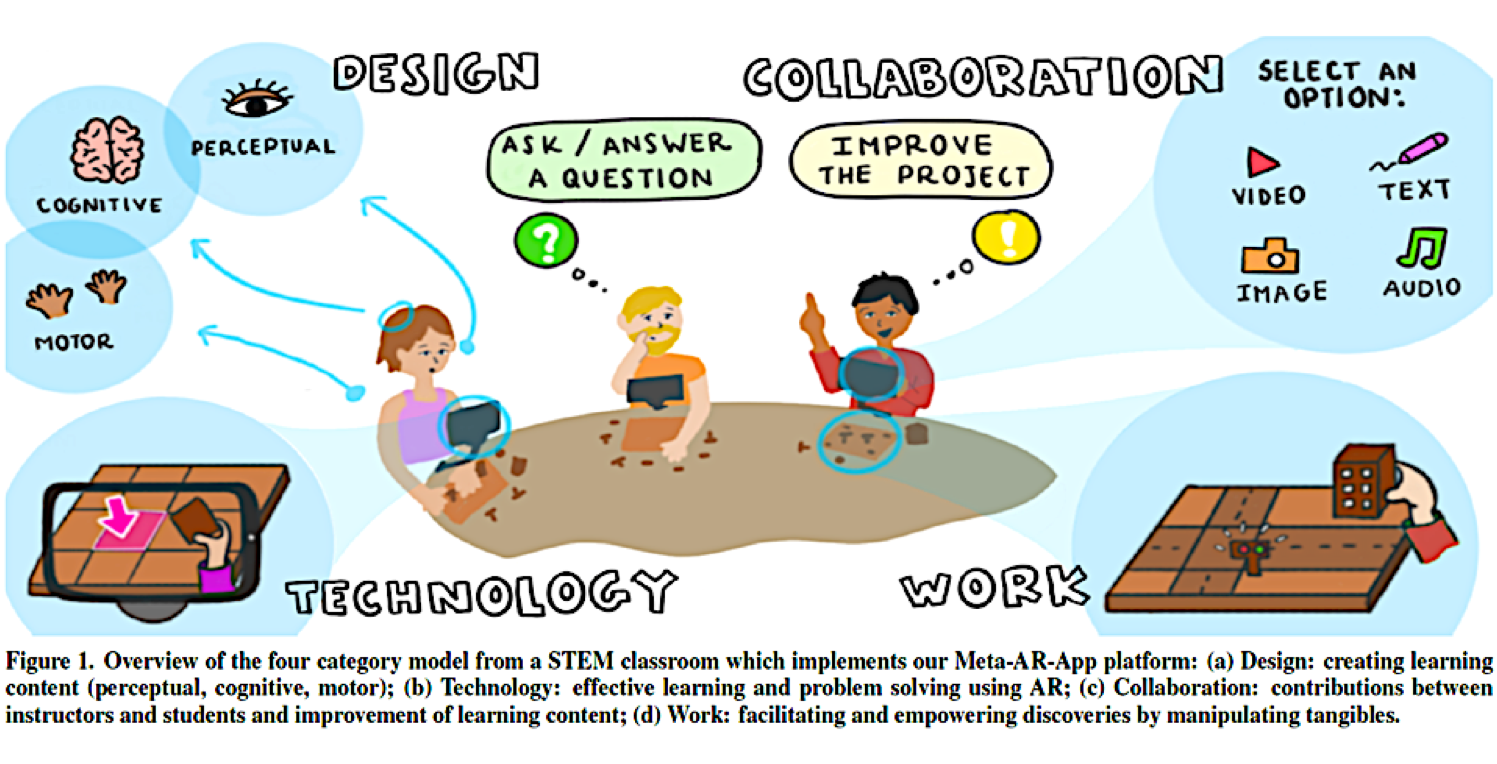
One of the test cases for Purdue’s MetaAR system involved a simple STEM education kit: a small model city designed to teach basic circuit concepts. Students worked with physical pieces such as streets and buildings that included conductive material. When assembled correctly, the circuit could light streetlights in the model city.
Through the AR system, students could look at their desks using a tablet and see digital guidance layered onto the real objects. The app could help them orient the pieces, understand what should connect where, and notice when something was placed incorrectly. In other words, the AR layer did what a good lab assistant does: it gave students just enough guidance to keep them learning without simply doing the work for them.
Real-Time Feedback Makes The Difference
Real-time feedback is one of the strongest educational features of AR. A textbook can explain that a circuit must be closed, but it cannot watch a student place a component in the wrong position. A video can show the correct process, but it cannot pause and say, “Nice try, but that piece is facing the wrong direction.” AR can bridge that gap by responding to student actions as they happen.
For STEM education, that matters because many concepts are physical, spatial, or procedural. Students are not only memorizing facts; they are developing mental models. They are learning how parts relate, how systems behave, and how mistakes change outcomes. AR can make those relationships visible.
The Collaborative Side: Students As Co-Creators
The most important feature of Purdue’s Meta-AR-App may not be the digital overlay itself. It may be the collaboration model behind it. The system allows students and instructors to share, retrieve, and improve AR learning content through cloud-based interaction. Students can ask questions, show their work, suggest solutions, and contribute improvements. Instructors can then integrate useful student feedback into the class content.
That turns the classroom into something closer to a living design studio. Instead of the teacher building one perfect lesson and students marching through it in silence, the lesson can evolve. Students become active agents in the learning process, not just people tapping “next” on an educational app.
This fits especially well with engineering, design, robotics, manufacturing, and science labs, where learning often happens through iteration. You try something, it fails, you compare results, you revise, and eventually you learn why the system behaves the way it does. MetaAR supports that cycle by making feedback and revision part of the platform itself.
Local Pull And Global Pull: A Smarter Sharing Model
The research behind Meta-AR-App describes a pull-based development model adapted for classroom learning. In simple terms, students and instructors can pull useful contributions into the learning content. A local pull might involve student-to-student sharing, where one learner’s solution helps another nearby learner. A global pull might allow an instructor to bring a useful contribution into the broader class lesson.
That model is powerful because classrooms are full of micro-discoveries. One student finds a clearer way to arrange parts. Another notices a common mistake. A third explains a concept in language that classmates understand immediately. In a traditional lab, those insights can disappear after class. In a collaborative AR platform, they can become part of the learning material.
Why Purdue’s MetaAR Matters For Remote And Hybrid Learning
Purdue highlighted MetaAR during a period when remote education had suddenly become a global necessity. Teachers had to reproduce hands-on learning through screens, which is not easy. Anyone who has tried to teach a lab activity through a video call knows the problem: the instructor cannot physically walk around the room, point to a student’s setup, or notice small mistakes in real time.
AR does not solve every challenge in remote education, but it can make distance learning more tactile and interactive. If students can work with physical objects at home while receiving digital guidance and instructor feedback, remote STEM learning becomes less like watching a cooking show and more like actually cooking. Burnt toast may still happen, but at least the learner is holding the spatula.
For hybrid classrooms, MetaAR also opens the door to flexible participation. Students can work at their own pace, instructors can update materials, and peer contributions can enrich the activity. That is especially valuable when students are split across different locations or when lab time is limited.
Benefits For Instructors
1. Easier AR Lesson Creation
The biggest instructor benefit is reduced technical friction. When creating AR content becomes more like building an instructional kit than commissioning custom software, more teachers can experiment with immersive learning. That can lead to more subject-specific, classroom-specific content instead of generic AR demos that look amazing but do not quite match the lesson.
2. Better Visibility Into Student Thinking
Because MetaAR supports interaction and feedback, instructors can see more than final answers. They can observe process: where students hesitate, what mistakes repeat, which explanations help, and which steps cause confusion. That information is gold for teaching. It helps instructors improve not only the AR content but also the lesson design.
3. Faster Iteration Of Learning Materials
Traditional lab manuals can become outdated or unclear, yet revising them often happens slowly. A collaborative AR platform encourages continuous improvement. If students repeatedly misunderstand a step, the instructor can adjust the digital cue. If a student proposes a better explanation, it can be incorporated. The lesson becomes a living resource.
Benefits For Students
1. Learning By Seeing And Doing
AR is especially useful when students need to connect abstract concepts to physical action. Electrical circuits, mechanical assemblies, chemical structures, anatomy, geometry, and robotics all benefit from visual-spatial understanding. When digital information appears directly on or around the object being studied, students can connect theory to practice more naturally.
2. More Active Participation
Students are not just watching an animation. They are manipulating objects, testing ideas, asking questions, and contributing to the lesson. That kind of active learning can increase engagement because students feel involved in the construction of knowledge, not just the consumption of it.
3. Helpful Feedback Without Embarrassment
In a busy classroom, some students avoid asking for help because they do not want to look confused. AR feedback can provide low-pressure guidance. A student can correct an error privately before calling the instructor over. That small design detail can make a big difference for confidence.
Possible Classroom Applications Beyond Circuit Kits
The model city circuit example is only one use case. The same authoring approach could support many other learning activities. In mechanical engineering, students could assemble gear systems while AR shows torque direction or part alignment. In biology, students could examine a model organ while labels and animations explain function. In chemistry, AR could help students visualize molecular geometry. In architecture, learners could place building models into physical space to study scale, circulation, and structure.
Even outside STEM, the concept has potential. History instructors could create AR timelines around artifacts. Art teachers could let students attach process notes to physical sketches. Language instructors could build object-based vocabulary experiences. The key is not simply adding digital sparkle. The key is using AR when spatial, procedural, or contextual information improves understanding.
Challenges Schools Should Consider
MetaAR points in an exciting direction, but schools still need realistic planning. Devices matter. Network quality matters. Accessibility matters. Privacy matters. Teacher training matters. AR should support learning goals, not become a high-tech distraction wearing a shiny hat.
Instructors also need time to design good AR lessons. A weak lesson does not become strong just because it floats in 3D. The best use of AR starts with a clear question: What can students understand better through physical interaction plus digital guidance than through text, video, or lecture alone?
Another challenge is equity. If some students have newer tablets, faster internet, or quieter learning spaces, AR-based assignments must be designed carefully so they do not widen gaps. Schools should consider shared devices, campus labs, offline options, and alternative formats when needed.
Why Authoring Is The Real Breakthrough
The education world does not need another flashy demo that works beautifully once and then disappears into a conference archive. What it needs are tools teachers can actually use, modify, and align with their curriculum. That is why the authoring focus of Purdue’s Meta-AR-App is so important.
When instructors can create their own AR learning content, lessons become more relevant. When students can contribute, lessons become more collaborative. When feedback can be integrated quickly, lessons become more adaptive. The platform’s value is not only in displaying digital objects; it is in changing how learning content is made.
Experience-Based Reflections: What Building AR Learning Content Feels Like In Practice
Anyone who has helped design digital learning materials knows that the first version is rarely the best version. A teacher may begin with a simple idea: “Let’s help students understand how electricity moves through a circuit.” On paper, that sounds straightforward. In practice, students bring different assumptions, different levels of confidence, and wonderfully creative ways to misunderstand directions. That is not a flaw. That is learning doing its messy little dance.
With a platform like Purdue’s Meta-AR-App, the design experience becomes more hands-on and more responsive. Instead of writing a long instruction sheet and hoping students interpret it correctly, an instructor can think in layers. What should the student see first? Where should the digital cue appear? Should the app highlight a part, show an arrow, play a short explanation, or wait until the learner makes a mistake? These decisions force teachers to think deeply about the learning journey.
For students, the experience can feel more like solving a puzzle than completing an assignment. They are not merely told that a component belongs in one place; they can test it. They can see how the system responds. They can compare their approach with a peer’s approach. When the AR feedback is well designed, it gives students enough direction to stay productive while still leaving room for discovery. That balance is the difference between a useful learning tool and a bossy robot clipboard.
One practical lesson from AR content creation is that small details matter. A label that appears too early can spoil the problem. A hint that appears too late can frustrate learners. A digital arrow that points vaguely toward an object may create more confusion than no arrow at all. Good AR instruction is not about filling the screen with floating graphics. It is about placing the right information in the right context at the right moment.
Another experience-based insight is that student feedback should be treated as design data. If five students make the same mistake, the problem may not be the students. The instruction may need a clearer cue. If one student invents a clever workaround, that idea might improve the lesson for everyone. Purdue’s collaborative model is valuable because it respects the classroom as a source of ongoing improvement.
For schools experimenting with AR, the best starting point is usually small. Choose one lesson where students struggle with spatial understanding or step-by-step procedure. Build a focused AR activity around that lesson. Test it with a few students. Watch where they pause, smile, argue, or accidentally rotate the tablet like it owes them money. Then revise. AR learning content gets better through use, not through perfectionism.
The future suggested by MetaAR is not a classroom where teachers are replaced by technology. It is a classroom where teachers gain a new authoring medium and students gain a more active role in shaping learning. That is a healthier and more realistic vision of educational technology: not less human, but more interactive, more visible, and more responsive to how people actually learn.
Conclusion
Purdue’s Meta-AR-App shows why augmented reality in education should be judged by more than visual wow-factor. The real promise is not simply putting 3D objects on a desk. The promise is helping instructors create meaningful AR lessons, helping students learn through action, and allowing classroom content to evolve through collaboration.
For STEM education especially, MetaAR points toward a future where remote and in-person learning can feel more hands-on, where mistakes become teachable moments, and where students help improve the learning tools they use. That is a major step beyond passive digital content. It is also a reminder that the best educational technology does not just deliver information. It invites learners to build, test, revise, and understand.