
Running an Airbnb or vacation rental without a smart lock is a little like running a coffee shop with one mug: technically possible, but wildly inefficient. Guests arrive late. Flights get delayed. People lose messages. Someone always asks, “Where’s the key?” while standing in the rain with three suitcases and the emotional stability of a wet receipt.
The right smart lock solves that drama before it starts. It lets you create unique guest access codes, schedule check-in and checkout windows, monitor lock activity, reduce key handoffs, and avoid the dreaded “I’m locked out” phone call during dinner. For hosts, smart locks are not just shiny door jewelry. They are part security tool, part guest-experience upgrade, and part sanity-preservation device.
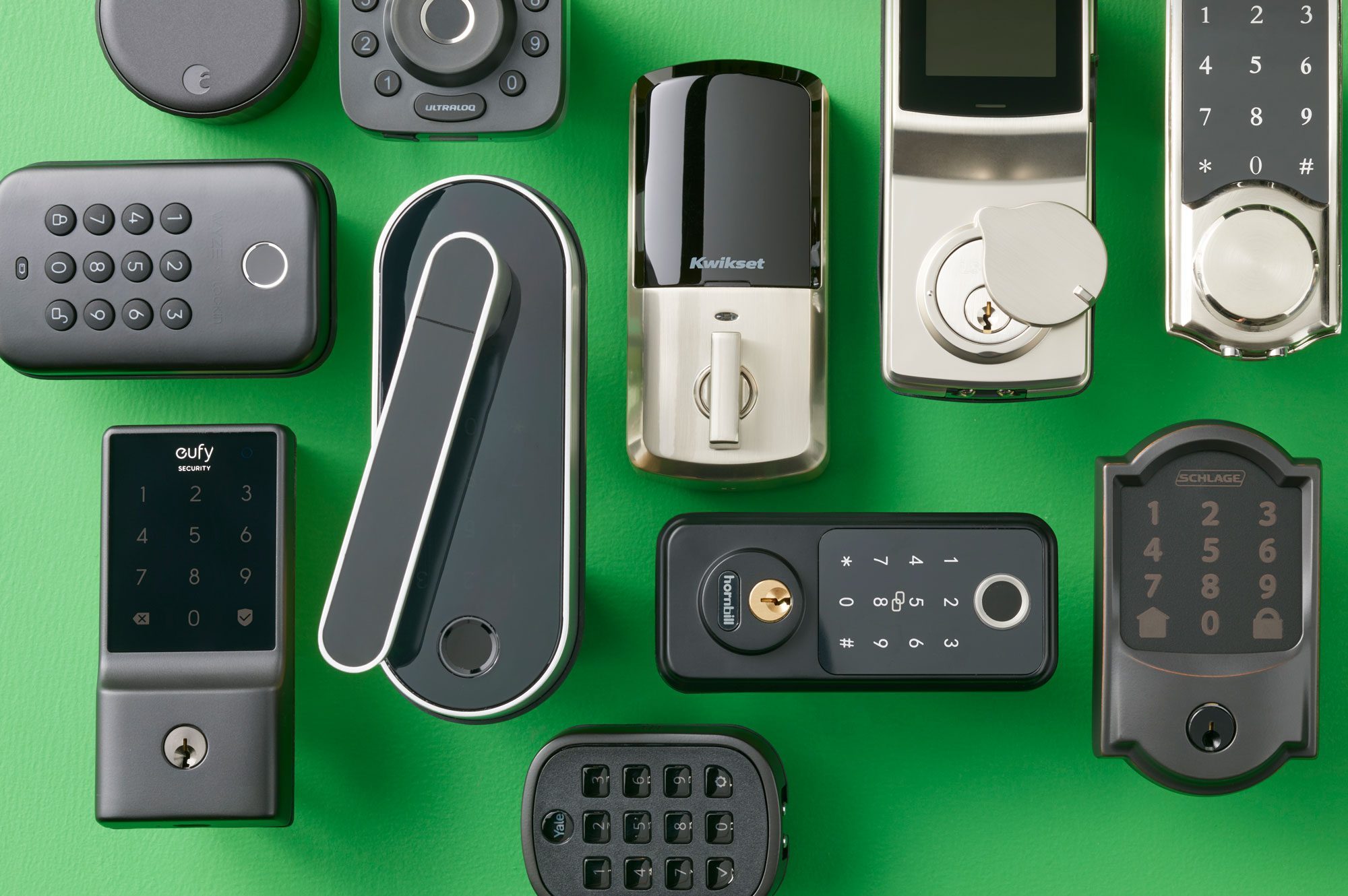
Below are eight of the best smart locks for Airbnb hosts, vacation rental owners, and short-term rental managers. Some integrate directly with Airbnb in supported regions, while others work best through their own apps, smart home systems, or third-party rental automation platforms. The best pick depends on your property type, Wi-Fi reliability, guest profile, budget, and whether your front door prefers modern tech or still thinks it is 1998.
What Makes a Smart Lock Great for Airbnb?
A smart lock for a vacation rental has a tougher job than one used at home. Your personal front door may see a few trusted family members. A rental door sees honeymooners, business travelers, sleepy parents, excited tourists, cleaning crews, maintenance workers, and the occasional guest who believes “push” means “pull harder.”
For Airbnb hosting, the best smart locks should offer reliable keypad entry, temporary or scheduled codes, remote lock control, activity logs, battery alerts, and a backup entry method. Built-in Wi-Fi is convenient, but it can drain batteries faster than Bluetooth, Z-Wave, or Thread-based options. A keypad is almost mandatory because not every guest wants to download an app, carry a key fob, or learn your smart home ecosystem before they can enter the property.
Also, do not overlook physical security. Look for strong deadbolt construction, ANSI or BHMA ratings where available, weather resistance for exterior doors, and clear low-battery warnings. The smartest lock in the world is not very smart if the door is misaligned, the batteries are dead, or the guest cannot read the keypad in bright sunlight.
Quick Comparison: Best Smart Locks for Airbnb Hosts
| Smart Lock | Best For | Key Access Methods | Host-Friendly Highlight |
|---|---|---|---|
| Schlage Encode Plus Smart WiFi Deadbolt | Best overall for Airbnb hosts | Keypad, app, key, Apple Home Key | Strong build, built-in Wi-Fi, Airbnb compatibility in supported regions |
| Yale Assure Lock 2 Keypad with Wi-Fi | Best flexible platform lock | Keypad, app, optional key or key-free models | Great smart home compatibility and rental-friendly code management |
| August Wi-Fi Smart Lock + Keypad | Best retrofit lock | App, keypad, existing key | Installs over existing deadbolt hardware |
| Kwikset Halo Touch | Best fingerprint Wi-Fi lock | Fingerprint, app, physical key | No hub required and strong residential certification |
| Ultraloq U-Bolt Pro WiFi | Best multi-access value | Fingerprint, keypad, app, key, auto-unlock | Lots of entry options and strong security rating |
| eufy Video Smart Lock E330 | Best lock with camera | Fingerprint, keypad, app, voice, key | Combines smart lock, video doorbell, and camera |
| Lockly Vision Elite | Best premium all-in-one lock | Fingerprint, PIN Genie keypad, app, key, QR scan | Video doorbell, solar support, and anti-peep keypad |
| Aqara Smart Lock U100 | Best Apple Home Key option | Fingerprint, keypad, Apple Home Key, NFC, app, key | Excellent for Apple-focused smart homes |
1. Schlage Encode Plus Smart WiFi Deadbolt
Best overall smart lock for Airbnb and vacation rentals
The Schlage Encode Plus is a top-tier choice for hosts who want a dependable, full-replacement smart deadbolt with built-in Wi-Fi, a keypad, strong physical hardware, and smart home support. It works with the Schlage Home app, Amazon Alexa, Google Assistant, Apple Home, and Apple Home Key, allowing users in Apple households to unlock with an iPhone or Apple Watch.
For Airbnb hosts, the big advantage is reliability. Schlage has a long reputation in traditional door hardware, and the Encode Plus feels like a lock first and a gadget second. That matters. Your rental entrance is not the place to experiment with a mystery-brand device that looks like it was designed by a toaster.
The Encode Plus supports remote access through built-in Wi-Fi, scheduled access codes, lock history, push notifications, auto-lock settings, and a physical key backup. It is especially strong for hosts who want direct Airbnb-compatible options in supported US and Canada listings. The downside is price. It is usually more expensive than basic smart locks, but for high-traffic vacation rentals, the extra cost can be easier to justify than another midnight lockout call.
Best for: Hosts who want a secure, polished, low-drama lock for primary guest entry.
2. Yale Assure Lock 2 Keypad with Wi-Fi
Best smart lock for platform flexibility
The Yale Assure Lock 2 is one of the most flexible smart locks available, and that flexibility makes it attractive for Airbnb and vacation rental owners. Depending on the model and module, it can support Wi-Fi, Bluetooth, Z-Wave, Matter, and major smart home platforms. For hosts managing different property setups, that versatility is not a small thing. It is the difference between “this works with my system” and “why is there a hub blinking angrily in the closet?”
The keypad models are especially useful for short-term rentals because guests can enter a code instead of installing an app. Hosts can create temporary codes, monitor access, and manage entry remotely. Yale models are also among the brands supported by Airbnb’s smart lock integration for eligible hosts in the United States and Canada, which makes them especially relevant for Airbnb-first properties.
There are keyed and key-free versions. Key-free looks sleek and removes the risk of unauthorized key copies, but a keyed version gives you a mechanical backup. For remote cabins or properties with spotty Wi-Fi, many hosts prefer having that backup available to a cleaner, keyless-only design.
Best for: Hosts who want broad smart home compatibility and rental-friendly code control.
3. August Wi-Fi Smart Lock + Keypad
Best retrofit smart lock for rentals and apartments
The August Wi-Fi Smart Lock is the “please do not make me replace the whole door hardware” option. Instead of replacing the exterior side of the deadbolt, it mounts on the inside of the door and works with your existing lock. Guests can still use a keypad when paired with an August or Yale keypad, while owners can still use the original physical key.
This makes August especially useful for condos, apartments, historic homes, and properties where exterior hardware changes are restricted by an HOA, building owner, or someone named Gary who has strong opinions about door aesthetics. It is also a good option when you want smart access without changing the outside look of the entry.
For Airbnb use, make sure you include the keypad. App-only entry is not ideal for vacation rentals because guests want simple instructions: arrive, enter code, open door, exhale. August is also listed among Airbnb-compatible smart lock options when paired with supported keypad hardware in eligible regions.
The main trade-off is battery life. Compact Wi-Fi locks can use batteries faster than larger deadbolts or hub-based systems. Good door alignment helps a lot because a smart lock motor that has to fight a sticky deadbolt will drain batteries and test your patience.
Best for: Hosts who want to keep existing exterior hardware while adding remote access and guest codes.
4. Kwikset Halo Touch
Best fingerprint smart lock with built-in Wi-Fi
The Kwikset Halo Touch is a strong pick for hosts who want fingerprint entry, built-in Wi-Fi, and no extra hub. It connects directly to a home Wi-Fi network and can be managed through the Kwikset app. It also supports fingerprint enrollment, remote locking and unlocking, and SmartKey Security, which allows re-keying without replacing the whole lock.
Fingerprint access is convenient for owners, cleaners, and maintenance staff. For guests, however, a fingerprint-first lock can be less ideal unless you are willing to enroll and remove fingerprints frequently. For most Airbnb stays, PIN codes are still easier. That said, the Halo Touch works well for vacation rentals where a small team repeatedly accesses the property.
Kwikset’s residential security certification is a major plus, and the direct Wi-Fi setup keeps installation simple. The drawback is that some models emphasize fingerprint access more than keypad convenience, so hosts should choose the exact Halo version carefully. If you want a traditional guest-code workflow, a keypad-based Halo may be more practical than a fingerprint-heavy model.
Best for: Owners who want easy Wi-Fi control and fingerprint access for recurring staff or family use.
5. Ultraloq U-Bolt Pro WiFi
Best multi-access smart lock for the money
The Ultraloq U-Bolt Pro WiFi is a feature-packed lock that gives guests and owners several ways to unlock the door: fingerprint, keypad code, smartphone app, physical key, auto-unlock, and more depending on the model. That variety is useful because guests are not all the same. Some love apps. Some fear apps. Some treat keypads like ancient temple puzzles.
For vacation rentals, the keypad and remote access features are the most important. The U-Bolt Pro also has a reputation for strong physical security, with models carrying high ANSI-grade certification. Its smaller, round exterior design is less flashy than many smart locks, which can be good for properties where you want security without making the front door look like a spaceship hatch.
It may not be as directly Airbnb-native as Schlage, Yale, or August in supported regions, so it is best for hosts who are comfortable managing codes manually or through compatible automation tools. Still, for the price, it offers a very strong mix of features.
Best for: Budget-conscious hosts who want many unlock methods and strong hardware.
6. eufy Video Smart Lock E330
Best smart lock with built-in camera and doorbell
The eufy Video Smart Lock E330 is not just a smart lock. It is a smart lock, video doorbell, and 2K camera in one device. For hosts who want to see the entry area, monitor deliveries, or reduce porch confusion, that all-in-one design is appealing. It supports fingerprint access, keypad codes, app control, voice assistant control, and a physical key.
The rental benefit is obvious: you reduce the number of devices mounted near the front door. Instead of installing a separate smart lock and video doorbell, you can combine both. That can look cleaner and simplify app management if you already use eufy security products.
However, hosts should be careful with cameras at vacation rentals. Exterior cameras may be allowed in many locations when properly disclosed, but indoor cameras are heavily restricted or prohibited on many platforms and in many jurisdictions. Always disclose exterior recording devices clearly in your listing and follow platform rules and local laws. A camera-equipped lock can be useful, but privacy compliance is not optional. It is not “fine print.” It is the whole print.
Best for: Hosts who want a lock and exterior entry camera in one device.
7. Lockly Vision Elite
Best premium all-in-one smart lock for high-end rentals
The Lockly Vision Elite is a premium smart lock designed for owners who want almost every feature in one package. It includes a video doorbell, HD camera, night vision, motion sensing, fingerprint access, app control, voice assistant support, physical keys, a rechargeable battery, solar charging support, and Lockly’s PIN Genie keypad.
The PIN Genie feature is especially interesting for rentals. Instead of showing a standard keypad layout, the numbers rotate in groups, making it harder for someone nearby to guess a code from fingerprints or shoulder-surfing. In plain English, it is harder for nosy people to play “guess the smudge.”
This is not the cheapest option, and it may be more lock than a simple studio apartment needs. But for luxury vacation homes, remote cabins, beach houses, or properties where the front door is also the main security checkpoint, the feature set can make sense.
As with the eufy model, remember that any video feature at a rental property must be disclosed and used responsibly. Security is important, but guest privacy is not a decorative throw pillow. You cannot just move it around when inconvenient.
Best for: Premium rentals where video, fingerprint access, and anti-peep keypad security are worth the cost.
8. Aqara Smart Lock U100
Best smart lock for Apple Home Key fans
The Aqara Smart Lock U100 is a strong option for hosts who live in the Apple smart home world. It supports Apple Home Key, allowing users to unlock with an iPhone or Apple Watch. It also includes a fingerprint reader, keypad, NFC support, app control, mechanical key backup, and compatibility with smart home platforms through Aqara’s ecosystem and Matter support.
For a vacation rental, the keypad is the star. Apple Home Key is fantastic for owners, family members, or trusted repeat users, but temporary guest PINs are usually easier for short stays. Fingerprint access is better for cleaners and property managers than one-time guests.
The U100 is especially appealing for hosts who already use Aqara hubs, sensors, cameras, or automations. You can build useful routines, such as locking the door after it closes or connecting entry events with other smart home actions. It is not the most universally Airbnb-focused lock on this list, but it is a polished choice for smart-home-heavy properties.
Best for: Apple Home users and hosts who want fingerprint, keypad, and Home Key access in one lock.
How to Choose the Best Smart Lock for Your Vacation Rental
Choose keypad entry first
For short-term rentals, keypad entry is the simplest guest experience. A code works whether the guest has an iPhone, Android phone, dead phone, no app, or a deep distrust of downloading anything before vacation. Fingerprints, NFC cards, and app unlocks are nice extras, but keypad codes should be the foundation.
Prioritize temporary and scheduled codes
The best Airbnb smart lock lets you create a unique code for each reservation and set it to work only during the stay. This reduces the risk of old guests returning with an active code. If your lock connects directly to Airbnb or your property management software, even better.
Think about Wi-Fi strength
Built-in Wi-Fi is convenient, but it needs a reliable signal. If your rental has thick walls, metal doors, a detached guest house, or rural internet that behaves like a moody raccoon, test the signal at the door before installation. A lock that constantly drops offline is not smart. It is just expensive metal with trust issues.
Look for battery alerts and backup access
Every smart lock needs power. Choose a model with clear battery warnings and a backup plan, such as a physical key, emergency charging port, or reliable local code storage. Replace batteries on a schedule, not only when the app begs for help.
Match the lock to your property type
A downtown condo may need a discreet retrofit lock like August. A mountain cabin may need a rugged deadbolt with a physical key backup. A luxury beach rental may benefit from a premium lock with video features. A multi-unit host may care most about centralized code management and easy staff access.
Host Experience: What Smart Locks Teach You After Real Guest Check-Ins
After enough guest stays, you learn that the best smart lock is not always the one with the longest feature list. It is the one guests can use at 11:47 p.m. after a delayed flight, in the dark, while holding takeout, a backpack, and possibly a child who has declared war on bedtime. Fancy features are wonderful, but clarity wins.
The first experience lesson is to write painfully simple check-in instructions. Do not say, “Access the property via the smart entry system.” Say, “Enter your 4-digit code, then press the checkmark button.” Include a photo of the door. Include a close-up of the keypad. Mention whether guests need to press a wake button first. You may feel silly explaining obvious steps, but obvious at your desk is not obvious in a driveway at midnight.
The second lesson is to test every code before check-in. Create the code, walk to the door, enter it, and confirm it works. If you manage the property remotely, ask your cleaner or local co-host to test it. A code that looks correct in the app but fails at the lock is the kind of tiny problem that becomes a five-star review’s evil twin.
The third lesson is door alignment. Many smart lock problems are not actually smart lock problems. They are door problems. If the deadbolt rubs against the strike plate, the motor works harder, batteries drain faster, and guests may think the code failed when the bolt simply did not retract smoothly. Before blaming the app, check the door. The bolt should glide like it is on vacation too.
The fourth lesson is battery discipline. Do not wait for low-battery alerts if your property has frequent turnover. For busy rentals, replace batteries on a calendar. Use quality batteries recommended by the manufacturer, and avoid mixing old and new batteries. Keep a spare set in a locked owner’s closet or with your cleaner. The cost of fresh batteries is tiny compared with refunding a guest because they spent 40 minutes outside arguing with a dead lock.
The fifth lesson is to have a backup entry plan that does not rely on wishful thinking. This could be a secured physical key with a trusted local contact, a secondary entrance with a separate lock, or a co-host who can respond quickly. Do not hide a key under a fake rock unless your security strategy is based on cartoons. Guests need convenience, but you still need control.
The sixth lesson is to separate guest access from staff access. Cleaners, inspectors, maintenance workers, and owners should not share one universal code. Create separate codes so you can see who entered and when. If something goes missing or a door is left unlocked, an activity log is far more useful than a group text full of “wasn’t me.”
The seventh lesson is that guests appreciate confidence. Mention self check-in in your listing. Explain that each guest receives a unique code. Let them know codes are changed between stays. This reassures travelers that your rental is secure and professionally managed. A good smart lock is not just hardware; it is part of the hospitality experience.
Finally, review your smart lock setup every few months. Apps update. Integrations change. Batteries age. Wi-Fi networks get renamed by someone who thought “PrettyFlyForAWiFi” was a life goal. A quick maintenance check can prevent a very unfun emergency later.
Final Verdict: Which Smart Lock Should Airbnb Hosts Buy?
For most Airbnb and vacation rental hosts, the Schlage Encode Plus Smart WiFi Deadbolt is the best overall choice because it combines strong hardware, built-in Wi-Fi, keypad access, smart home support, and Airbnb-friendly compatibility in supported regions. The Yale Assure Lock 2 Keypad with Wi-Fi is the best flexible alternative, especially if you care about smart home ecosystems and multiple connectivity options.
If you cannot replace exterior hardware, choose the August Wi-Fi Smart Lock + Keypad. If you want a strong value lock with many ways to unlock, consider the Ultraloq U-Bolt Pro WiFi. For rentals where entry video matters, the eufy E330 and Lockly Vision Elite are powerful all-in-one options, provided you follow privacy rules and disclose cameras properly.
The best smart lock is the one that makes check-in boring. Boring is good. Boring means the guest got inside, the door locked behind them, the code worked, and your phone did not explode with panic messages during dessert.
SEO Tags