
Every workshop has a dream. Sometimes that dream is a perfectly organized wall of parts bins. Sometimes it is a soldering iron that never disappears under a pile of jumper wires. And sometimes, if the maker gods are feeling generous, it is a small autonomous robot that can hear a command, roll across the room, find a component bin, grab it, bring it back, and politely act like this is normal.
That is the charm of BunnyBot, a Hackaday Prize entry built by Jack Qiao. It is not a glossy consumer robot promising to “revolutionize your lifestyle” while mostly blinking in the corner. BunnyBot is a practical, ROS-based autonomous robot platform designed to do useful shop chores: fetch electronic parts, carry small objects, help with repetitive tasks, and generally reduce the number of times a human has to stand up just to retrieve a tiny resistor that costs less than the electricity used to search for it.
The project stands out because it tackles a hard robotics problem with maker-friendly pragmatism. BunnyBot combines a mobile base, LIDAR, depth vision, fiducial markers, a gripper, speech recognition, and behavior-tree logic into one helpful machine. It is the kind of build that says, “Yes, autonomous robotics is complicated, but also, maybe we can make it fetch snacks.” That is a noble scientific mission.
What Is BunnyBot?
BunnyBot is an autonomous robot assistant created as an entry for the 2016 Hackaday Prize. Its goal is refreshingly specific: become useful in daily life by moving objects from one place to another. In a workshop, that might mean fetching bins of electronic components. In a home or lab, it could mean bringing a drink, carrying a cleaning pad, or transporting small tools.
The name “BunnyBot” is a playful nod to TurtleBot, the famous ROS-compatible robot platform. But where TurtleBot is often used for research and education, BunnyBot aims for practical assistance. It is less “look, I can map a hallway” and more “look, I brought the 1 kΩ resistors, please stop crawling under the bench.”
At its core, the robot is designed around three abilities:
- Navigate autonomously through a changing indoor space.
- Recognize objects and positions using vision and fiducial markers.
- Interact physically with items using a simple arm and gripper.
That combination matters. A robot that can move but cannot manipulate objects is basically a fancy scooter with anxiety. A robot that can grip but cannot navigate is an expensive desk ornament. BunnyBot tries to connect mobility, perception, and manipulation into one useful loop.
Why BunnyBot Is a Clever Hackaday Prize Entry
The Hackaday Prize has always rewarded more than flashy hardware. It celebrates open-source hardware, real-world problem solving, and engineering that can inspire other builders. BunnyBot fits that spirit beautifully because it is practical, documented, modular, and honest about trade-offs.
Instead of trying to build a humanoid robot, BunnyBot focuses on a narrower and more achievable goal: moving small objects reliably. That is smart engineering. Robots become dramatically harder when they need to climb stairs, fold laundry, understand sarcasm, or avoid stepping on a sleeping cat. BunnyBot wisely says, “Let’s start with bins.”
A Robot Built for Real Tasks
One of the most interesting examples is bin picking. The idea is simple: the user gives a voice command, such as asking for a specific resistor bin, and BunnyBot navigates to the storage area, identifies the right target, grasps the bin, brings it back, and later returns it to the shelf.
That sounds easy until you remember that robots are famously bad at “simple” human tasks. Humans casually grab objects using vision, touch, balance, and years of practice. A robot must calculate where it is, where the object is, how to approach it, how to grip it, and whether it actually succeeded. BunnyBot approaches this challenge with practical design instead of magic.
The Hardware Behind BunnyBot
BunnyBot is built from a mix of off-the-shelf components, salvaged parts, and custom fabrication. This is classic maker robotics: buy what saves time, build what matters, and repurpose anything that looks useful after removing enough screws.
Kobuki Base: The Rolling Foundation
The robot uses a Kobuki mobile base, a platform also associated with TurtleBot. This gives BunnyBot a ready-made drive system with odometry, gyro data, battery support, and ROS compatibility. Choosing an existing base avoids months of painful work building motor control, wheel encoders, and power management from scratch.
That decision is one of the project’s strongest lessons. Good hacking is not always about building every part yourself. Sometimes the smartest move is to stand on a reliable platform and spend your energy on the problem that makes the project unique.
Neato XV-11 LIDAR: Borrowing Eyes from a Vacuum
For localization and mapping, BunnyBot uses a rangefinder from a Neato robotic vacuum. This is both practical and delightfully maker-ish. Robot vacuums are basically tiny domestic explorers with dust issues, and their sensors can be extremely useful in DIY robotics.
The LIDAR helps BunnyBot measure distances to walls and obstacles, enabling it to build and use maps of its environment. Without that sensor data, the robot would be doing the navigation equivalent of wandering around a dark room while holding a sandwich.
Intel RealSense R200: Depth Vision for Object Detection
BunnyBot also uses an Intel RealSense R200 depth camera. A depth camera does more than capture a flat image. It estimates distance, helping the robot understand the three-dimensional shape of the scene in front of it. For a robot with a gripper, that is essential. A normal camera can say, “There is a bin.” A depth camera can help answer, “How far away is the bin, and where should I move?”
The RealSense camera provides depth information for object detection and an RGB stream for recognizing fiducial markers. This makes it a strong choice for a robot that must navigate broadly, then perform more precise object interactions up close.
NVIDIA Jetson TK1: The Robot’s Brain
BunnyBot’s main computer is an NVIDIA Jetson TK1. At the time of the project, the TK1 was a powerful embedded board for robotics and computer vision. Its CUDA-capable GPU made it possible to accelerate image-processing tasks that would otherwise punish the CPU like a compiler error at 2 a.m.
This is important because mobile robots have limited power, limited cooling, and limited space. You cannot simply strap a gaming desktop to a small robot unless your design goal is “autonomous space heater.” The Jetson TK1 gives BunnyBot enough compute power to process vision data while still remaining a mobile platform.
Arduino, Linear Actuator, Arm, and Gripper
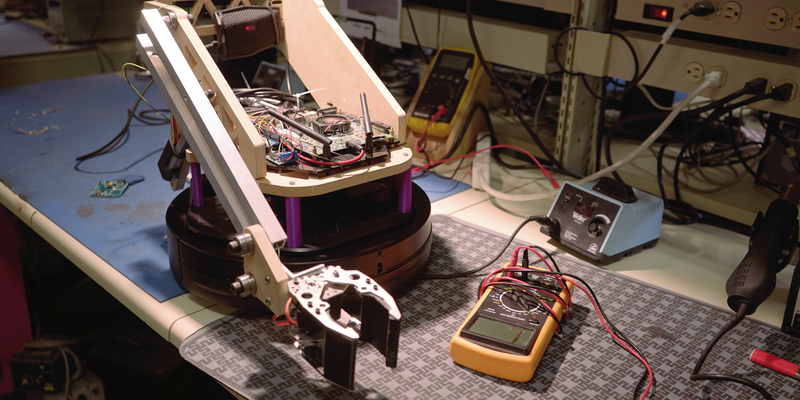
For physical interaction, BunnyBot uses a single-degree-of-freedom arm and a simple planar gripper. The arm is driven by a linear actuator, with an Arduino handling motor control. This division makes sense: Linux is excellent for high-level computing, but it is not a real-time motor-control environment. An Arduino is better suited to generating predictable control signals for actuators.
The gripper itself was purchased rather than built from scratch. Some purists may gasp dramatically, but this was a smart decision. Robotics projects can drown in side quests. If the real research challenge is autonomous object retrieval, buying a gripper saves time for navigation, perception, and behavior logic.
The Software Stack: ROS Makes the Bunny Hop
BunnyBot’s software is based on ROS, the Robot Operating System. Despite the name, ROS is not exactly an operating system like Windows or Linux. It is a set of open-source libraries and tools that help developers build robot applications using modular pieces called nodes.
That modular structure is ideal for a project like BunnyBot. One node can handle LIDAR data. Another can process camera images. Another can plan navigation. Another can control the gripper. ROS lets those parts communicate without forcing the builder to reinvent the entire robot software universe. Reinventing the universe is generally discouraged unless you have a very long weekend.
SLAM: Mapping While Moving
BunnyBot uses SLAM, or simultaneous localization and mapping, to understand its environment. SLAM allows a robot to build a map while also estimating where it is within that map. This is one of the pillars of autonomous mobile robotics.
In BunnyBot’s case, mapping helps the robot move through a workshop or room without being manually driven every time. After the initial mapping phase, the goal is for the robot to operate without teleoperation. That is a huge step from remote-controlled gadget to genuine helper.
Navigation and Obstacle Avoidance
Using ROS navigation tools, BunnyBot can plan paths to waypoints and avoid obstacles. This matters because real rooms are messy. Chairs move. Boxes appear. Humans drop backpacks in exactly the wrong place because apparently chaos is a lifestyle.
Autonomous navigation is not just about getting from point A to point B. It is about doing so safely, repeatedly, and with enough flexibility to handle small changes. BunnyBot combines LIDAR, odometry, and gyro data to localize itself and plan movement through the environment.
Fiducial Markers and AprilTags
For precise object interaction, BunnyBot uses fiducial markers, specifically AprilTags. These are visual tags that look a bit like square barcodes designed for robotics and computer vision. A camera can detect an AprilTag and calculate its identity, position, and orientation relative to the camera.
This solves an important problem. SLAM may get the robot close to a shelf, but “close” is not good enough for grasping. A few centimeters of error can mean grabbing a bin, bumping it, or confidently pinching empty air. AprilTags give BunnyBot a more precise visual reference for final approach and manipulation.
How BunnyBot Completes a Task
A typical BunnyBot task can be thought of as a layered process. First, the user gives a voice command. Then the robot interprets the task and selects a behavior. It navigates toward the general target location using its map and navigation stack. Once near the object, it uses fiducial markers and camera data for precise alignment. Finally, it moves the arm and gripper to grab the item.
This layered approach is smart because different tools are best at different levels of accuracy. LIDAR and SLAM are great for room-scale navigation. AprilTags and depth vision are better for close-up positioning. The gripper is the final actor, doing the physical work after the sensors and planners have done their part.
Behavior Trees: Simple “AI” That Can Be Debugged
BunnyBot uses behavior-tree logic for high-level decision making. A behavior tree is a structured way to define what a robot should do and in what order. It is common in games and robotics because it is easier to understand and debug than a giant bowl of spaghetti code.
This is a very practical choice. When people hear “robot AI,” they often imagine deep learning, neural networks, and dramatic music. BunnyBot’s needs are more grounded. It needs to run a list of actions, respond to sensor information, and recover when something goes wrong. A behavior tree can do that cleanly.
For example, a behavior might include: listen for a command, navigate to the shelf, detect the marker, approach the bin, activate the gripper, return to the user, and release the object. If one step fails, the robot can eventually be designed to retry, back up, or report the problem. This is less glamorous than a robot writing poetry, but far more useful when you need resistors.
The Mechanical Design: Simple Beats Fancy
BunnyBot’s mechanical design favors simplicity. The single-degree-of-freedom arm avoids complex inverse kinematics, reduces weight, and improves load capacity. The robot body is shaped so the camera has a clear view when the arm lowers. Even the bins are designed around the robot’s limitations.
That last point is important. Instead of forcing the robot to handle any random object, the project designs objects the robot can reliably manipulate. The cylindrical bins are easier to grip from different angles, and their shape helps them settle into place even if dropped with slight inaccuracy.
This is a brilliant robotics principle: do not make perception and manipulation harder than necessary. If you control the environment, design the environment to help the robot. Humans do this all the time with handles, labels, shelves, ramps, and color coding. BunnyBot simply extends that idea into the workshop.
What BunnyBot Gets Right
It Solves a Real Problem
BunnyBot is not just a demo platform. It is built around useful tasks: fetching parts, carrying items, and assisting in a workspace. That gives the project a clear purpose.
It Uses Open Tools
By relying on ROS, open design files, custom nodes, and documented build logs, BunnyBot becomes educational for other makers. The project is not locked inside a mystery box.
It Balances Ambition and Restraint
The project is ambitious enough to be exciting, but restrained enough to be believable. It does not try to solve all of robotics. It focuses on navigation, object recognition, and simple manipulation.
It Shows Real Engineering Trade-Offs
BunnyBot’s documentation discusses limitations: the robot is too short, the gripper can sometimes miss without feedback, and the camera’s narrow field of view creates placement constraints for fiducial markers. That honesty is valuable. Real engineering is not a highlight reel; it is a blooper reel with measurements.
Challenges and Limitations
BunnyBot is impressive, but it also shows why domestic robots remain difficult. Object manipulation is hard. Navigation in changing spaces is hard. Voice commands can be unreliable. Vision systems depend on lighting, angle, calibration, and compute performance. Even a small task like fetching a bin requires many systems to cooperate.
One limitation is grasp feedback. If the robot does not know whether it successfully grabbed an object, it may assume success while holding nothing. Humans notice this instantly because our hands provide rich touch feedback. Robots need sensors, logic, and recovery behaviors to handle the same situation.
Another challenge is camera placement. If the gripper blocks the fiducial marker during the final approach, the robot loses the visual reference it needs. Solving that may require better camera angles, a tilting head, more markers, or a planner that can temporarily trust wheel odometry when the marker disappears.
Why BunnyBot Still Feels Relevant
Although BunnyBot was created in 2016, its ideas remain relevant. Modern robots still depend on the same core concepts: mapping, localization, perception, motion planning, manipulation, and task-level behavior. The hardware has improved, but the architecture remains recognizable.
Today, builders might use a newer Jetson board, ROS 2, a more advanced depth camera, better SLAM tools, and stronger machine-learning models. But the basic workflow would be similar: sense the world, build a map, plan movement, identify the object, grasp it, and recover gracefully when reality does something rude.
BunnyBot is a snapshot of maker robotics at a fascinating moment. Affordable depth cameras, embedded GPU boards, and ROS-compatible platforms were making autonomous robots more accessible. The project captured that energy and turned it into a useful assistant with personality.
Experience Notes: What Builders Can Learn from BunnyBot
Working on a BunnyBot-style project teaches a lesson that every robotics builder eventually learns: the robot is never one project. It is ten projects wearing a trench coat. You start by thinking, “I will build a helpful autonomous assistant.” Then you discover you must also become a mechanical designer, Linux troubleshooter, ROS wrangler, camera calibration technician, power-system negotiator, and part-time therapist for a machine that refuses to move because one topic name has an underscore in the wrong place.
The first practical experience is that navigation should be solved before manipulation. A robot that cannot reliably reach the shelf has no business trying to grab a bin from it. Start with the base. Make sure odometry works. Verify that the LIDAR publishes clean data. Build a map. Send the robot to waypoints. Watch how it behaves when a chair is moved. Only after the robot can travel repeatably should the gripper enter the story.
The second experience is that designing the world is often easier than making the robot smarter. BunnyBot’s cylindrical bins are a perfect example. Instead of expecting the robot to pick up any container from any orientation, the project uses containers shaped for reliable grasping. That is not cheating. That is engineering. Factories use fixtures, guides, pallets, and marks for the same reason. A well-designed object can save thousands of lines of fragile code.
The third experience is that sensors lie politely. A depth camera may be noisy. A fiducial marker may disappear at the worst moment. Wheel odometry may drift. Speech recognition may hear “get the resistor” as “pet the transistor.” The solution is not to trust one sensor completely, but to combine information and build recovery behaviors. A useful robot should be able to pause, retry, back away, ask for help, or admit defeat with dignity.
The fourth experience is that simple control logic is underrated. Behavior trees may not sound as exciting as artificial intelligence, but they are understandable. When something fails, a builder can inspect the sequence, isolate the broken behavior, and improve it. For a homebrew assistant robot, debuggability is a superpower. The fanciest algorithm in the world is not helpful if it turns every failure into a haunted mystery.
The final experience is emotional: a useful robot does not need to look human. BunnyBot proves that helpfulness can come from a rolling base, a modest arm, a camera, and a clear mission. It does not need a face, dramatic eyebrows, or the ability to discuss the weather. It just needs to perform a task that saves time. In a workshop, fetching a parts bin is not glamorous, but neither is searching for one tiny component while your soldering iron cools down and your coffee enters the tragic temperature zone.
For makers, BunnyBot is inspiring because it is approachable. It shows that autonomous robotics can be built from available parts, open-source software, and careful design choices. It also shows that useful robots are not born from one magical breakthrough. They come from many small decisions: choose a reliable base, use ROS where it helps, add fiducials for precision, simplify the gripper, design objects for repeatability, and keep improving the system after every awkward failure.
Conclusion
Hackaday Prize Entry: BunnyBot Helps Out All On Its Own is more than a charming robot build. It is a thoughtful example of practical autonomous robotics. By combining ROS, SLAM, LIDAR, depth vision, AprilTags, behavior trees, and a simple gripper, BunnyBot demonstrates how a maker-built robot can move beyond remote control and begin handling useful tasks independently.
The project’s greatest strength is not that it solves every problem perfectly. It does not. Its strength is that it identifies the right problems, documents real trade-offs, and builds a working path toward a robot assistant that can actually help. BunnyBot may not replace a human lab assistant, but it can fetch a parts bin, and in the kingdom of cluttered workbenches, that makes it royalty with wheels.
Note: This article is original, rewritten content based on real public information about BunnyBot, autonomous mobile robots, ROS, SLAM, fiducial markers, depth cameras, embedded GPU computing, and open-source hardware design.